


Windows 10 reached EOS (end of support) on October 14, 2025. If you are on Windows 10, see this article.

搜尋 Mozilla 技術支援網站

防止技術支援詐騙。我們絕對不會要求您撥打電話或發送簡訊,或是提供個人資訊。請用「回報濫用」功能回報可疑的行為。

了解更多

Web-based outlook.com side scrollbar missing after Firefox 146.0.1

  • 2 回覆
  • 0 有這個問題
  • 145 次檢視
  • 最近回覆由 donaldgebbie

Problem started with Firefox 146.0.1 Windows 11

1. Open outlook.com in FF browser (https://outlook.live.com/mail/0/). 2. Open any email. 3. No side scrollbar appears so you can't page down within email. Note: the Outlook folder scrollbar does appear and does work. 4. The within-email-item side scroll bar does appear from outlook.com opened in Edge browser. So this is a Firefox bug.

Have tried: a. Windows settings->Accessibility->Visual effects->Always show scrollbars = on b. Turned Adblock on and off for outlook.com c. Firefox settings autoscrolling, smooth scrolling tried all combinations.

Any fixes?

Problem started with Firefox 146.0.1 Windows 11 1. Open outlook.com in FF browser (https://outlook.live.com/mail/0/). 2. Open any email. 3. No side scrollbar appears so you can't page down within email. Note: the Outlook folder scrollbar does appear and does work. 4. The within-email-item side scroll bar does appear from outlook.com opened in Edge browser. So this is a Firefox bug. Have tried: a. Windows settings->Accessibility->Visual effects->Always show scrollbars = on b. Turned Adblock on and off for outlook.com c. Firefox settings autoscrolling, smooth scrolling tried all combinations. Any fixes?

被選擇的解決方法

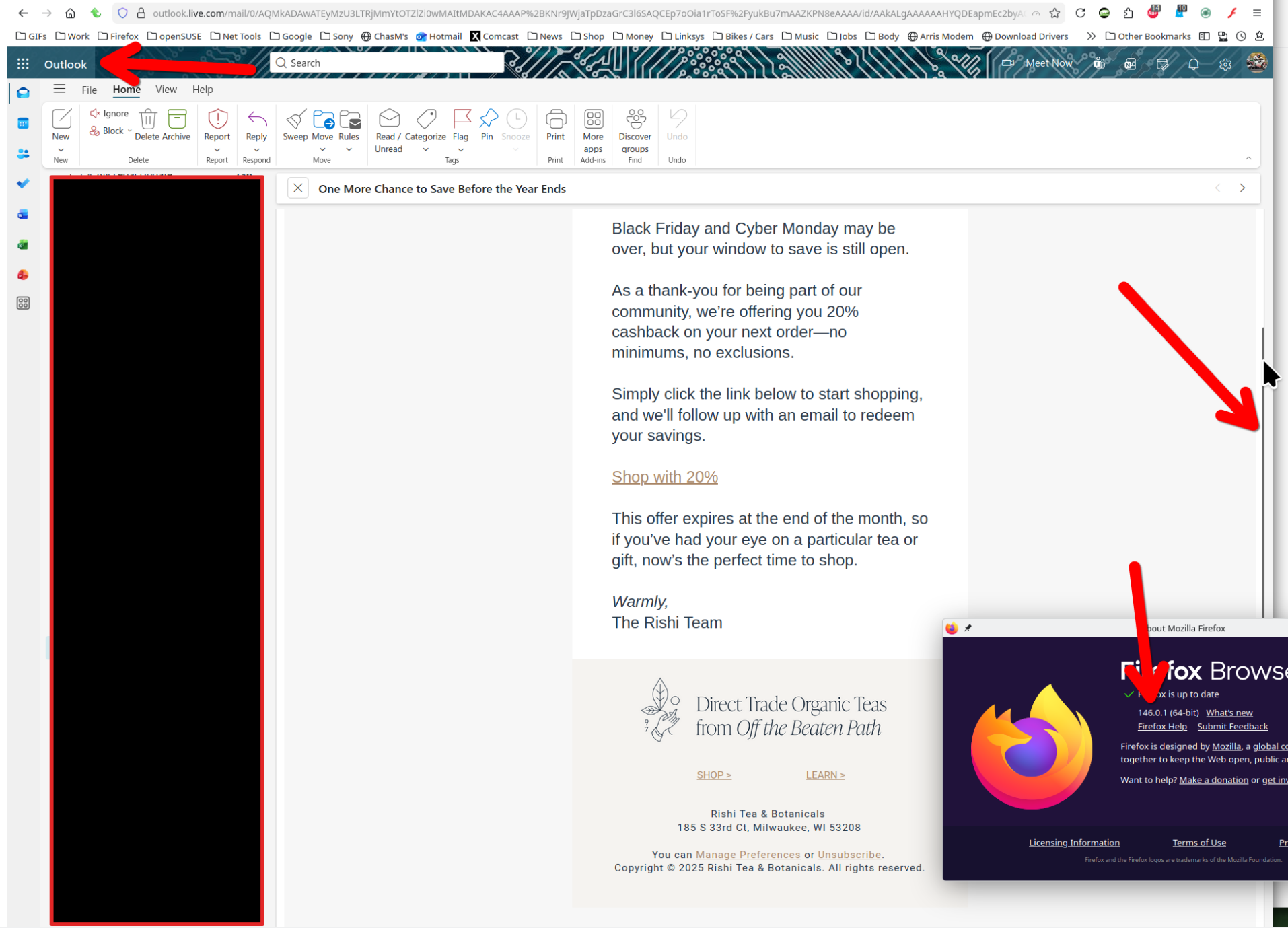
I'm not seeing the issue. see screenshot Windows home or pro? Are you running any security software besides MS Defender? Have you tried with Firefox in Troubleshoot Mode? https://support.mozilla.org/en-US/kb/diagnose-firefox-issues-using-troubleshoot-mode#w_how-to-start-firefox-in-4troubleshoot-modesf5safe-modesf
從原來的回覆中察看解決方案 👍 1

所有回覆 (2)

選擇的解決方法

I'm not seeing the issue. see screenshot Windows home or pro? Are you running any security software besides MS Defender? Have you tried with Firefox in Troubleshoot Mode? https://support.mozilla.org/en-US/kb/diagnose-firefox-issues-using-troubleshoot-mode#w_how-to-start-firefox-in-4troubleshoot-modesf5safe-modesf

1. Windows 11 Home. 2. MS Defender plus Adblock. 3. Problem still happens in Troubleshoot Mode 4. Refresh Firefox worked: https://support.mozilla.org/en-US/kb/refresh-firefox-reset-add-ons-and-settings

由 donaldgebbie 於 修改

問個問題

如果您還沒有帳號,您必須先登入帳號 來回覆文章。還沒有帳號的話,只能發問新問題