


Windows 10 reached EOS (end of support) on October 14, 2025. For more information, see this article.

搜尋 Mozilla 技術支援網站

防止技術支援詐騙。我們絕對不會要求您撥打電話或發送簡訊,或是提供個人資訊。請用「回報濫用」功能回報可疑的行為。

了解更多

"Find" highlighted text background is really tough for this color blind person.

  • 1 回覆
  • 0 有這個問題
  • 54 次檢視
  • 最近回覆由 TyDraniu

更多選項

Doing a "find" ends up showing a greenish (so I'm told) background with white text. Want to guess which "find" in the attached image is difficult for me to find?

What I would like: Find (focus): yellow text on black background Find All: white text on black background

Yes, of course it would be nice if that would auto switch to black on yellow if the website default is black background.

I can hack userContent.css and get the selection function to work:

/* General highlight (for text selection, etc.) */

selection {
   background: #FFFF00 !important;  /* Yellow background */
   color: #000000 !important;       /* Black text */

}

I can hack userContent.css and get the Find All (sans the focus) to work.

But firefox always provides the focus with white on green. Even if I do something like this:

/* Customize the color of highlighted search text */ input[type="search"]:focus::selection {

   background: #FFFF00 !important;  /* Yellow background */
   color: #000000 !important;       /* Black text */

}

I tried several themes. No change. I tried changing Windows Preferences. No change.

There must be a way to make this "find" feature useful for me.
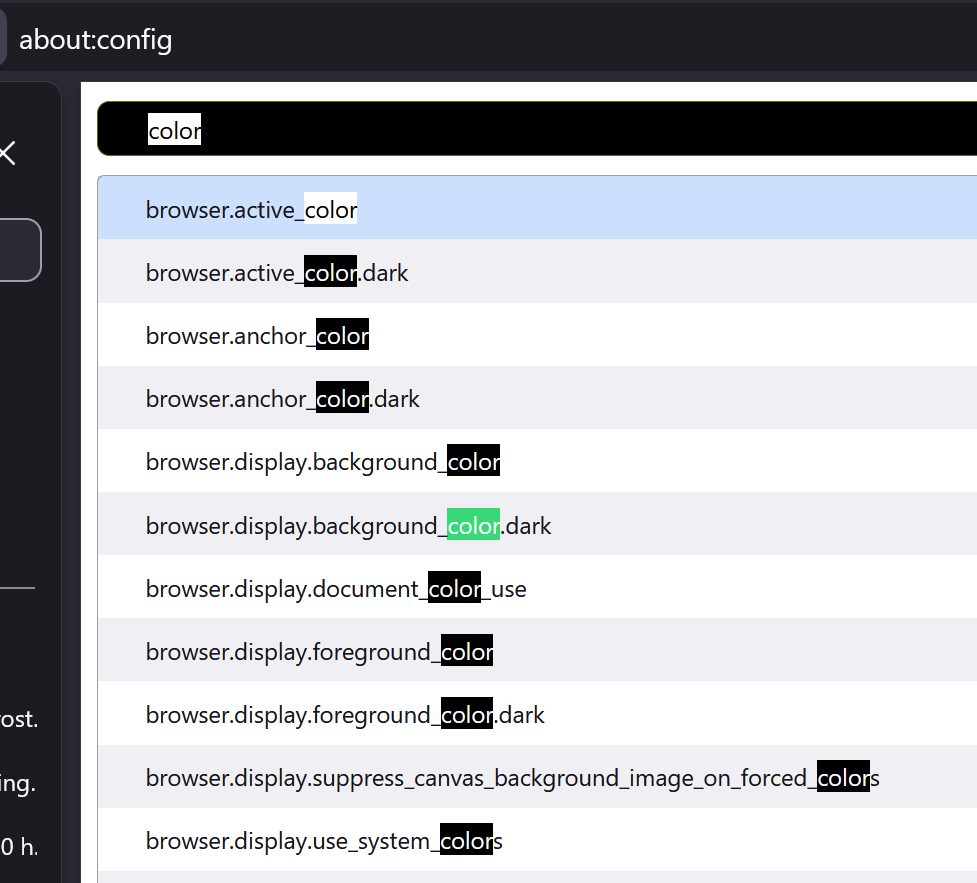
Doing a "find" ends up showing a greenish (so I'm told) background with white text. Want to guess which "find" in the attached image is difficult for me to find? What I would like: Find (focus): yellow text on black background Find All: white text on black background Yes, of course it would be nice if that would auto switch to black on yellow if the website default is black background. I can hack userContent.css and get the selection function to work: /* General highlight (for text selection, etc.) */ ::selection { background: #FFFF00 !important; /* Yellow background */ color: #000000 !important; /* Black text */ } I can hack userContent.css and get the Find All (sans the focus) to work. But firefox always provides the focus with white on green. Even if I do something like this: /* Customize the color of highlighted search text */ input[type="search"]:focus::selection { background: #FFFF00 !important; /* Yellow background */ color: #000000 !important; /* Black text */ } I tried several themes. No change. I tried changing Windows Preferences. No change. There must be a way to make this "find" feature useful for me.
附加的畫面擷圖

所有回覆 (1)

更多選項

Go to about:config and type ui.text in the Search preference name textbox. It should give you 5 preferences that you can experiment with.

由 TyDraniu 於 修改

問個問題

如果您還沒有帳號,您必須先登入帳號 來回覆文章。還沒有帳號的話,只能發問新問題