


Blue symbols in drop-down list.

Search drop-down list has first Item with blue pushpin symbol next to it and the next item has a blue star symbol next to it. The rest do not have any symbols next to them. I'm using Windows 11, Firefox. and DuckDuckGo.
被選擇的解決方法
Yes, those should match your Firefox Home page shortcuts. If you use a custom home page or custom new tab page, type or paste about:home in the address bar and press Enter to load it.
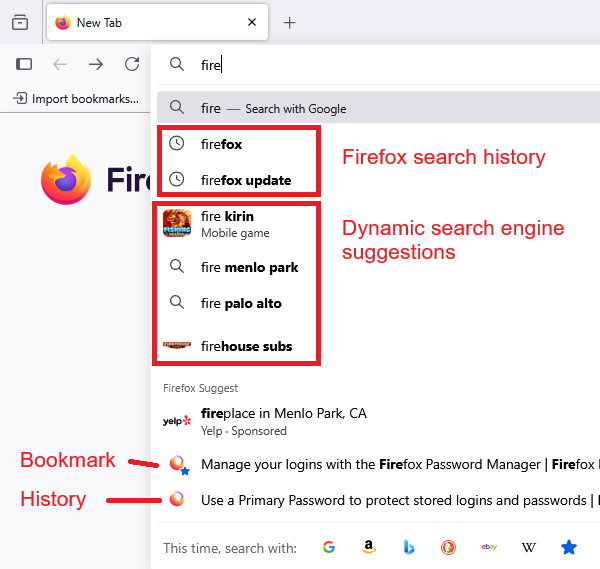
The blue star indicates a bookmarked URL, but I can't recall seeing the star on the Firefox Home page; that might only appear on the address bar drop-down.
從原來的回覆中察看解決方案 👍 1所有回覆 (3)
When you first click in the address bar, before you type anything for Firefox to match off of, it usually shows the first 4-10 shortcuts from the built-in Firefox Home/new tab page (also known as about:home).
After typing a couple of characters, you may see suggestions based on bookmarks (star icon), history, and open tabs, as well as real-time search engine suggestions and historical search entries.
To modify any of the above:
(1) You can curate your new tab page shortcuts so the initial list is useful. See: Customize items on your Firefox New Tab page.
(2) You can turn different categories of suggestions on/off. See: Address bar autocomplete suggestions in Firefox.
If you're seeing something that doesn't match up with those articles, can you share a screenshot of the mystery area? See: How do I create a screenshot of my problem?

選擇的解決方法
Yes, those should match your Firefox Home page shortcuts. If you use a custom home page or custom new tab page, type or paste about:home in the address bar and press Enter to load it.
The blue star indicates a bookmarked URL, but I can't recall seeing the star on the Firefox Home page; that might only appear on the address bar drop-down.