


Windows 10 reached EOS (end of support) on October 14, 2025. For more information, see this article.

搜尋 Mozilla 技術支援網站

防止技術支援詐騙。我們絕對不會要求您撥打電話或發送簡訊,或是提供個人資訊。請用「回報濫用」功能回報可疑的行為。

了解更多

No more tabgroups

  • 2 回覆
  • 0 有這個問題
  • 51 次檢視
  • 最近回覆由 Kiki

更多選項

I am using tab groups and suddenly they all disappeared. There is no hint or trace of this function, not even in the tab pulldown menue. I checked the internet, I restartet Firefox several times, I restarted my notebook (Windows 11), I checked about:config (tab groups are enabled). I even reinstalled firefox - it seems like tab groups never have existed. What might have happend - and how could I get that feature back?

Thank you in advance Wolf
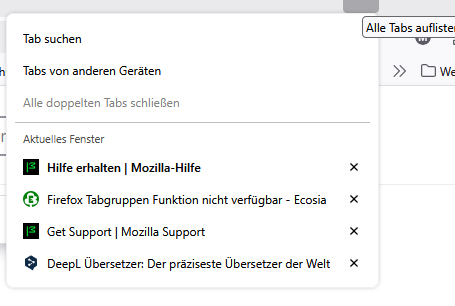
I am using tab groups and suddenly they all disappeared. There is no hint or trace of this function, not even in the tab pulldown menue. I checked the internet, I restartet Firefox several times, I restarted my notebook (Windows 11), I checked about:config (tab groups are enabled). I even reinstalled firefox - it seems like tab groups never have existed. What might have happend - and how could I get that feature back? Thank you in advance Wolf
附加的畫面擷圖

被選擇的解決方法

Re-installed firefox a second time and tab groups are back again!

從原來的回覆中察看解決方案 👍 0

所有回覆 (2)

更多選項

選擇的解決方法

Re-installed firefox a second time and tab groups are back again!

更多選項

Hi there,

Thank you so much for coming back to this thread to share your solution and marking it as the answer! By doing this, you're not only resolving your own issue but also helping others who might run into the same problem. We really appreciate it!

問個問題

如果您還沒有帳號,您必須先登入帳號 來回覆文章。還沒有帳號的話,只能發問新問題