


Windows 10 reached EOS (end of support) on October 14, 2025. If you are on Windows 10, see this article.

搜尋 Mozilla 技術支援網站

防止技術支援詐騙。我們絕對不會要求您撥打電話或發送簡訊,或是提供個人資訊。請用「回報濫用」功能回報可疑的行為。

了解更多

Web app shows Firefox icon instead of the site icon when PINNED TO START

  • 1 回覆
  • 2 有這個問題
  • 154 次檢視
  • 最近回覆由 Ed

This may be a small issue but it's pretty bothering, I do understand that the web app as of now is primarily to be pinned at the taskbar, but would this be done in the start menu in the future? I mainly keep my apps at the start menu for my convenience.

Basically the problem here is the shortcut icon, so take this Messenger web app as an example. If I pin this to taskbar, or even make a desktop shortcut, it's showing the correct icon, it's also in the start menu but unpinned. However, when I pin it to the start menu, in the app catalog, it changes to the Firefox icon (for some reason the one on the taskbar sometimes does that as well).

I've tried looking into the Properties tab of the shortcut, but apparently it's already set to the Messenger icon, so I'm guessing it's primarily the start menu problem.
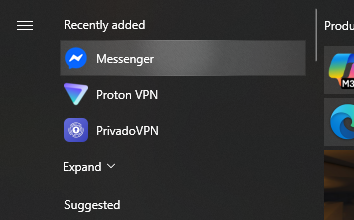
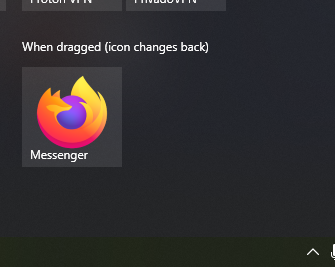
This may be a small issue but it's pretty bothering, I do understand that the web app as of now is primarily to be pinned at the taskbar, but would this be done in the start menu in the future? I mainly keep my apps at the start menu for my convenience. Basically the problem here is the shortcut icon, so take this Messenger web app as an example. If I pin this to taskbar, or even make a desktop shortcut, it's showing the correct icon, it's also in the start menu but unpinned. However, when I pin it to the start menu, in the app catalog, it changes to the Firefox icon (for some reason the one on the taskbar sometimes does that as well). I've tried looking into the Properties tab of the shortcut, but apparently it's already set to the Messenger icon, so I'm guessing it's primarily the start menu problem.
附加的畫面擷圖

所有回覆 (1)

You could report it as a possible bug at https://bugzilla.mozilla.org/enter_bug.cgi/.

問個問題

如果您還沒有帳號,您必須先登入帳號 來回覆文章。還沒有帳號的話,只能發問新問題