


url search options gone

After the recent update, the buttons on the url-bar-search for searching in bookmarks, tabs or search engine, are gone and turned into a drop down. This kinda sucks. the buttons were perfectly fine; one-click.
Any way to get the buttons back?
After the recent update, the buttons on the url-bar-search for searching in bookmarks, tabs or search engine, are gone and turned into a drop down. This kinda sucks. the buttons were perfectly fine; one-click.
Any way to get the buttons back?
由 Yinmin 於 修改
所有回覆 (2)
Hello
Unless I have misunderstood.
An subject https://connect.mozilla.org/t5/discussions/address-bar-updates-now-live-in-firefox-nightly/m-p/77329
About Studies https://support.mozilla.org/en-US/kb/shield
Type about:studies into your address bar to see a list of your studies. Click the Remove button next to the study you want to opt out of.
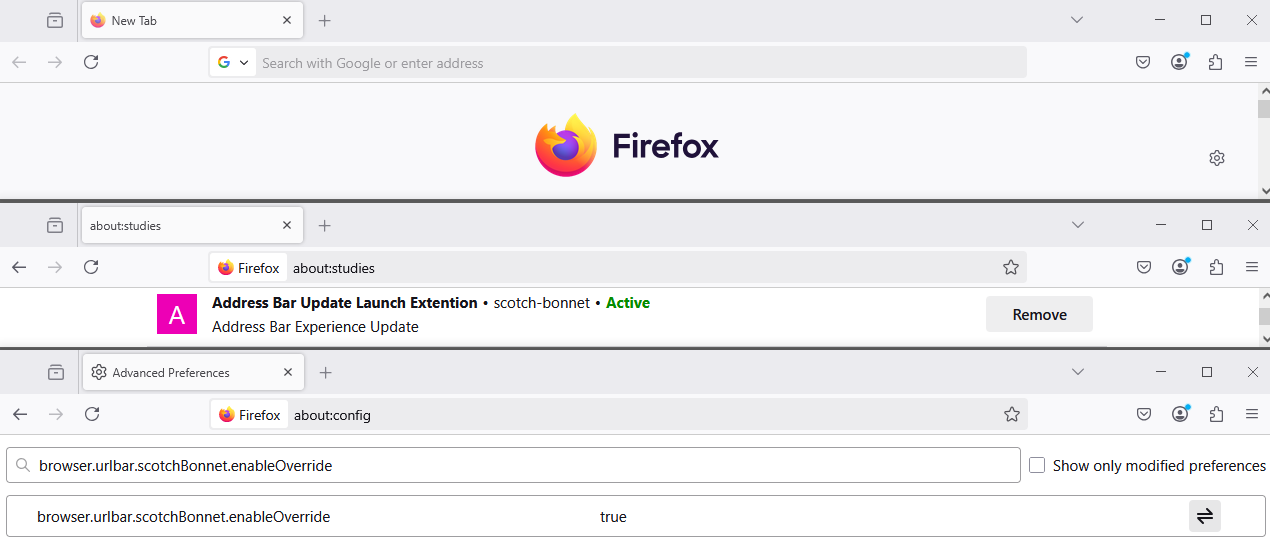
由 Agent virtuel 於 修改
that seems to be it