


My email got locked even when trying to create a profile in FF Nightly, even though I received the code in my email
I just tried creating a new profile in Nightly, and I received the "Approve sign-in to Firefox" email with a code, twice, but the profile page kept saying that my email bounced or something. Now it's saying it's locked.
被選擇的解決方法
Kiki said
Nada said
Hi Kiki, thank you so much for the response. I actually found this link and submitted a ticket, but I haven't received a response yet. The ticket # is 259373. Do you have access to getting an update on it?I followed up with my team, and you should hear back from them by now.
Thank you again, Kiki, I really appreciate it. I think I figured it out...I saw the page asking me to enter the code flash for a split second, and then go to the "your account is locked" page. I clicked the back arrow to return to the previous page and there it was.. the page to enter the code. I entered the code I just received and now I'm logged in. This might be a Nightly glitch? Thank you for your help.
從原來的回覆中察看解決方案 👍 0所有回覆 (15)

Email login issue isn't a Firefox browser problem. That is something you need to contact your email provider about.
markwarner22 said
Email login issue isn't a Firefox browser problem. That is something you need to contact your email provider about.
I am not talking about my email. I am talking about logging into Firefox nightly with an email so I am able to sync my browser across multiple devices. My email has no issues I'm logged in and I'm receiving the code from firefox, however when I go back to Firefox to enter that code when first creating the account with Firefox, Firefox is telling me my account is locked.
Screenshot of the Firefox message then?
it's attached.
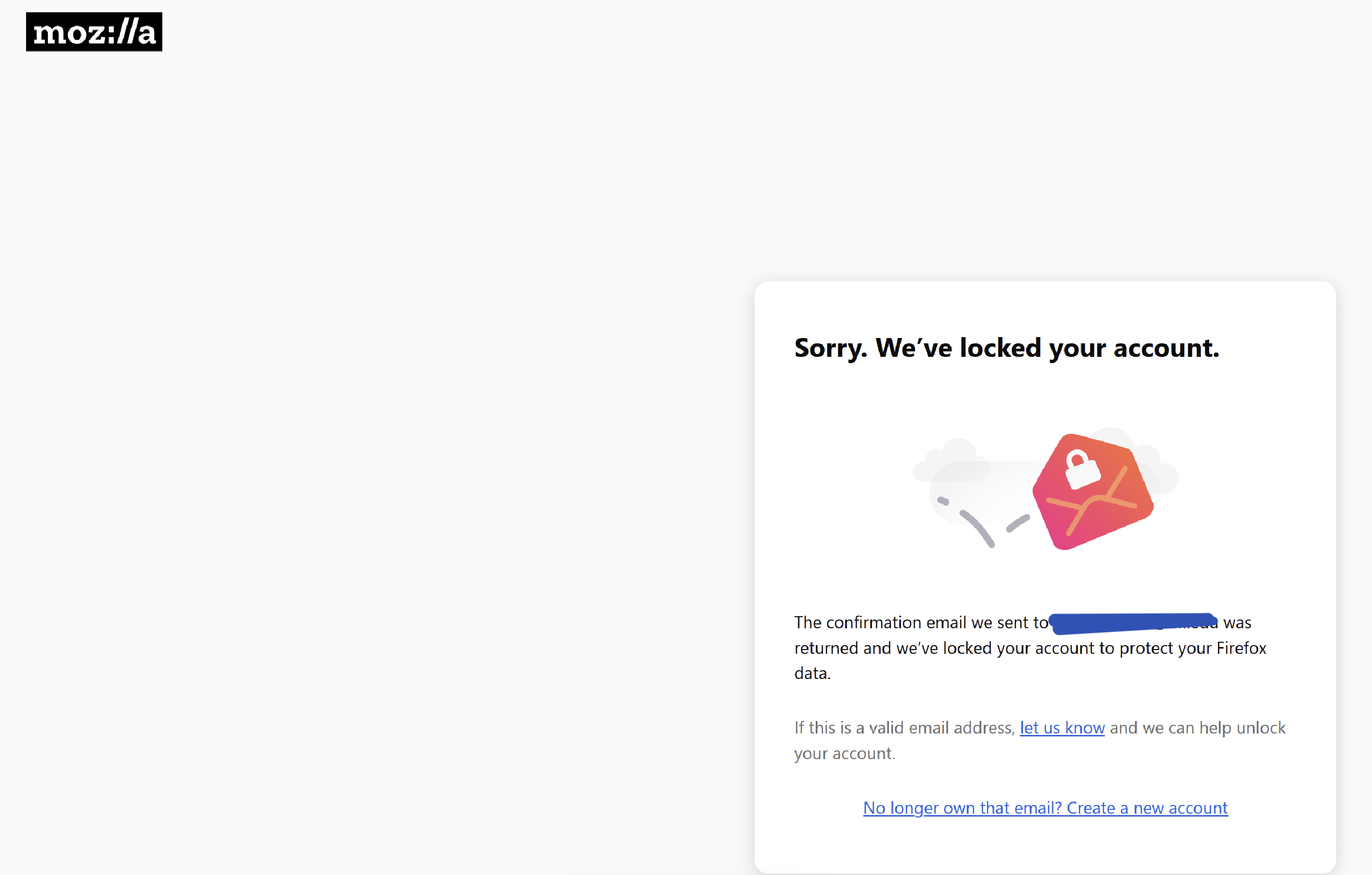
If your email is locked how are you able to post here? If email didn't work you won't be able to login and post to Firefox forum? They said it was returned so it seems your using a the wrong code from the email is what it sounds like.
I'm using my personal one and I was trying to create a work one. Did you read my initial post at all? I received the email with the code twice, but when I went to enter the code, it said my account was locked. My email account is perfectly fine, I'm receiving and sending emails with no issues. And I can't just create a new email, this is my work email.
Can I get some support for someone who works for Mozilla?? How is there no way to contact support?
So which email did the code go to? And are you using the same email for both accounts?
The code went to my work email. The same email I was trying to log into the new FF Nightly profile.
Wait so you use the same email for both work and personnel Firefox browser?
markwarner22 said
Wait so you use the same email for both work and personnel Firefox browser?
Holy moly dude. This conversation has been more frustrating than the issue itself. Where exactly did you get the idea that I am using the same email, when it is clearly not possible?
I found an actual support Mozilla support page where I can submit a ticket. No normal user can unlock my account, it has to be Mozilla.
Feel free to stop responding with more frustrating questions.
Hi Nada,
I'm Kiki, the Community Manager on this platform. You're dealing with a Mozilla account issue, and we have a direct one-one-one support for Mozilla account (which is a different thing from peer to peer support forum like this one).
Please file a new ticket from this page so our support agent can assist you further.
Kiki said
Hi Nada, I'm Kiki, the Community Manager on this platform. You're dealing with a Mozilla account issue, and we have a direct one-one-one support for Mozilla account (which is a different thing from peer to peer support forum like this one). Please file a new ticket from this page so our support agent can assist you further.
Hi Kiki, thank you so much for the response. I actually found this link and submitted a ticket, but I haven't received a response yet. The ticket # is 259373. Do you have access to getting an update on it?
Nada said
Hi Kiki, thank you so much for the response. I actually found this link and submitted a ticket, but I haven't received a response yet. The ticket # is 259373. Do you have access to getting an update on it?
I followed up with my team, and you should hear back from them by now.
選擇的解決方法
Kiki said
Nada said
Hi Kiki, thank you so much for the response. I actually found this link and submitted a ticket, but I haven't received a response yet. The ticket # is 259373. Do you have access to getting an update on it?I followed up with my team, and you should hear back from them by now.
Thank you again, Kiki, I really appreciate it. I think I figured it out...I saw the page asking me to enter the code flash for a split second, and then go to the "your account is locked" page. I clicked the back arrow to return to the previous page and there it was.. the page to enter the code. I entered the code I just received and now I'm logged in. This might be a Nightly glitch? Thank you for your help.
Nada said
Kiki said
Thank you again, Kiki, I really appreciate it. I think I figured it out...I saw the page asking me to enter the code flash for a split second, and then go to the "your account is locked" page. I clicked the back arrow to return to the previous page and there it was.. the page to enter the code. I entered the code I just received and now I'm logged in. This might be a Nightly glitch? Thank you for your help.
Glad to help. (:
Now that you've found a way out, mind to mark this question as solved by choosing an answer as the solution?