


Yahoo email

When we log into our Yahoo email, there's a small triangle (see screen shot) next to the padlock on the address bar that says "connection not secure".
Not sure what to do to get rid of it.

所有回覆 (6)
Hi, if you opened a message that contained an embedded image, and the sender linked the image using HTTP instead of HTTPS, then it's normal to get that warning. Firefox doesn't block insecure images because they are a low threat.
I'm not sure when the warning would usually go away, because the page doesn't reload as you read different messages. I guess you could reload it yourself (click the Reload button on the toolbar or press Ctrl+R).
You could enable HTTPS-Only Mode but this may block some content from loading.
Hi,
So I have no idea if we opened a message with an embedded image. Unfortunately, the warning still appears, even if I type Ctrl +R.
So I will try enable HTTPS-Only Mode, not sure what content it would prevent from loading.
For what it may be worth, we have Verizon DSL. A Geek Squad contact I have said DSL does use an older protocol and older computer language. Maybe a glitch? I reached out to Verizon, no reply.
At the moment, we're still very worried that our email says it has a "insecure connection".
Please advise.
zeroknight said
You could enable HTTPS-Only Mode but this may block some content from loading.
This works for me with no issues. see screenshots I'm wondering where does the "sg" come from in the url? Are you accessing yahoo mail directly or through another source. The sg still works for me, but just want to know where it comes from.

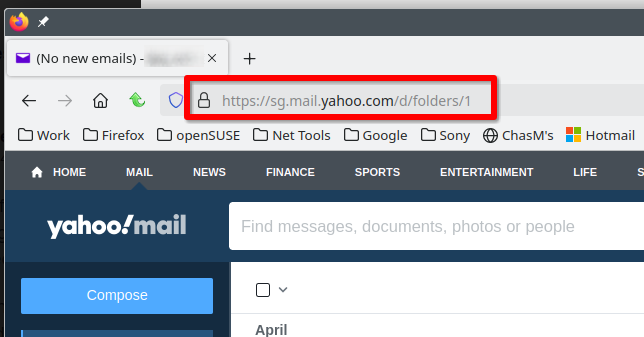
..."I'm wondering where does the "sg" come from in the url? Are you accessing yahoo mail directly or through another source. The sg still works for me, but just want to know where it comes from".
Good eye...I dont know exactly.
Perhaps when I was told by a Yahoo agent to reset Firefox default settings and had to redo our Homepage tabs afterwards...maybe I copied the address that way...seems weird to have the "sg". But wait, its also on the original screen shot I sent in my first inquiry too!! Strange...maybe thats where/when this issue started?
You may need to update your bookmarks or tabs, try visiting the mail site directly from *yahoo.com*.