


MimeTypes.rdf missing

Hi,
I'm using FF on Fedora 39.
However Firefox does not remember any file associations. The MimeTypes.rdf file in the profile is missing and is also not created on restarting the browser.
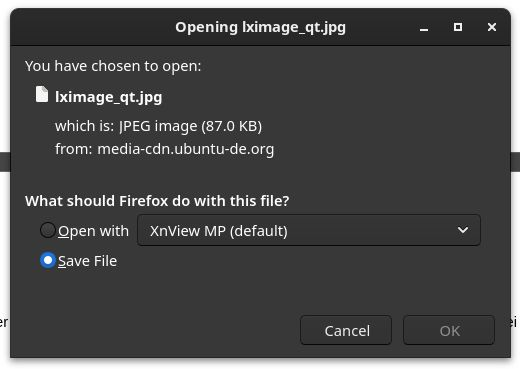
In the options I've now set the configuration to "Ask whether to open or save files". Now I see a popup when clicking on a file however there is no checkbox with "remember this file associations" (or something similiar).
被選擇的解決方法
Firefox would normally be able to handle JPG files internally (image/jpeg) and display them in a tab. You can only set an action if the file is send with a valid image content type, if the file is send with a generic content type like "application/octet-stream" or "content-disposition:attachment" then you won't be able to set an action. You should be able to check the HTTP response headers in the Network Monitor.
從原來的回覆中察看解決方案 👍 1所有回覆 (3)
Firefox stopped using MimeTypes.rdf years ago, current releases use handlers.json.
- Settings -> General -> Applications
- https://support.mozilla.org/en-US/kb/change-firefox-behavior-when-open-file
Ok, thanks. However I cannot make Firefox remember the association for file types, e.g. jpeg. There is simply no checkbox (see attached image)
選擇的解決方法
Firefox would normally be able to handle JPG files internally (image/jpeg) and display them in a tab. You can only set an action if the file is send with a valid image content type, if the file is send with a generic content type like "application/octet-stream" or "content-disposition:attachment" then you won't be able to set an action. You should be able to check the HTTP response headers in the Network Monitor.