Disable download finished notification
I want to disable notifications when a download is finished, however the key in about:config 'browser.download.manager.showAlertOnComplete' does not exist any more. Is there some other way to disable these notifications?
選擇的解決方法
Does it still happen in Troubleshoot Mode?
所有回覆 (5)
What kind of notification are you getting?
What I see is a visual change on the toolbar button, and the panel listing recent downloads drops open. There is a preference to prevent the panel from dropping, if you want to turn that off:
(1) In a new tab, type or paste about:config in the address bar and press Enter/Return. Click the button accepting the risk.
More info on about:config: Configuration Editor for Firefox. The moderators would like us to remind you that changes made through this back door aren't fully supported and aren't guaranteed to continue working in the future. Since we have had this setting for a long time and I use it myself, I feel comfortable mentioning it.
(2) In the search box in the page, type or paste browser.download.alwaysOpenPanel and pause while the list is filtered
(3) Double-click the preference to switch the value from true to false
jscher2000 - Support Volunteer said
What kind of notification are you getting?
I get an global/OS notification that a download has finished.
System info:
- Kubuntu 23.10
- KDE Plasma 5.27.8
- Firefox 123.0 (snap)
由 Robin_w151 於 修改
Hmm, I don't see those on Windows. Maybe a Linux user can chime in.
選擇的解決方法
Does it still happen in Troubleshoot Mode?
zeroknight said
Does it still happen in Troubleshoot Mode?
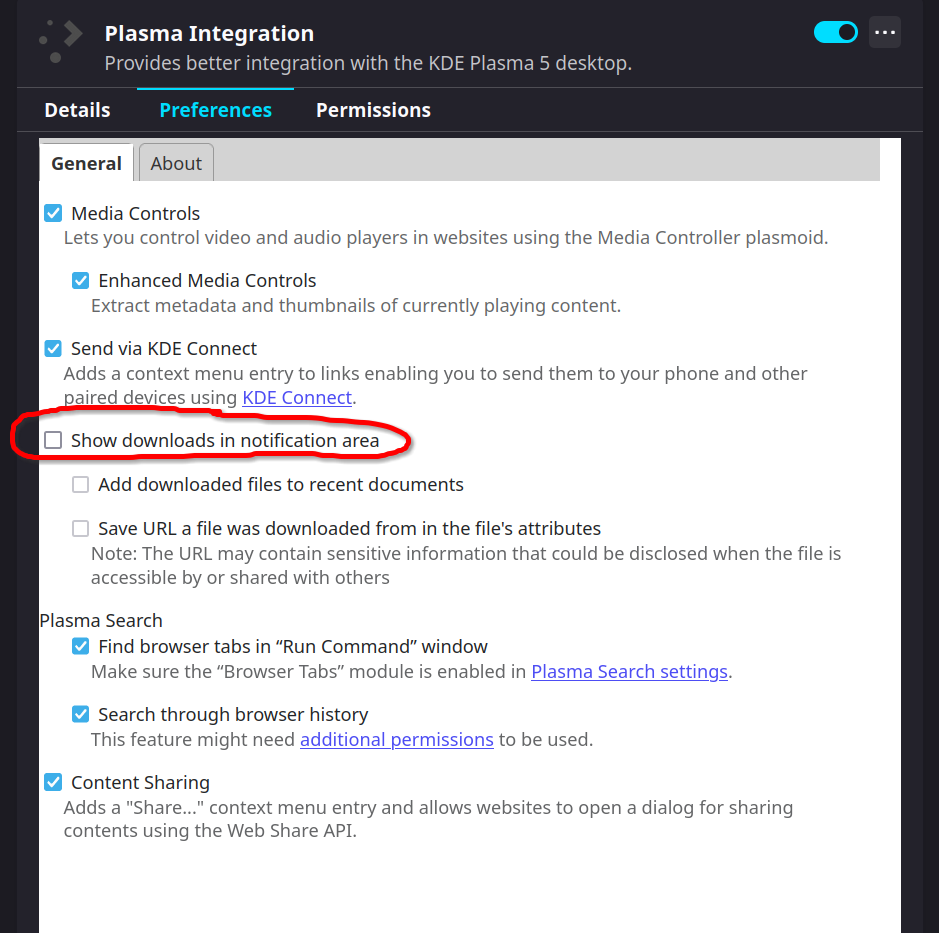
In Troubleshoot Mode the problem does not occur any more. I found out, that the Plasma Integration caused this behaviour and it can be disabled.