


Windows 10 reached EOS (end of support) on October 14, 2025. For more information, see this article.

搜尋 Mozilla 技術支援網站

防止技術支援詐騙。我們絕對不會要求您撥打電話或發送簡訊,或是提供個人資訊。請用「回報濫用」功能回報可疑的行為。

了解更多

Save passwort but never ask for update?

  • 2 回覆
  • 1 有這個問題
  • 70 次檢視
  • 最近回覆由 Elenktik

When I login at my online bank account, I am always asked for two passwords (see image), where the second password just consists of 2 numbers.

Every time I can use the autosaved password for the first form. After submitting the second form Firefox asks me always if I want to update the autosaved password for the first form. I always have to press "no" and when I hit accidentally "yes" I have to reenter my password in the first form.

The second form has always two random digits, so I don't wont to save this data anyway. I just don't wont to get asked anymore if I want to update my password.

Can I save a password for a website but never get asked again to update it?
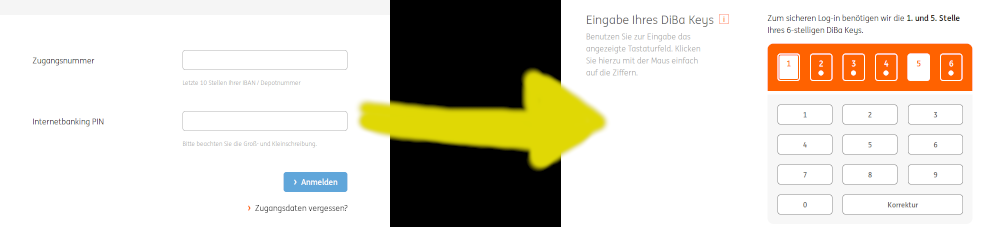
When I login at my online bank account, I am always asked for two passwords (see image), where the second password just consists of 2 numbers. Every time I can use the autosaved password for the first form. After submitting the second form Firefox asks me always if I want to update the autosaved password for the first form. I always have to press "no" and when I hit accidentally "yes" I have to reenter my password in the first form. The second form has always two random digits, so I don't wont to save this data anyway. I just don't wont to get asked anymore if I want to update my password. Can I save a password for a website but never get asked again to update it?
附加的畫面擷圖

被選擇的解決方法

You have to choose Never save password for this domain. After that, first form should be autofilled with an old pass, but the question shouldn't show up anymore.

從原來的回覆中察看解決方案 👍 1

所有回覆 (2)

選擇的解決方法

You have to choose Never save password for this domain. After that, first form should be autofilled with an old pass, but the question shouldn't show up anymore.

Holy Cow it works

由 Elenktik 於 修改