


Why isn't Shockwave working?

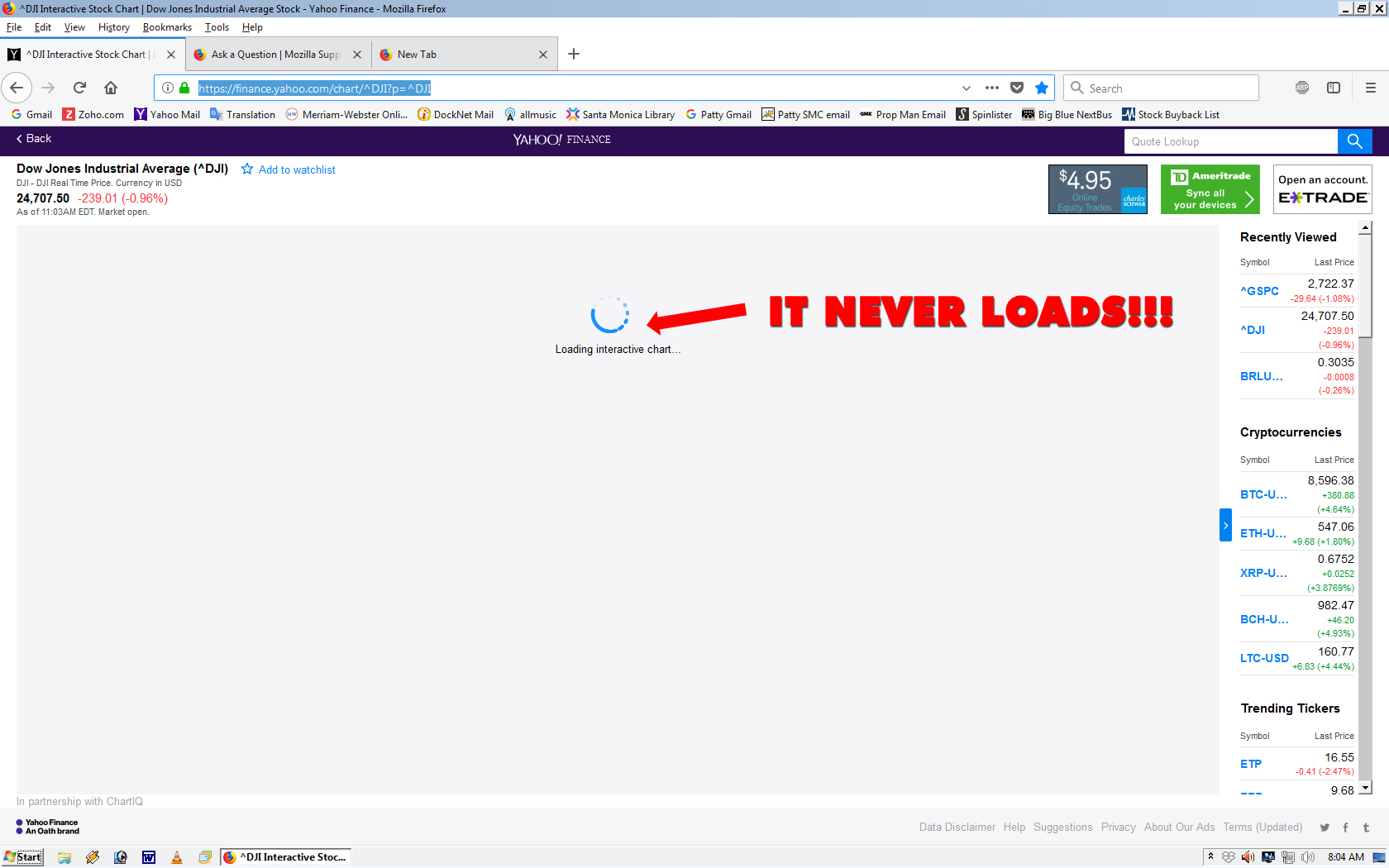
Yahoo Finance Charts - I believe - use Shockwave to show the Stock Charts. Suddenly, on Friday March 09, 2018, Yahoo Finance Charts STOPPED WORKING on Firefox. I have tried everything to get Yahoo Finance Charts to work - LIKE THEY USED TO JUST FINE - Firefox. Why do you do this crap?!?!
被選擇的解決方法
Don't give up just yet ....
You said earlier :
" Had a similar problem in Chrome. Adding Yahoo Finance to the Flash-excepted sites fixed it. Does Firefox have a similar function? Where you can SPECIFY what sites you want it to ignore blocking of Flash? "
Well, it looks like it's not just a Flash related issue ....
Have you tried Yahoo Help yet ?
https://forums.yahoo.net/t5/Finance/ct-p/fin
When I scroll down, I see the same problem mentioned ...... with Chrome.
從原來的回覆中察看解決方案 👍 0所有回覆 (16)

Please provide public link(s) (no password) that we can check out. No Personal Information Please !
Make sure you are not blocking content.
Start Firefox in Safe Mode {web link} by holding down the <Shift> (Mac=Options) key, and then starting Firefox.
A small dialog should appear. Click Start In Safe Mode (not Refresh). Is the problem still there?
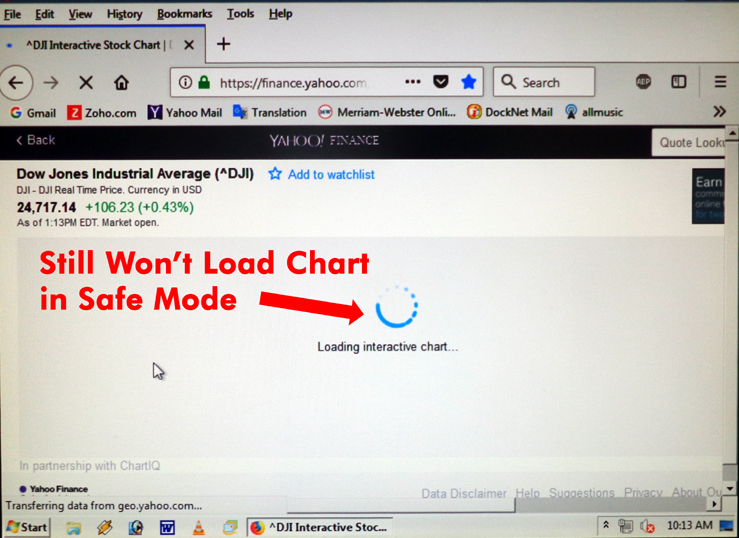
It still won't load the graph/chart:
Had a similar problem in Chrome. Adding Yahoo Finance to the Flash-excepted sites fixed it. Does Firefox have a similar function? Where you can SPECIFY what sites you want it to ignore blocking of Flash?
Flash test Page : http://www.dhs.state.il.us/accessibility/tests/flash/video.html
The block happens as per this page look and then will have to do 2 step Authorization.
I would think that Yahoo uses HTML5 rather than Flash.
I had no problem with the finance.yahoo.com/chart link. I tried to check out the player, but it did not identify itself (flash, html5 . . .).
Start your Computer in safe mode with network support. Then start Firefox. Try Safe websites. Is the problem still there?
http://encyclopedia2.thefreedictionary.com/Linux+Safe+Mode Starting Any Computer In Safe Mode; Free Online Encyclopedia
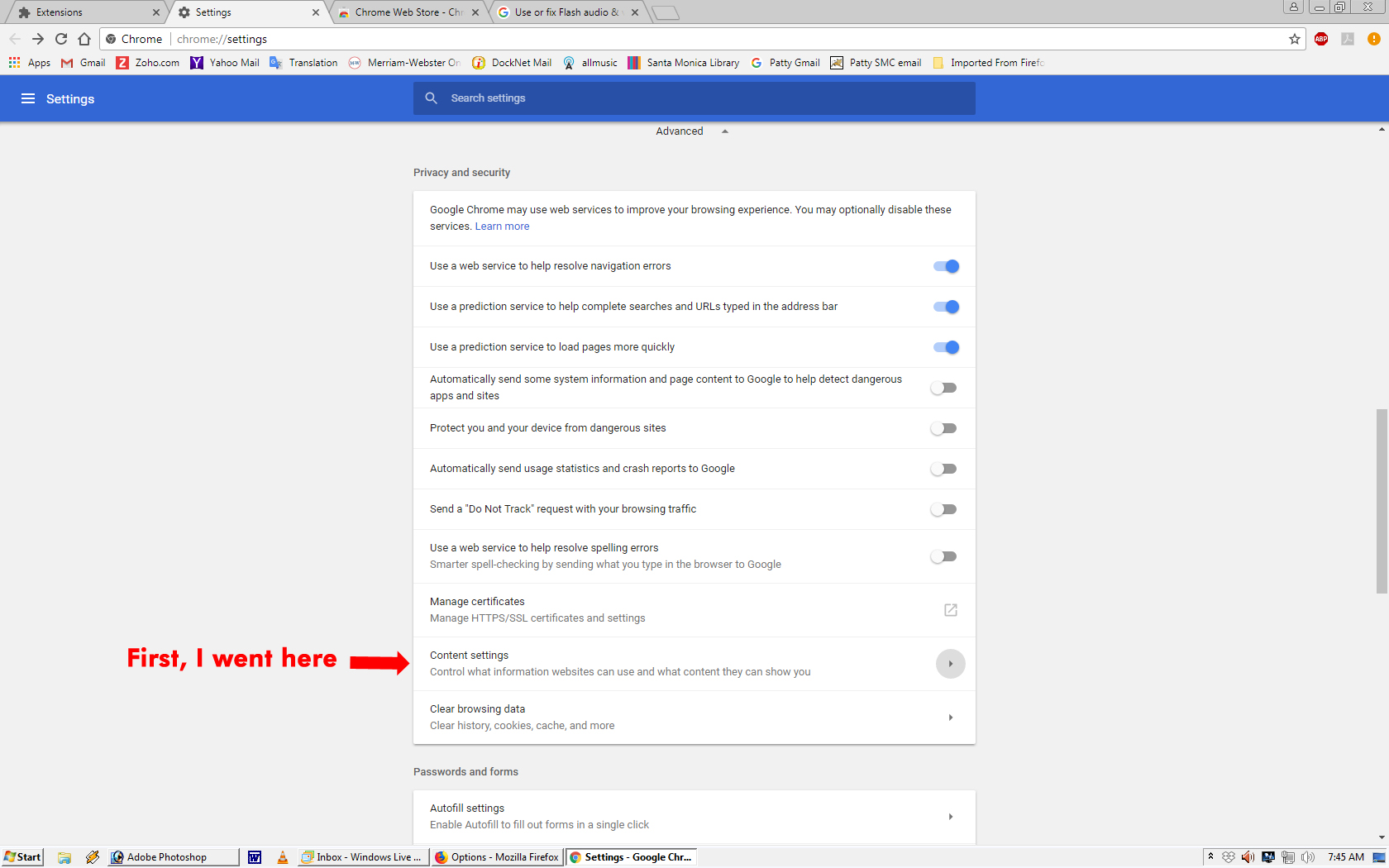
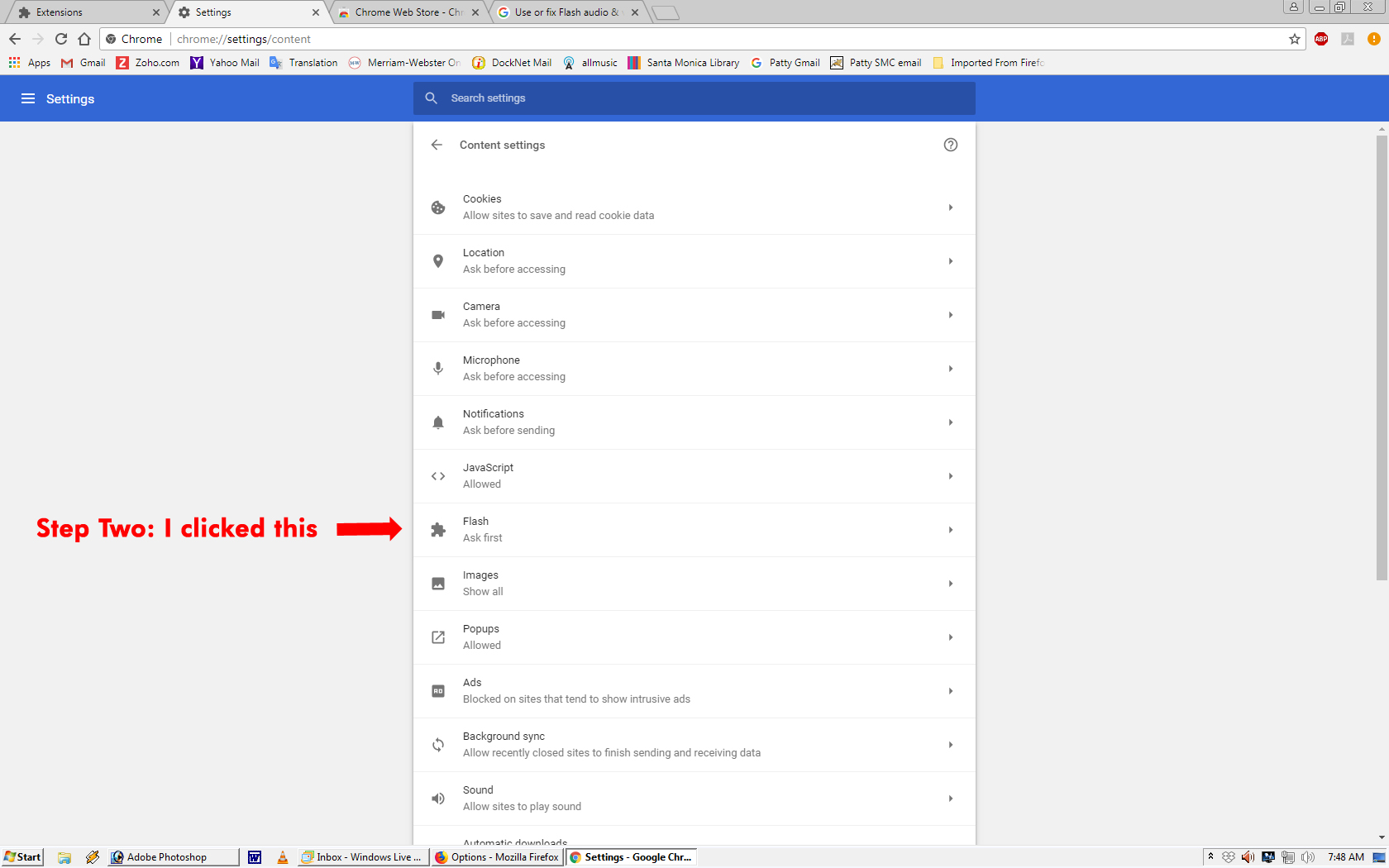
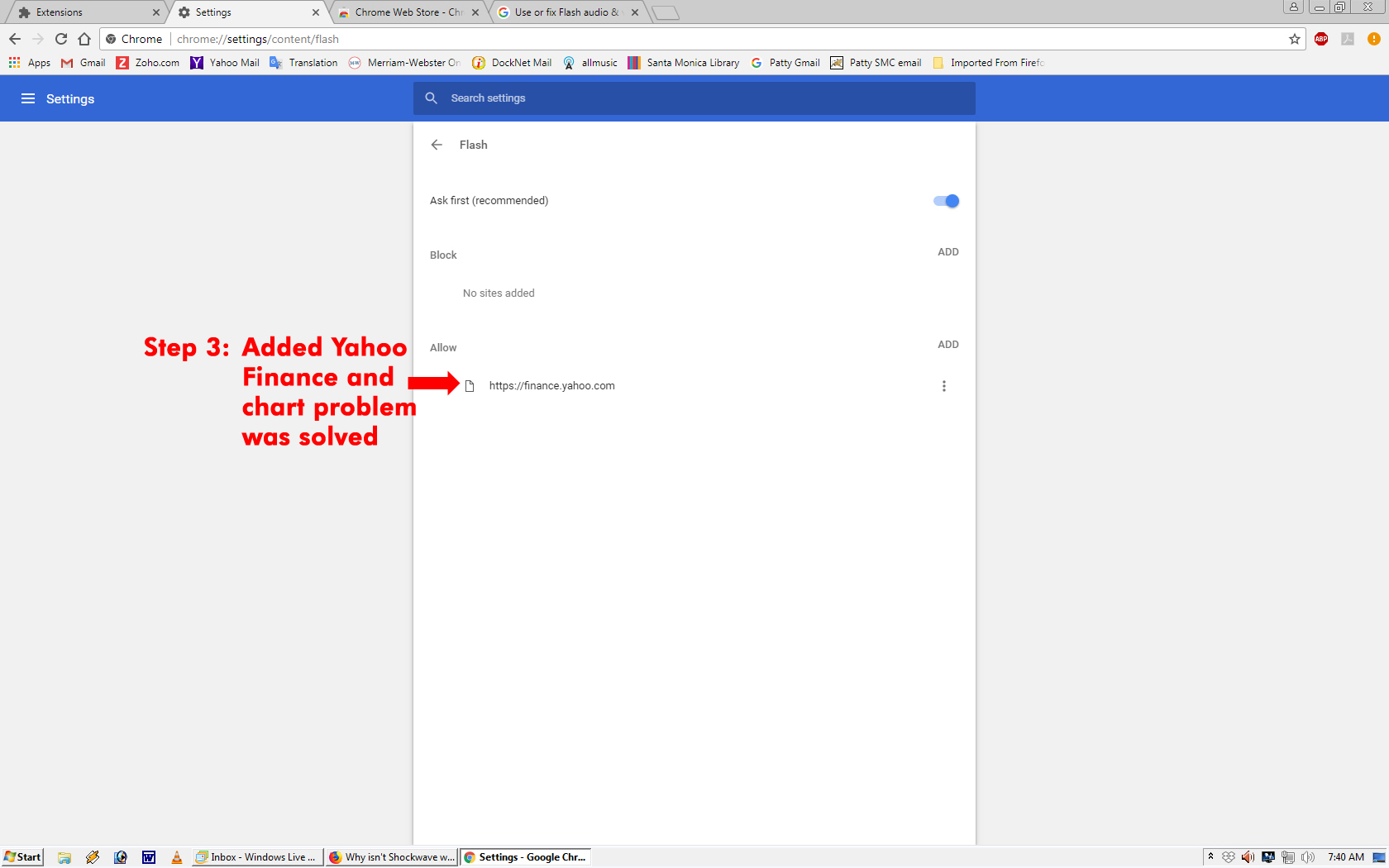
Flash Test Page played OK. I don't know if it's Flash or HTML5 or whatever - but when I added Yahoo Financial to the list of Flash-excepted sites in Chrome - it worked. See attached for 3-step procedure (Chrome Settings 01, Chrome Settings 02, Chrome Settings 03.jpg) I used to fix this in Chrome. This fix worked perfectly in Chrome.
FredMcD: Went to Safe encyclopedia link and found this:
" Safe mode loads a standard low resolution video driver and does not support connection to the Internet."
If I cannot get on the Internet in Safe Mode, how would I be able to: "start Firefox. Try Safe websites." ?
Am I missing something here?
FredMcD said
Start your Computer in safe mode with network support
In most computers, there are several types of Safe Mode. The primary ones used most are; *Safe Mode: Only programs that came with the computer are started. No other programs will be started unless the user starts them. *Safe Mode with Networking: Same as above but the network drivers (internet) will also be running. This is a way to test if one of the other programs on the computer is causing the issue.
In addition to the above :
https://www.lifewire.com/how-to-start-windows-7-in-safe-mode-2624540
(You'll have to scroll down some for Safe Mode with networking)
FredMcD: Started in Safe Mode. Went to Yahoo Finance. Chart still won't load (see attached).
So there's no facility and/or page or 'Setting' in Firefox where you can choose *specific* websites to allow Flash to load, like in Chrome? (That solved the problem in Chrome)
baaadmoon said
So there's no facility and/or page or 'Setting' in Firefox where you can choose *specific* websites to allow Flash to load, like in Chrome? (That solved the problem in Chrome)
There sure is :
Page Info (click on the little 'i' in a circle, at the left side of the address bar), then click 'More Information'. Under the 'Permissions' tab : "Activate Plugins' => Adobe Flash : Uncheck 'Use Default' and check 'Allow'.
Just to make sure :
In the 3-bar menu (or 'Tools') => Add-ons => Plugins : Have you set Shockwave Flash to 'Ask to Activate' ?
Happy, Checked 'Ask to Activate'. Went to 'Permissions', "Activate Plugins', checked allow. Still didn't work. Closed/Opened Firefox, still didn't work. Re-Booted computer, still didn't work. BTW, when I click the circled 'i' now, under 'Permissions' it reads: "You have not granted this site any special permissions" - even though 'Allow' is still checked under 'Activate Plugins'.
I give up. I'll just use Chrome for Stocks analysis.
選擇的解決方法
Don't give up just yet ....
You said earlier :
" Had a similar problem in Chrome. Adding Yahoo Finance to the Flash-excepted sites fixed it. Does Firefox have a similar function? Where you can SPECIFY what sites you want it to ignore blocking of Flash? "
Well, it looks like it's not just a Flash related issue ....
Have you tried Yahoo Help yet ?
https://forums.yahoo.net/t5/Finance/ct-p/fin
When I scroll down, I see the same problem mentioned ...... with Chrome.
Happy, It WORKED! Reset Firefox Preferences to default and the Chart loads again.
Why? Who knows. But if I set a preference and it stops working again, at least I'll know.
Thanks all you guys.
Yay ! I bet that's a huge relief and put a great big smile on your face !
Fingers crossed it stays this way.
And by the way : well done !
Well done both of you.