since I updated my Mozilla my bookmarks have disappeared. I had a long list . How do I get them back? The info shown is of no help

I guess I just don't know how to do this. We have lost the bookmarks that was at top left. How do I find them. I now see the star on top right, but where are all the old ones?
被選擇的解決方法
Hi suziempea, could you check on your desktop for a folder named Old Firefox Data? Firefox creates that folder during a Refresh.
If you find one: Inside you should find at least one semi-randomly-named folder. If you click into that and then into the bookmarkbackups folder, are those files up-to-date?
從原來的回覆中察看解決方案 👍 0所有回覆 (6)
See this KB article: https://support.mozilla.org/en-US/kb/restore-bookmarks-from-backup-or-move-them
Restore a backup from the day before your bookmarks were "lost".
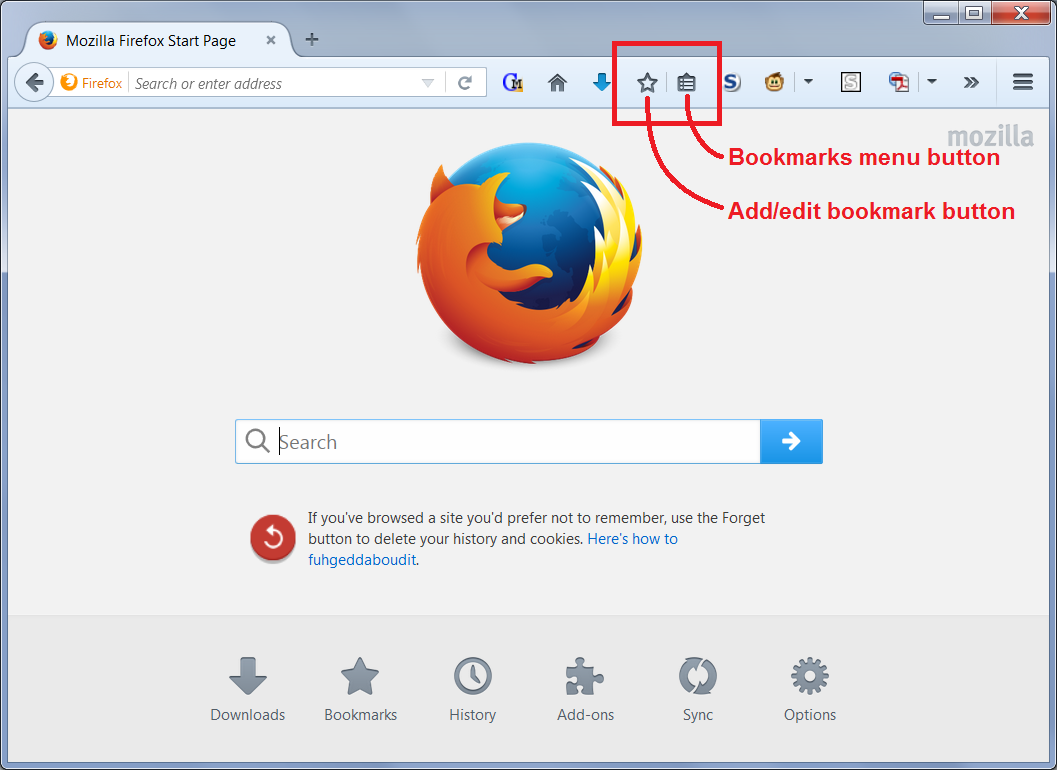
You see a star, do you see something that looks a bit like a clipboard just to the right of it? (screen shot attached for reference) That button should display a list very similar to the classic Bookmarks menu.
If you prefer using the menu bar, you can use one of these methods to show the toolbar list and turn it back on:
- right-click a blank spot on the tab bar (or the "+" button)
- tap the Alt key to activate the classic menu bar > View > Toolbars
- in Customize mode > Show/Hide Toolbars (see: Customize Firefox controls, buttons and toolbars)
To turn on the Menu Bar, Bookmarks Toolbar, or other bars, click it on the list.
Does that get your bookmarks back or is the list itself missing?
My bookmarks list is still missing. It shows only new one that I have created, but not my old long list.
選擇的解決方法
Hi suziempea, could you check on your desktop for a folder named Old Firefox Data? Firefox creates that folder during a Refresh.
If you find one: Inside you should find at least one semi-randomly-named folder. If you click into that and then into the bookmarkbackups folder, are those files up-to-date?
found the folder with old data and the bookmarkbackups. Now how do I get them back back on my open yahoo page like they were before. Should I try moving to the library next to the star? Thanks for the help so far. Maybe I am not the most educated with my PC
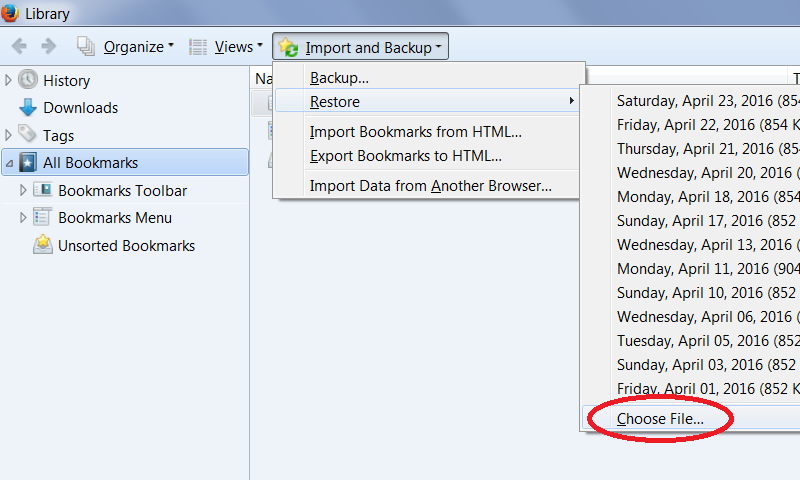
Hi suziempea, try using the Bookmark Restore feature. The following article describes using the Library dialog to restore a bookmark backup. Below the dated backups you'll find "Choose File" as the last option. (Example screen shot attached)
Restore bookmarks from backup or move them to another computer
Using that choice, you can point Firefox to your Desktop, then Old Firefox Data, then into your old profile folder, bookmarkbackups folder, to your most recent backup.
Does it work?