


New web page will not save to folder of choice in Bookmarks Toolbar.

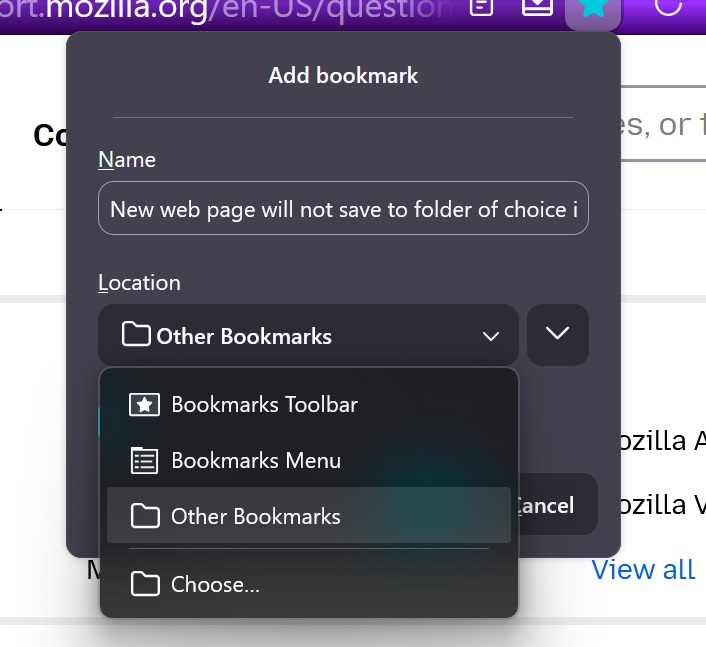
When I try to save a new URL, Web Page, by clicking on the "Star" on the tool bar menu, then selection my existing folder for my chosen location it is not saved, at least most of the time. It is however saved under Recently Bookmarked and is also in Manage Bookmarks. I can force it to save by selecting Bookmarks Menu. It then is at the bottom of all my saved folder. I then can copy and paste into my folder of choice. What do I need to do to make it save to the folder of choice immediately?
Thanks, James
All Replies (4)
Hi..
It seems that you doing the correct option if you are selecting the folder you want
Amoun,
Yes I have been using this correct option to save to a folder of choice for years. Sometimes it does save and on other days, today for instance, it does not save. Then it seems that it will appear the next day or later. This is strange to me. Does the whole system need to be reset? I do have the long Mozilla Account Security Code. Or is there something in Trouble Shooting to correct this? I do save all my bookmarks and will do again if a refresh or reset is needed.
I await the solution.
James
Do you close Windows via Restart now and then as Power off etc. keeps old settings.
Normally I close my ****.msn.com email and other pages from file (upper left) then to bottom and Exit. Occasionally when experiencing glitches, I will Restart. Then periodically I will clear recent browsing history, cookies and cached files from the "Show recent history from the clock-face button on the tool bar. What else could you suggest that actually works? I just tried to save an article from the New York Times digital web page, chose my folder from Location, Show Editor is checked and this time it did save to my choice. The save was set to Bookmark Toolbar before I changed the location to my chosen folder.The vagaries of the system....or ???? I will just play with it.
alf shukr y grazie molto