


Intranet site 401 Unauthorized kerberos SSO

Hi!
We have a intranet site that works in Edge and Chrome without issues with the site added to "internet options". But for some reason we are getting 401 Unauthorized when trying to access it from Firefox. I have tried adding the urls to: network.automatic-ntlm-auth.trusted-uris network.automatic-ntlm-auth.allow-proxies: true network.automatic-ntlm-auth.allow-non-fqdn: true network.auth.force-generic-ntlm: false network.auth.force-generic-ntlm-v1: false
Ingocnito mode , same error. I have tried disabling all plugins. Disabled DNS over HTTPS.
HTTP/1.1 401 Unauthorized Server: Microsoft-IIS/10.0 WWW-Authenticate: Negotiate X-Powered-By: ASP.NET Date: Mon, 25 May 2026 08:15:41 GMT Content-Length: 0
Regards Rasmus
All Replies (19)
I assume it's configured with network.negotiate-auth.trusted-uris and related network.negotiate-auth.delegation-uris — according to https://firefox-admin-docs.mozilla.org/reference/policies/authentication/ where it's configured in most cases.
Linux specifics aside, the Firefox config steps are also described e.g. in https://docs.redhat.com/en/documentation/red_hat_enterprise_linux/5/html/deployment_guide/sso-config-firefox
Hi!
Yes these are all tested except network.auth.private-browsing-sso, but this one did not help either. These settings are only changed in the about:config at first. Will deploy them later to everyone when we find the issue.
Regards Rasmus
Do you have any logs from the server side, Rasmus? — To see if there are actually any attempts to submit the kerberos ticket at all? Or it's a just a single 401 only… and then silence.
Also please share your setup (OS versions, browser distribution/channel etc.?) — it's not apparent what versions you're trying to deploy as this question was not submitted from within one.
Hi! The webserver is windows server 2025. The software is IBM Cognos Analytics with IIS.
what do you mean by browser dristribution/channel?
This is from event viewer when trying to log in from firefox:
An account failed to log on.
Subject: Security ID: NULL SID Account Name: - Account Domain: - Logon ID: 0x0
Logon Type: 3
Account For Which Logon Failed: Security ID: NULL SID Account Name: Account Domain: -
Failure Information: Failure Reason: An Error occured during Logon. Status: 0xC000035B Sub Status: 0x0
Process Information: Caller Process ID: 0x0 Caller Process Name: -
Network Information: Workstation Name: - Source Network Address: 10.10.xx.xx Source Port: 18965
Detailed Authentication Information: Logon Process: Kerberos Authentication Package: Kerberos Transited Services: - Package Name (NTLM only): - Key Length: 0
I'm not entirely sure it's necessary, but when you've allowlisted the hosts, have you tried adding both without, and with the port number for the service?
As for logs I mean either server logs (what the IIS sees as received on its webserver/ingress side), or a capture in Network devtools — whether it's just a one, single document hit and that's it (i.e. no attempt to respond to the 401 challenge with any content?)
As for deployment I mean what Firefox and Windows versions you're trying this on, as this thread not being submitted from the affected browser, it includes no support/debug data — so it's not apparent if you're trying a current release Firefox 15x.x, or ESR 140.x … and whether that's Windows 10 or 11 etc.
The error code points to using old NTLM v1, not Kerberos: https://learn.microsoft.com/en-us/troubleshoot/windows-server/remote/0xc000035b-when-you-use-lmcompatibility (not sure if WWW-Authenticate: Negotiate should ever fall back to it no matter the settings/env, though…)
If you're only using the Firefox instance for "tinkering" with the prefs and have no useful content in the installation, could you completely reset the profile to the factory defaults, and without flipping any of the legacy prefs, just focus on enabling the two currently impactful ones: the network.negotiate-auth.trusted-uris and potentially network.negotiate-auth.delegation-uris if needed for your instance — so that none of the legacy challenge paths get enabled at all?
Here is something from the IIS logs. Is it to any help? Should i only add our domain the the delegation and trusted uris or the internal sites name? I have tried with domain and the sites name plus port. NTLM is blocked in our domain and all the other browsers (edge and chrome) can login using kerberos without issues.
Firefox version: 151.0.2 (64-bit)
2026-05-27 10:38:56 10.10.90.73 GET /ibmcognos/bi/v1/whatsnew/ X-ARR-LOG-ID=aced16cb-e15e-49f1-99f9-2695e0d48cf8&SERVER-STATUS=200 443 HARTMAN_NOTES1\rasmus.geisor 10.10.xx.xx Mozilla/5.0+(Windows+NT+10.0;+Win64;+x64)+AppleWebKit/537.36+(KHTML,+like+Gecko)+Chrome/148.0.0.0+Safari/537.36 https://scm.hartman.fi/ibmcognos/bi/ 200 0 0 696 3103 2395 2026-05-27 10:38:57 10.10.90.73 GET /ibmcognos/bi/v1/agentic/status X-ARR-LOG-ID=9a0da748-a5e8-4281-9d21-421be61f1f61&SERVER-STATUS=404 443 HARTMAN_NOTES1\rasmus.geisor 10.10.xx.xxMozilla/5.0+(Windows+NT+10.0;+Win64;+x64)+AppleWebKit/537.36+(KHTML,+like+Gecko)+Chrome/148.0.0.0+Safari/537.36 https://scm.hartman.fi/ibmcognos/bi/?perspective=home&tab=recents&folder=recents 404 0 0 464 3240 74 2026-05-27 10:39:01 10.10.90.73 GET /ibmcognos/bi/v1/agentic/status X-ARR-LOG-ID=3e38bffa-199c-4f66-a2ae-47879283302a&SERVER-STATUS=404 443 HARTMAN_NOTES1\rasmus.geisor 10.10.140.190 Mozilla/5.0+(Windows+NT+10.0;+Win64;+x64)+AppleWebKit/537.36+(KHTML,+like+Gecko)+Chrome/148.0.0.0+Safari/537.36 https://scm.hartman.fi/ibmcognos/bi/?perspective=home&tab=recents&folder=recents 404 0 0 464 3240 77
No, that's some Chrome/Edge hitting 404s in the logs, that's unrelated. Considering other browsers have access to the tickets I'm not focusing on system availability or entitlement to be using the tickets, and being signed in the right way; just on the entitlement for particular sites to be responded to with the kerberos ticket.
1. Please confirm you've reverted back all the legacy prefs or reset the Firefox profile to start from a default state.
2. Ideally verify all of the network.negotiate-* prefs are at their default. (attached)
3. Not sure what value you'd need in your setup, I'd just start with ".hartman.fi" incl. the leading dot (no quotes, no nothin, just the domain and leading dot) for network.negotiate-auth.trusted-uris if that matches your hosts and add more later (e.g. allowing non-FQDN, adding the IP, adding delegation, etc.)
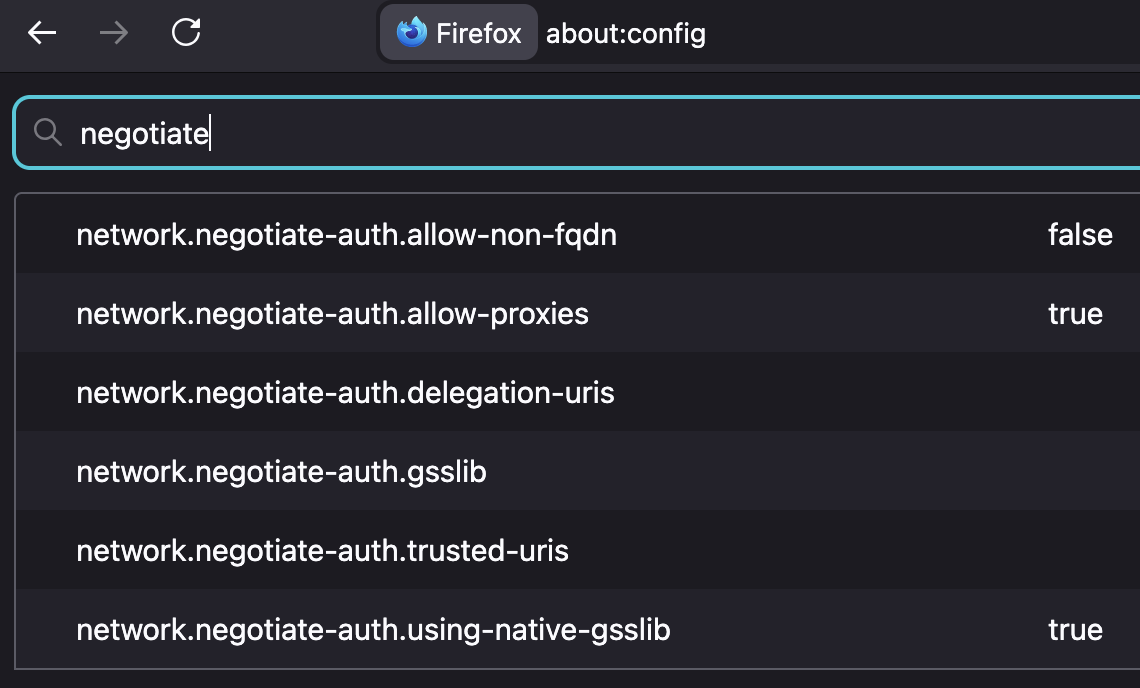
Hi!
I did a full reset, added .hartman.fi to the uris and checked all the network.negotiate settings as in the picture but still same 401 error.
I'd leave the delegation one empty, or try e.g. just "https://" for starters as its value if it makes any difference.
And would always restart Firefox after making the changes — not sure at what point they get loaded for the entitlements.
Hi!
I just tried leaving it empty and with https:// with no success , i did a restart after both entries.
noticed we have Windows SSO enabled that we are pushing with intune to all users.
Can this cause some issues?
Windows SSO \Mozilla\Firefox If this policy is enabled, Firefox will use credentials stored in Windows to sign in to Microsoft, work, and school accounts.
If this policy is disabled or not configured, credentials must be entered manually.
Setting type: Device
Your hosts don't look like they need network.negotiate-auth.allow-non-fqdn flipped, but you can try that as well.
Other than that, reaching out to Enterprise Support.
Some debugging:
- Checking ticket is available:
klist
- Logging the debug for the kerberos module:
set NSPR_LOG_MODULES=negotiateauth:5 set NSPR_LOG_FILE=C:\temp\firefox_kerberos.log "C:\Program Files\Mozilla Firefox\firefox.exe"
- What to look for in the NSPR logs:
"service = [principal]" or "Using SPN of [host/domain.tld]" that it gets the right format, "Sending a token of length XXX" whether it tried to send the ticket etc.
You can try disabling that pref in network.http.windows-sso.enabled but it doesn't have to necessarily interfere with negotiate auth — it's this How to enable Windows SSO login in Firefox feature (with the image lower what "Email & accounts" that are signed into on the system would be used — especially if you have none there, it would have no impact.) … Can't tell whether your IBM/IIS stack would be preferring this federation model per se — the list of 401 auth options is pretty clear.
klist looking good.
Logs:
[Parent 25276: Main Thread]: D/negotiateauth service = scm.hartman.fi [Parent 25276: Main Thread]: D/negotiateauth using negotiate-sspi [Parent 25276: Main Thread]: D/negotiateauth nsAuthSSPI::Init [Parent 25276: Main Thread]: D/negotiateauth Using SPN of [HTTP/scm.hartman.fi] [Parent 25276: Main Thread]: D/negotiateauth AcquireCredentialsHandle() succeeded. [Parent 25276: BgIOThreadPool #3]: D/negotiateauth nsHttpNegotiateAuth::GenerateCredentials() [challenge=Negotiate] [Parent 25276: BgIOThreadPool #3]: D/negotiateauth entering nsAuthSSPI::GetNextToken() [Parent 25276: BgIOThreadPool #3]: D/negotiateauth InitializeSecurityContext: continue. [Parent 25276: BgIOThreadPool #3]: D/negotiateauth Sending a token of length 2166 [Parent 25276: BgIOThreadPool #3]: D/negotiateauth nsHttpNegotiateAuth::GenerateCredentials() [challenge=Negotiate] [Parent 25276: BgIOThreadPool #3]: D/negotiateauth entering nsAuthSSPI::GetNextToken() [Parent 25276: BgIOThreadPool #3]: D/negotiateauth InitializeSecurityContext failed [rc=-2146893048:] [Parent 25276: Main Thread]: D/negotiateauth service = scm.hartman.fi [Parent 25276: Main Thread]: D/negotiateauth using negotiate-sspi [Parent 25276: Main Thread]: D/negotiateauth nsAuthSSPI::Init [Parent 25276: Main Thread]: D/negotiateauth Using SPN of [HTTP/scm.hartman.fi] [Parent 25276: Main Thread]: D/negotiateauth AcquireCredentialsHandle() succeeded. [Parent 25276: BgIOThreadPool #4]: D/negotiateauth nsHttpNegotiateAuth::GenerateCredentials() [challenge=Negotiate] [Parent 25276: BgIOThreadPool #4]: D/negotiateauth entering nsAuthSSPI::GetNextToken() [Parent 25276: BgIOThreadPool #4]: D/negotiateauth InitializeSecurityContext: continue. [Parent 25276: BgIOThreadPool #4]: D/negotiateauth Sending a token of length 2166 [Parent 25276: BgIOThreadPool #4]: D/negotiateauth nsHttpNegotiateAuth::GenerateCredentials() [challenge=Negotiate] [Parent 25276: BgIOThreadPool #4]: D/negotiateauth entering nsAuthSSPI::GetNextToken() [Parent 25276: BgIOThreadPool #4]: D/negotiateauth InitializeSecurityContext failed [rc=-2146893048:] [Parent 25276: Main Thread]: D/negotiateauth service = scm.hartman.fi [Parent 25276: Main Thread]: D/negotiateauth using negotiate-sspi [Parent 25276: Main Thread]: D/negotiateauth nsAuthSSPI::Init [Parent 25276: Main Thread]: D/negotiateauth Using SPN of [HTTP/scm.hartman.fi] [Parent 25276: Main Thread]: D/negotiateauth AcquireCredentialsHandle() succeeded. [Parent 25276: BgIOThreadPool #4]: D/negotiateauth nsHttpNegotiateAuth::GenerateCredentials() [challenge=Negotiate] [Parent 25276: BgIOThreadPool #4]: D/negotiateauth entering nsAuthSSPI::GetNextToken() [Parent 25276: BgIOThreadPool #4]: D/negotiateauth InitializeSecurityContext: continue. [Parent 25276: BgIOThreadPool #4]: D/negotiateauth Sending a token of length 2166 [Parent 25276: BgIOThreadPool #4]: D/negotiateauth nsHttpNegotiateAuth::GenerateCredentials() [challenge=Negotiate] [Parent 25276: BgIOThreadPool #4]: D/negotiateauth entering nsAuthSSPI::GetNextToken() [Parent 25276: BgIOThreadPool #4]: D/negotiateauth InitializeSecurityContext failed [rc=-2146893048:] [Parent 25276: Main Thread]: D/negotiateauth service = scm.hartman.fi [Parent 25276: Main Thread]: D/negotiateauth using negotiate-sspi [Parent 25276: Main Thread]: D/negotiateauth nsAuthSSPI::Init [Parent 25276: Main Thread]: D/negotiateauth Using SPN of [HTTP/scm.hartman.fi] [Parent 25276: Main Thread]: D/negotiateauth AcquireCredentialsHandle() succeeded. [Parent 25276: BgIOThreadPool #4]: D/negotiateauth nsHttpNegotiateAuth::GenerateCredentials() [challenge=Negotiate] [Parent 25276: BgIOThreadPool #4]: D/negotiateauth entering nsAuthSSPI::GetNextToken() [Parent 25276: BgIOThreadPool #4]: D/negotiateauth InitializeSecurityContext: continue. [Parent 25276: BgIOThreadPool #4]: D/negotiateauth Sending a token of length 2166 [Parent 25276: BgIOThreadPool #4]: D/negotiateauth nsHttpNegotiateAuth::GenerateCredentials() [challenge=Negotiate] [Parent 25276: BgIOThreadPool #4]: D/negotiateauth entering nsAuthSSPI::GetNextToken() [Parent 25
This looks all alright. Besides the part rejecting the auth;)
rc=-2146893048 is SEC_E_INVALID_TOKEN (0x80090308) 🤷
That said, a ticket is provided and everything seems to be configured correctly. Only the server then rejecting the ticket content/privileges;))
I'm not sure if you're willing to actually try to intercept the ticket to compare, or raising the log verbosity in the environment variable to see if there's more of the things being done logged… EDIT: I think any logging the module does is on LOG level already, nothing more verbose seems to ever be emitted, but you can always try, the weather here's not favorable to quickly trying grasp C source code;)
jbr மூலமாக திருத்தப்பட்டது
Could you try a different machine, from a different user account — to just see if this is rejected in all cases, or this have been just some freak token booboo?
(The setup you apparently get right — just the single domain entry is all that was needed to allow the challenge. So you can try setting that up for another workstation user and see if that ticket also gets rejected by the IIS?)
I have now tried with multiple accounts and different machines. No sucess :( should we just not use this site with firefox?