


Windows 10 reached EOS (end of support) on October 14, 2025. If you are on Windows 10, see this article.

Search Support

Avoid support scams. We will never ask you to call or text a phone number or share personal information. Please report suspicious activity using the “Report Abuse” option.

Learn More

Tabs sharing over local network even though Sync is disabled

  • பதில்கள் இல்லை
  • 0 இந்த பிரச்னைகள் உள்ளது
  • 6 views
  • Open

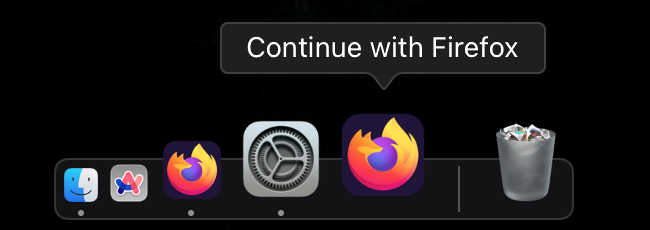
Hello, I have multiple devices using Firefox on the same network, and whenever using them at the same time, I get an additional Firefox icon in my doc which will open whatever tab is up on the other device. I was not signed in to any account on either device, yet it is still sharing tab data across devices.

I then created an account and signed in on one device and disabled every Sync option I could find, but still the sharing is enabled over local network. How do I disable this so there is no communication between the two devices?

Device 1 - MacBook Pro (Retina, 13-inch, Early 2015) macOS Monterey 12.7.6 Firefox Version 149.0.2

Device 2 - MacBook Pro 14-inch, 2023 macOS Sequoia 15.4.1 Firefox Version 149.0.2 Local Network access disabled for Firefox in macOS settings

It doesn't seem like this should even be possible given that local network access is disabled for the one device, and neither device is logged into a mozilla account.

Can someone please help me disable this functionality?
Hello, I have multiple devices using Firefox on the same network, and whenever using them at the same time, I get an additional Firefox icon in my doc which will open whatever tab is up on the other device. I was not signed in to any account on either device, yet it is still sharing tab data across devices. I then created an account and signed in on one device and disabled every Sync option I could find, but still the sharing is enabled over local network. How do I disable this so there is no communication between the two devices? Device 1 - MacBook Pro (Retina, 13-inch, Early 2015) macOS Monterey 12.7.6 Firefox Version 149.0.2 Device 2 - MacBook Pro 14-inch, 2023 macOS Sequoia 15.4.1 Firefox Version 149.0.2 Local Network access disabled for Firefox in macOS settings It doesn't seem like this should even be possible given that local network access is disabled for the one device, and neither device is logged into a mozilla account. Can someone please help me disable this functionality?
Attached screenshots

You must log in to your account to reply to posts. Please start a new question, if you do not have an account yet.