


Windows 10 reached EOS (end of support) on October 14, 2025. If you are on Windows 10, see this article.

Search Support

Avoid support scams. We will never ask you to call or text a phone number or share personal information. Please report suspicious activity using the “Report Abuse” option.

Learn More

Emoji no longer display after upgrade to 148

  • 3 பதிலளிப்புகள்
  • 0 இந்த பிரச்னைகள் உள்ளது
  • 48 views
  • Last reply by TyDraniu

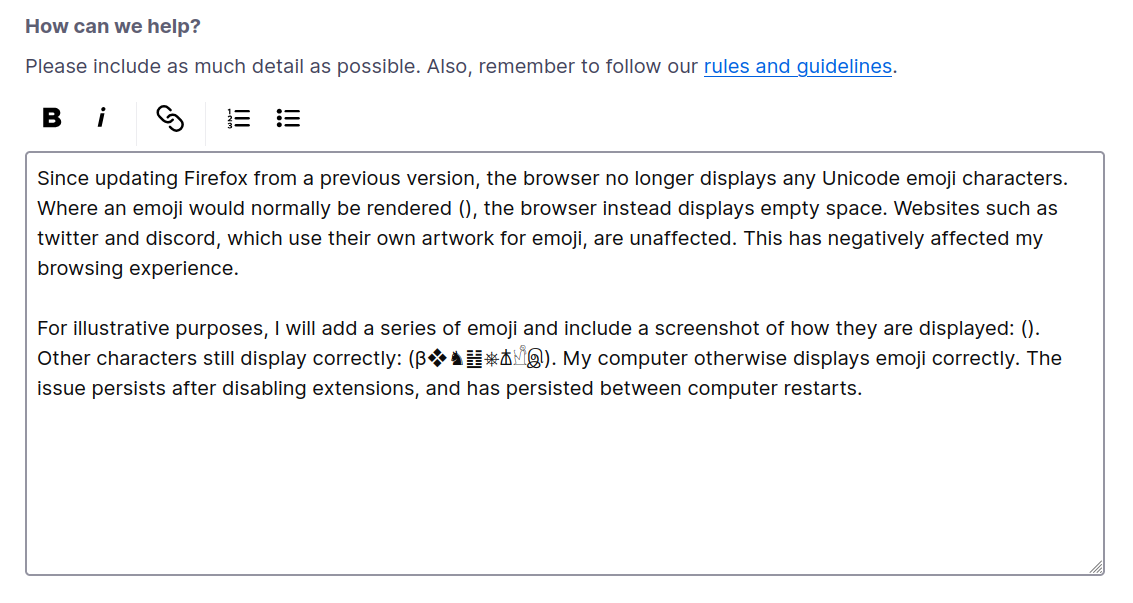
Since updating Firefox from a previous version, the browser no longer displays any Unicode emoji characters. Where an emoji would normally be rendered (👁️), the browser instead displays empty space. Websites such as twitter and discord, which use their own artwork for emoji, are unaffected. This has negatively affected my browsing experience.

For illustrative purposes, I will add a series of emoji and include a screenshot of how they are displayed: (😀🙁😡💀). Other characters still display correctly: (β❖♞䷲⎈𐘢𓀺இ). My computer otherwise displays emoji correctly. The issue persists after disabling extensions, and has persisted between computer restarts.

I'm running Linux (NixOS) and Firefox version 148. I've tested on Chrome based browsers and they work fine. Tested on Firefox forks and they also don't display correctly. This is new since less than a week ago.

Thanks for any help with this.
Since updating Firefox from a previous version, the browser no longer displays any Unicode emoji characters. Where an emoji would normally be rendered (👁️), the browser instead displays empty space. Websites such as twitter and discord, which use their own artwork for emoji, are unaffected. This has negatively affected my browsing experience. For illustrative purposes, I will add a series of emoji and include a screenshot of how they are displayed: (😀🙁😡💀). Other characters still display correctly: (β❖♞䷲⎈𐘢𓀺இ). My computer otherwise displays emoji correctly. The issue persists after disabling extensions, and has persisted between computer restarts. I'm running Linux (NixOS) and Firefox version 148. I've tested on Chrome based browsers and they work fine. Tested on Firefox forks and they also don't display correctly. This is new since less than a week ago. Thanks for any help with this.
Attached screenshots

All Replies (3)

Try to temporary switch security.sandbox.gpu.level to 0 in about:config and restart the browser.

It was already at 0. I changed it to 1 as a test, but same results.

No idea then 😕.

கேள்வி எழுப்பு

You must log in to your account to reply to posts. Please start a new question, if you do not have an account yet.