


I have a 17" computer, and I'dlike to use the entire screen to view, but in order to do so, I have to press Control + several times at each site.

I have a 17" computer, and I'dlike to use the entire screen to view, but in order to do so, I have to press Control + several times at each site. I don't want to use "full screen."
Does anyone know how to set a default to maximize the screen? For some reason, the screen appears even smaller than my old 15" computer.
All Replies (3)

To reset the page to normal zoom(100%) press ctrl+0(zero) and it should fix it.
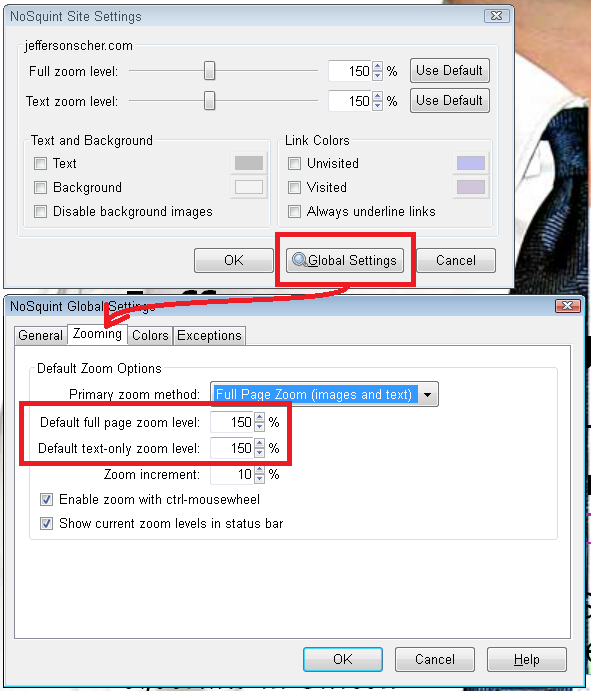
Yes, it's a hassle to zoom every single site manually. You can "zoom" all sites using this add-on: NoSquint. After setting your Global zoom level, you can still fine-tune the zoom on individual sites.
After installing NoSquint, click the % on the Add-on Bar to call up site preferences, then click the Global Settings button, then the Zooming tab.
If you don't have the Add-on Bar displayed, you can right-click the new tab button ("+") or a blank area of the tab bar to the right of it and choose Add-on Bar from the shortcut menu.
You can experiment with sizes larger than 125%, but I wouldn't go much higher than 150% unless you have a large high-resolution monitor.
If there are particular sites that still present a problem, feel free to post their URLs.
Another extension that you can look at is Default FullZoom Level.
- Default FullZoom Level: https://addons.mozilla.org/firefox/addon/default-fullzoom-level/