


My Thunderbird email isn't receiving sends from Practice Better any more, when it used to.

Addressing the problem, Practice Better says my acct is not blocked on their end. They say put
notifications@practicebetter.io in a safe senders list, but I can't find anything like that. How could I get my Thunderbird email acct to accept Practice Better's messages?
Thanks, Jane Kroll
All Replies (11)

- Who is your email provider?
- Is this an IMAP or POP3 account?
Their suggestion only applies to your email provider's web mail, which may or may not have such a feature. Even if they do, it would only possibly prevent their messages from winding up in your Spam folder. It wouldn't affect them being "blocked" or not.
Can I assume that you are receiving messages from everybody else, it's just this one sender that's a problem?
If so, the first thing to do is to check your email provider's web mail, particularly the Spam folder. Are they there or in any other folder? Please report your findings.
Mozilla Firefox Thunderbird
I think it a POP3 account. Where would I look to find it. (Sorry, I'm not really tech savvy, but I can follow directions.)
Yes, I'm getting everything else.
Nothing is in the Spam folder.
By "email provider" I mean, do you get your email from, say, Gmail, Yahoo, Comcast, Charter, etc? Most or all email hosts have a web mail page that lets you read and send mail using only a web browser. So you should go to that page and check out the Spam folder there. I suspect that you will find them there.
You can check to see if Thunderbird is set to interact with your provider using either POP or IMAP by going to <Account Settings | (the account in question) | Server Settings>. It will say at the top whether the Server Type is "IMAP Mail Server" or "POP Mail Server".
Thunderbird (and all POP mail clients) only synchronize with the Inbox folder. That means, if the server has decided a message is Spam and puts it in a Spam folder, Thunderbird will never know about it. This is one of the advantages of IMAP over POP - IMAP synchronizes all folders.
There may be a way to either turn of the spam protection on the server (so Thunderbird can take care of it) or to "whitelist" certain senders, which is what their advice to you in your initial post was about. But we'll save that for later...
So, check the Spam folder on web mail (not in Thunderbird).
I can't find it anywhere on Thunderbird settings. And isn't Mozilla my provider? It's not any of those you list. I have a Macbook Pro, if that's any help. I'm sorry, I'm just not finding what you're asking for. Maybe I just quit .
I find this a rather difficult topic, but I will try and begin at the beginning. your email address has someone@somewhere dot net or com Lin is asking what company is named in the somewhere part of the address.
For instance bill@Microsoft.com would be the individual address "bill" at Microsoft to Bills provider would be Microsoft. So the question is which company supplies the email address.
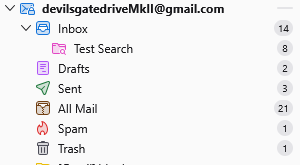
You will usually find your email address in the folder pane of Thunderbird immediately above the inbox folder.
For example see below
If you right click on your account name (on a mac that is a command click I think) you get a menu.
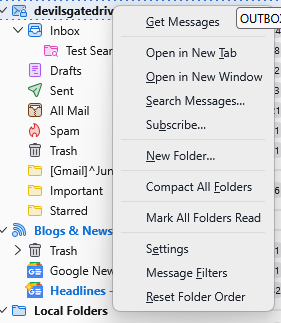
Select settings to go to the account settings Lin talks of. The tab will open in the Identity section of the account you right clicked. there is several references to your email address on that pane.
HAving offered all of that, I think your problem will be in web mail not Thunderbird. This is especially the case with yahoo as anything they think is SPAM is not offered to a POP mail client. So you never get to see email they distrust. SO log into your webmail using a browser and look there for the safe senders list, or even add the sender to that address book. (essential for yahoo when they decide something is spam they can not be dissuaded from that position unless the sender is in your online yahoo address book, as opposed to Thunderbird's
So my email is jkroll@igc.org. igc stands for Institute for Global Communications which was bought by Earthlink many years ago.
I went to Earthlink, first into my email inbox and thento the spam folder. Nothing from Practice Better was in either.
Other ideas?
I added notifications@practicebetter.io as a new email account under my practitioner's name. I could ask for my practitioner to send it again and see if it comes in. Seem reasonable?
She tried, and it didn't come in. notifications@practicebetter.io doesn't seem like a regular email address to me. Seem OK to you? Thoughts?
jkroll3 said
She tried, and it didn't come in. notifications@practicebetter.io doesn't seem like a regular email address to me. Seem OK to you? Thoughts?
That appears to be a legitimate email address. Here is their web site:
Thanks. I'll see if there's a way she can put it in an email, and I can access it through the link.
I need to leave now. Thanks for your help. Jane
When someone sends an email to you a few things could happen, assuming yours is a POP account...
Scenario 1: It's received by your email provider (Earthlink?) and placed in your Inbox on the mail server out there on the Internet. Thunderbird on your local computer will check the server Inbox, and ONLY the Inbox, and if it finds new messages there, it will download them to your local computer and delete them from the server, leaving the only copy on your computer. That copy will be found in Thunderbird's Inbox, or possibly in one of its other folders. You should check all local folders (you can use Thunderbird's Search features to do this more easily.)
Scenario 2: It's received by your email provider (Earthlink?), who decides it's spam, and moves the message to their Spam folder. Since Thunderbird checks ONLY the server's Inbox for new messages, not its spam folder, Thunderbird will not know it's there and won't download it. The only way to see the message is to go to Earthlink's web mail.
Scenario 3: The sender sends the message, but there's a problem delivering it to Earthlink. The problem might not necessarily be Earthlink's - there are many points of possible failure between sender and recipient. What's supposed to happen is that the sender's mail server will keep trying to deliver it for up to several days or more, and if it keeps failing, the sender should eventually receive a non-delivery notice, but it may not happen right away.
Scenario 4: Earthlink, or someone else in the chain could be misconfigured or malfunctioning and silently rejecting the message. This isn't supposed to happen... but it sometimes does.
What this all means is that if you are receiving all other email except from this one sender, and you have searched all your local Thunderbird folders, and have checked all folders in your Earthlink web mail, then I can confidently say the message was never received.
I don't think this is a Thunderbird issue. Your next step would probably be to contact Earthlink's tech support.