


In Create Saved Search, Choose Folder dialog, how to select all and expand all folders ?

Hello,
I want to make Saved Searches
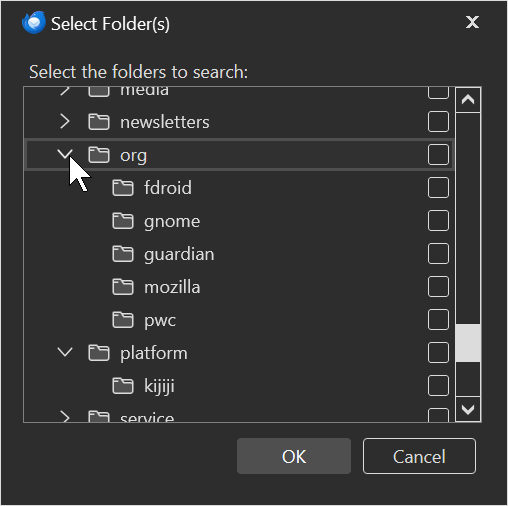
So the 3rd step is to choose your folders.
I have a TON of folders and mostly I want to
Start from all folders and only unselect a few of them.
But here it starts from all subfolder collapsed and all folders unselected.
So for me the first step is to manually expand all folders, and subfolder and subsubsubfolders and so on.
And then go down the entire list and select every single one.
And THEN start from the top of the list again and now, choose which one in particular I want to exclude.
I know this sounds like, I should just check the ones I want to include.
But for some reason, that feels completely impossible to do. I can only unselect the ones I don't want and it feels impossible to only select the ones I want "which is all except a few"....
Usually, I never make it to the end and just give up before I get to the stage where I would start unchecking the ones I don't want.
So, this is the reason for this question.
"In Create Saved Search, Choose Folder dialog, how to select all and expand all folders ?"
All Replies (2)

Salon said
In Create Saved Search, Choose Folder dialog, how to select all and expand all folders ?
I am sorry that I do not know how to expand all folders. However, the following link might help you select multiple folders: Using Saved Searches https://support.mozilla.org/en-US/kb/using-saved-searches
Quotation from the above link:
Tip: If you want to include a number of folders that are next to each other in the list, click on the row of the first folder (not in the check box), then press Shift and click on the last folder. Then press the Spacebar to select the check box of all the highlighted folders (pressing Spacebar again will clear the check boxes).
However, the above method will not select subfolders inside a collapsed folder. Therefore, you need to expand the folders by yourself, and then use the above method to select multiple folders.
Thanks ! Given the importance of this feature, I really wish it would be easier to do this !
Especially a saved search which "includes all" folders minus exception, instead of including selected folders. So that I would not have to remember to add a folder to all saved searches everytime I create one (or forget, then don't remember which one I excluded on purpose and which I merely forgot to add and have to go through the entire list again !)
For a world class mail software that thunderbird is, I am surprised this wasn't solved some time around 1996 !