


Inbox sequence.

New messages received by an email account are scattered at random in the inbox instead of being at the top of the list. How can I ensure that the inbox has new messages at the top?
Chosen solution
Thanks, Matt. As you surmise, I was expecting the decades-old appearance of lists — unthreaded, sorted by descending date. This seems contrary to all Thunderbird defaults. Card view and threading were new concepts to me.
Read this answer in context 👍 0All Replies (4)

There are many ways to display a mail folder, so the answer may depend on how you have set it up. I use Table View, which gives me headers at the top of each column - I can click on the column header to sort it in any way I want. You can get to most of the message list display and sort options by clicking on the icon I show in the attached image, or from the menu option View | Sort By.

Thanks, Lin. The image is helpful. I had cleared the inbox so that new messages would be apparent, so I shall have to wait until several new messages arrive to see if they are located in sequence. Thunderbird offers oldest first or newest first, but not "random" of course!
psmith4 said
New messages received by an email account are scattered at random in the inbox instead of being at the top of the list.I sincerly beleive that there is nothing random about the arrengement at all.
How can I ensure that the inbox has new messages at the top?
Based on your description I think your are having issues understanding and managing threading and sorting in your folder display. Lin tells you haw to change to the table display and this I fully support as it makes threading intuitive something that does not happen in the "card view" which is the default.
If you go to setting and change your setting for threading to unthreaded you will probably revert to the decades old appearance of lists that you apparently are expecting.
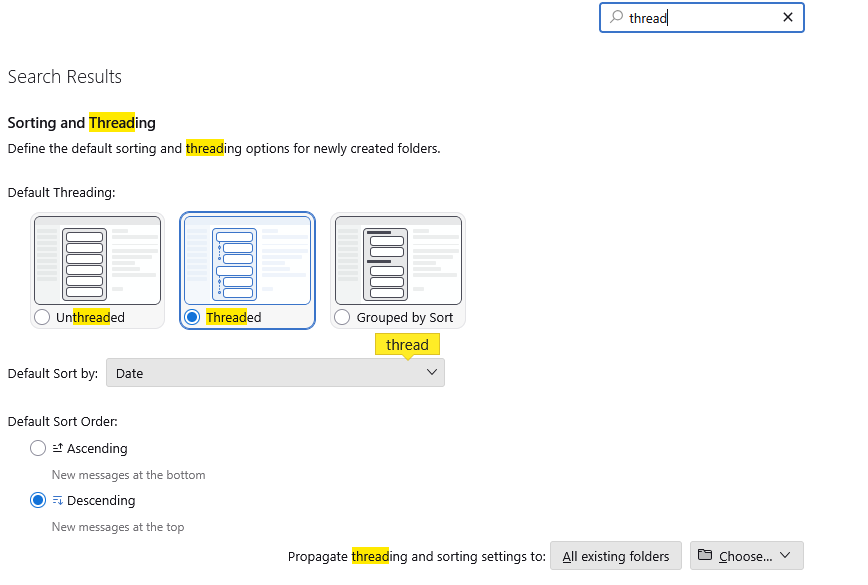
Make sure to apply the change to existing folders. You would not be the first to make the change and fel it did not work because they did not select that option.
Suluhisho teule
Thanks, Matt. As you surmise, I was expecting the decades-old appearance of lists — unthreaded, sorted by descending date. This seems contrary to all Thunderbird defaults. Card view and threading were new concepts to me.