Windows 10 reached EOS (end of support) on October 14, 2025. For more information, see this article.

Search Support

Avoid support scams. We will never ask you to call or text a phone number or share personal information. Please report suspicious activity using the “Report Abuse” option.

Learn More

Global Search > "Show results as list" > right-click > context menu has two problems: (1) redundant dividers, and (2) submenu of "Tag" is incomplete.

  • 1 jibu
  • 0 wana tatizo hili
  • 32 views
  • Last reply by dqtimrykfv

more options

Steps to reproduce the problems:

Perform a Global Search (ctrl + K). Search for any string. Just make sure there is at least one search result. > Click "Show results as list". > Right-click on the search result in the Message List Pane. (Please see the footnote.) > The pop-up context menu has two problems:

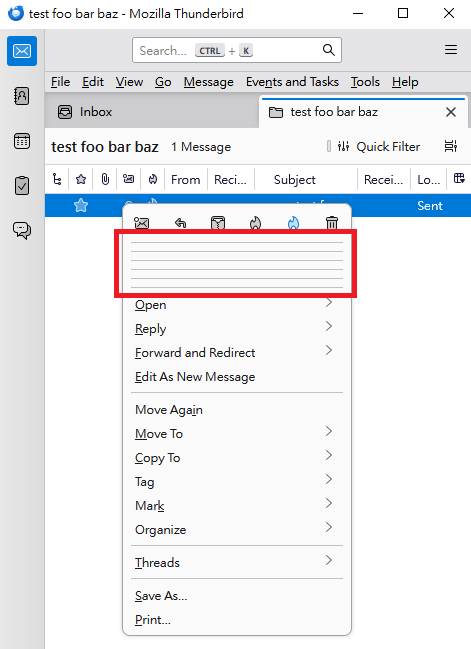
(1) There are redundant dividers. (Please see the first attached image.)

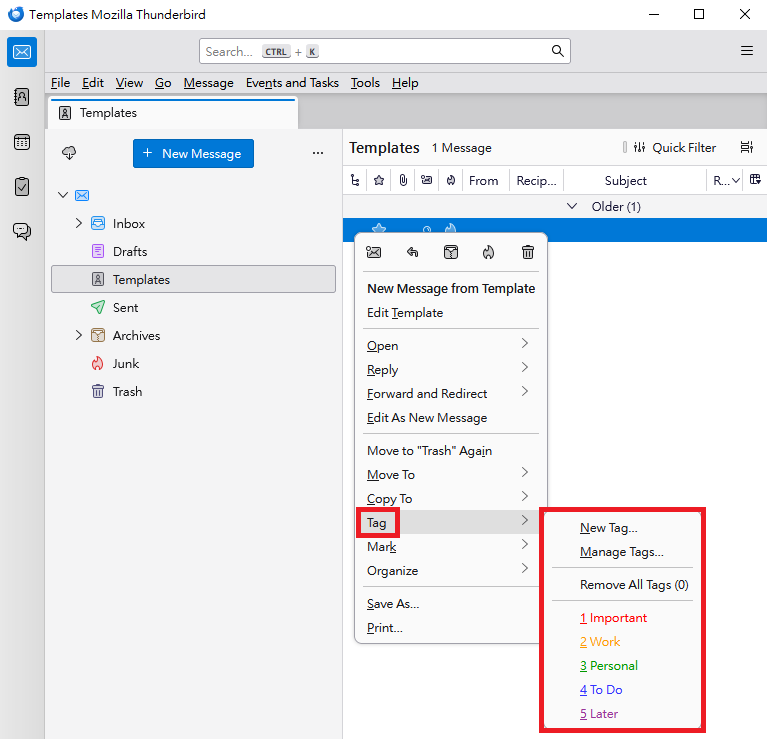
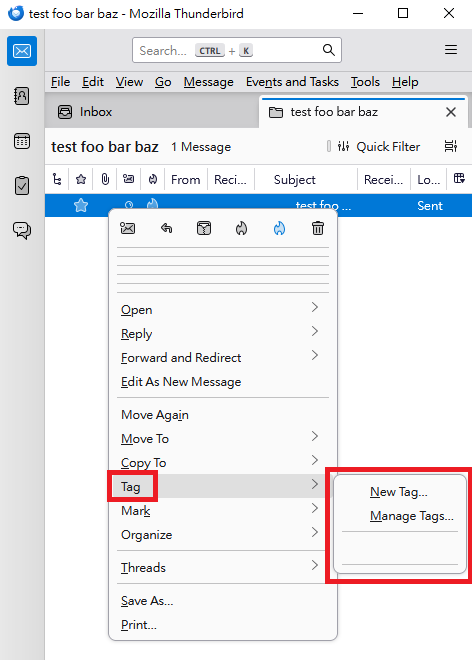
(2) Hover the mouse over "Tag". The pop-up submenu of "Tag" is incomplete. The menu includes "New Tag" and "Manage Tags". However, "Remove All Tags", "Important", "Work", "Personal", "To Do" and "Later" are missing. (Please see the second attached image.)

---

These problems (redundant dividers and incomplete submenu) also occur in Troubleshoot Mode.

---

These problems only occur after using Global Search and clicking "Show results as list".

If I right-click a message in the Message List Pane of a regular folder (such as the "Inbox" folder or "Templates" folder), the pop-up context menu displays correctly: There are no redundant dividers, and the submenu of "Tag" is complete. (Please see the third attached image.)

---

Operating system: Windows 10.

Versions of Thunderbird: 140.3.1esr (32-bit) and 140.6.0esr (32-bit). Previously I was using 140.3.1esr (32-bit), and currently I am using 140.6.0esr (32-bit). Both versions have the same problems.

---

Footnote: When I right-click on the search result in the Message List Pane, the following error messages display in the Error Console (please see the fourth attached image):

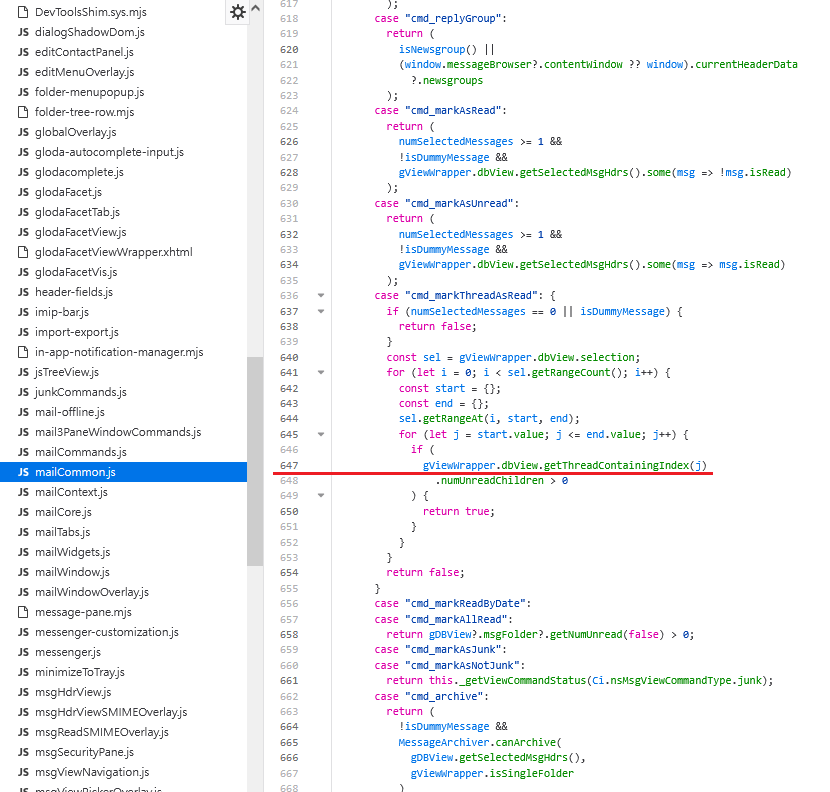
Uncaught NS_ERROR_FAILURE: Component returned failure code: 0x80004005 (NS_ERROR_FAILURE) [nsIMsgDBView.getThreadContainingIndex]        mailCommon.js:647
    isCommandEnabled chrome://messenger/content/mailCommon.js:647
    fillMailContextMenu chrome://messenger/content/mailContext.js:340
    onPopupShowing chrome://messenger/content/mailContext.js:146
    handleEvent chrome://messenger/content/mailContext.js:133
    _onContextMenu chrome://messenger/content/about3Pane.js:5235
    handleEvent chrome://messenger/content/about3Pane.js:4758
    init chrome://messenger/content/about3Pane.js:4712
    async* chrome://messenger/content/about3Pane.js:170
    async* chrome://messenger/content/about3Pane.js:139

---

The fifth attached image shows mailCommon.js:647.
Steps to reproduce the problems: Perform a Global Search (ctrl + K). Search for any string. Just make sure there is at least one search result. > Click "Show results as list". > Right-click on the search result in the Message List Pane. (Please see the footnote.) > The pop-up context menu has two problems: (1) There are redundant dividers. (Please see the first attached image.) (2) Hover the mouse over "Tag". The pop-up submenu of "Tag" is incomplete. The menu includes "New Tag" and "Manage Tags". However, "Remove All Tags", "Important", "Work", "Personal", "To Do" and "Later" are missing. (Please see the second attached image.) --- These problems (redundant dividers and incomplete submenu) also occur in Troubleshoot Mode. --- These problems only occur after using Global Search and clicking "Show results as list". If I right-click a message in the Message List Pane of a regular folder (such as the "Inbox" folder or "Templates" folder), the pop-up context menu displays correctly: There are no redundant dividers, and the submenu of "Tag" is complete. (Please see the third attached image.) --- Operating system: Windows 10. Versions of Thunderbird: 140.3.1esr (32-bit) and 140.6.0esr (32-bit). Previously I was using 140.3.1esr (32-bit), and currently I am using 140.6.0esr (32-bit). Both versions have the same problems. --- Footnote: When I right-click on the search result in the Message List Pane, the following error messages display in the Error Console (please see the fourth attached image): <pre>Uncaught NS_ERROR_FAILURE: Component returned failure code: 0x80004005 (NS_ERROR_FAILURE) [nsIMsgDBView.getThreadContainingIndex] mailCommon.js:647 isCommandEnabled chrome://messenger/content/mailCommon.js:647 fillMailContextMenu chrome://messenger/content/mailContext.js:340 onPopupShowing chrome://messenger/content/mailContext.js:146 handleEvent chrome://messenger/content/mailContext.js:133 _onContextMenu chrome://messenger/content/about3Pane.js:5235 handleEvent chrome://messenger/content/about3Pane.js:4758 init chrome://messenger/content/about3Pane.js:4712 async* chrome://messenger/content/about3Pane.js:170 async* chrome://messenger/content/about3Pane.js:139 </pre> --- The fifth attached image shows mailCommon.js:647.
Attached screenshots

Modified by dqtimrykfv

All Replies (1)

more options

Modified by dqtimrykfv

Uliza swali

You must log in to your account to reply to posts. Please start a new question, if you do not have an account yet.