


Windows 10 reached EOS (end of support) on October 14, 2025. If you are on Windows 10, see this article.

Search Support

Avoid support scams. We will never ask you to call or text a phone number or share personal information. Please report suspicious activity using the “Report Abuse” option.

Learn More
Archived

I cannot add meeting invitations to google agenda.

guayaver replied
gabriel.agm

When I receive an invitation from outlook, with a multipart message with Content-Type: text/calendar the event is rendered properly, but I am getting a "No writable calendars are configured for invitations..." error message. I have a google agenda set up (googleapi://...), and I can see and create events in it, two way (at google calendar and thunderbird), but the message remains. Creating a local a agenda fix the error, but doesn't sync with google.

Checking the issue https://support.mozilla.org/en-US/questions/1097284 (and https://support.mozilla.org/en-US/questions/1108836) I went for creating a new agenda using iCAL- and the result is a worse error popup: MODIFICATION_FAILED I then used the https://www.google.com/calendar/dav/<emailaddress>/events option for calDav, it prompts for login forever. Then, searching even more I found another URL for calDav: https://apidata.googleusercontent.com/caldav/v2/your@email/events

That finally worked. So, why don't you remove the "google calendar" option in the new agenda wizard if it doesn't work? Same for iCAL+google.
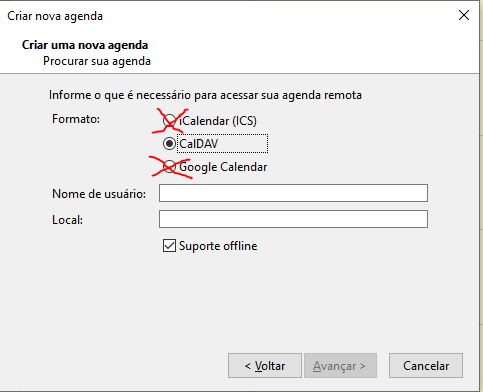
When I receive an invitation from outlook, with a multipart message with Content-Type: text/calendar the event is rendered properly, but I am getting a "No writable calendars are configured for invitations..." error message. I have a google agenda set up (googleapi://...), and I can see and create events in it, two way (at google calendar and thunderbird), but the message remains. Creating a local a agenda fix the error, but doesn't sync with google. Checking the issue https://support.mozilla.org/en-US/questions/1097284 (and https://support.mozilla.org/en-US/questions/1108836) I went for creating a new agenda using iCAL- and the result is a worse error popup: MODIFICATION_FAILED I then used the https://www.google.com/calendar/dav/<emailaddress>/events option for calDav, it prompts for login forever. Then, searching even more I found another '''URL for calDav: https://apidata.googleusercontent.com/caldav/v2/your@email/events''' That finally worked. So, why don't you remove the "google calendar" option in the new agenda wizard if it doesn't work? Same for iCAL+google.
Attached screenshots

All Replies (2)

Is the 'Google Calendar' option due to the Provider add-on? You may have better results with TbSync and Provider for CalDAV & CardDAV.

To sync a calendar other than your default one, check https://superuser.com/questions/756697/sync-a-single-google-calendar-with-caldav