


Windows 10 reached EOS (end of support) on October 14, 2025. If you are on Windows 10, see this article.

Sök i support

Akta dig för supportbedrägerier: Vi kommer aldrig att be dig att ringa eller skicka ett sms till ett telefonnummer eller dela personlig information. Rapportera misstänkt aktivitet med alternativet "Rapportera missbruk".

Läs mer
Öppen

Unable to save screen capture as PDF using fireshot

tmnnpyrm59

I use Fireshot on my Mac to take screenshots and normally save as PDF. This works fine using Safari and Chrome browsers. However, using Firefox, when saving the screenshot as a PFD it uses file type 'All files' Up till now, I have been unable to open the file saved as an 'All files' document. But this morning, saving the capture as a PDF 'All files' type, has saved the document as a PDF.

QUESTION: Just using Firefox, why does saving a screen capture uses 'All files' when saving as a PDF. And has the issue been noted and resolved, but the All files file type still shown? NOTE: The drop-down arrow on Format does not offer any alternative.
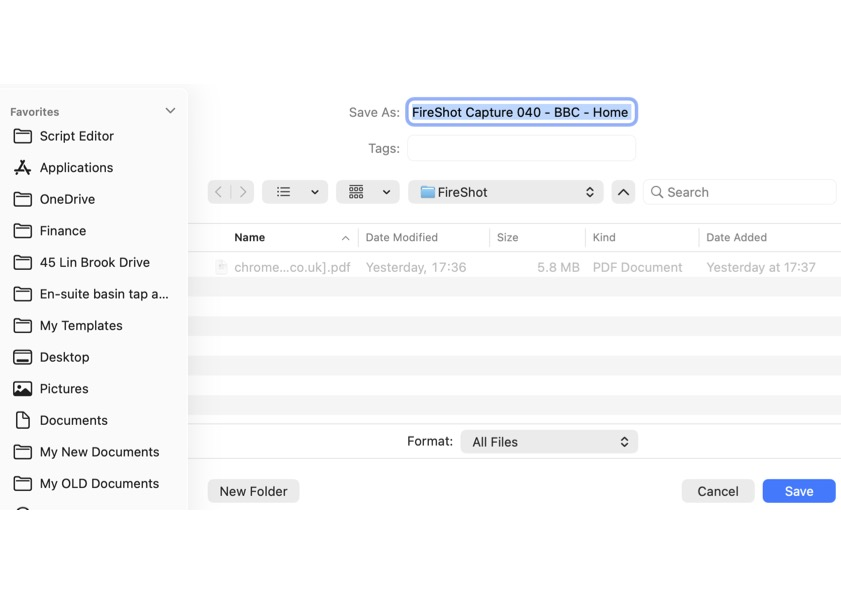
I use Fireshot on my Mac to take screenshots and normally save as PDF. This works fine using Safari and Chrome browsers. However, using Firefox, when saving the screenshot as a PFD it uses file type 'All files' Up till now, I have been unable to open the file saved as an 'All files' document. But this morning, saving the capture as a PDF 'All files' type, has saved the document as a PDF. QUESTION: Just using Firefox, why does saving a screen capture uses 'All files' when saving as a PDF. And has the issue been noted and resolved, but the All files file type still shown? NOTE: The drop-down arrow on Format does not offer any alternative.
Bifogade skärmdumpar

Alla svar (1)

All files is because your screenshot doesn't have a definitive type I imagine. See if you can set the screenshot to another option

Ställ en fråga

Du måste logga in på ditt konto för att svara på inlägg. Vänligen starta en ny fråga om du inte har ett konto ännu.