


Windows 10 reached EOS (end of support) on October 14, 2025. If you are on Windows 10, see this article.

Sök i support

Akta dig för supportbedrägerier: Vi kommer aldrig att be dig att ringa eller skicka ett sms till ett telefonnummer eller dela personlig information. Rapportera misstänkt aktivitet med alternativet "Rapportera missbruk".

Läs mer

How do I disable the "Suggest Firefox Relay email mask" option

  • 1 svar
  • 0 har detta problem
  • 217 visningar
  • Senaste svar av Denys
  • Open

With reference to this question: https://support.mozilla.org/en-US/questions/1439281 from 2024

The answer was this: Disable "Suggest Firefox Relay email masks to protect your email address" in "Settings -> Privacy & Security -> Passwords".

But I already have this setting disabled. The popup still comes up. (BTW it's in "Preferences -> Privacy & Secutiry ->Passwords". The popup still comes up.

NO ONE IS WATCHING ME! I'm at home! (Except for that guy who sees what I do in bed /s)

Moderator note: This question has been edited to correct the link.
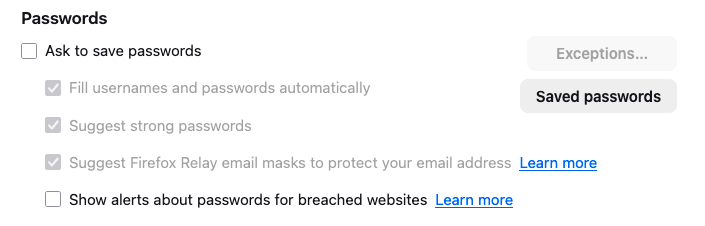
With reference to this question: https://support.mozilla.org/en-US/questions/1439281 from 2024 The answer was this: Disable "Suggest Firefox Relay email masks to protect your email address" in "Settings -> Privacy & Security -> Passwords". But I already have this setting disabled. The popup still comes up. (BTW it's in "'''''Preferences''''' -> Privacy & Secutiry ->Passwords". The popup still comes up. NO ONE IS WATCHING ME! I'm at home! (Except for that guy who sees what I do in bed /s) ''Moderator note: This question has been edited to correct the link.''
Bifogade skärmdumpar

Ändrad av Denys

Alla svar (1)

Hi,

Not sure what may be the reason, but could you please check "Ask to save passwords", uncheck the Relay option (as it should become available) and then uncheck "Ask to save passwords" again? Does it help?

Ställ en fråga

Du måste logga in på ditt konto för att svara på inlägg. Vänligen starta en ny fråga om du inte har ett konto ännu.