


Issue with POP GMails Emails Downloading & getting deleted from Server

Hello Everyone,
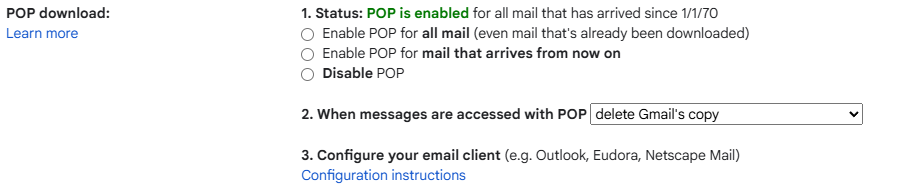
Background: Using Thunderbird for almost an year and extremely happy with the product set. I use it to access GMAIL via POP and use the settings "After the email gets downloaded to my computer, delete the GMAIL copy" (Settings attached).
My usage pattern which changed recently: Earlier, I will always download emails using Thunderbird every day and it was working perfectly. Recently I have to travel for few days and during those days I will access my GMAIL via my android mobile primarily and I download all the emails after my return.
Current Issue: Now after I return, all the mails gets downloaded, but it does not get deleted at GMail side (online). From the time I started using Thunderbird after my return, the newer emails from that time are getting downloaded and deleted but the old emails stay in GMail. Current inconvenience is it takes time to validate if all the important emails are downloaded and I cleanup the GMAIL manually and then we are all in sync. This continues until my next travel. I tried resetting the GMAIL POP settings and there is no improvement.
Any pointers or suggestions to resolve will be gladly appreciated. Thanks in advance!
Vald lösning
Ethiraj P said
Hello Everyone, Background: Using Thunderbird for almost an year and extremely happy with the product set. I use it to access GMAIL via POP and use the settings "After the email gets downloaded to my computer, delete the GMAIL copy" (Settings attached). My usage pattern which changed recently: Earlier, I will always download emails using Thunderbird every day and it was working perfectly. Recently I have to travel for few days and during those days I will access my GMAIL via my android mobile primarily and I download all the emails after my return. Current Issue: Now after I return, all the mails gets downloaded, but it does not get deleted at GMail side (online). From the time I started using Thunderbird after my return, the newer emails from that time are getting downloaded and deleted but the old emails stay in GMail. Current inconvenience is it takes time to validate if all the important emails are downloaded and I cleanup the GMAIL manually and then we are all in sync. This continues until my next travel. I tried resetting the GMAIL POP settings and there is no improvement. Any pointers or suggestions to resolve will be gladly appreciated. Thanks in advance!
I deleted the account setting and setup the account again and moved my emails. Everything is working fine now. THanks!
Läs svaret i sitt sammanhang 👍 0Alla svar (1)
Vald lösning
Ethiraj P said
Hello Everyone, Background: Using Thunderbird for almost an year and extremely happy with the product set. I use it to access GMAIL via POP and use the settings "After the email gets downloaded to my computer, delete the GMAIL copy" (Settings attached). My usage pattern which changed recently: Earlier, I will always download emails using Thunderbird every day and it was working perfectly. Recently I have to travel for few days and during those days I will access my GMAIL via my android mobile primarily and I download all the emails after my return. Current Issue: Now after I return, all the mails gets downloaded, but it does not get deleted at GMail side (online). From the time I started using Thunderbird after my return, the newer emails from that time are getting downloaded and deleted but the old emails stay in GMail. Current inconvenience is it takes time to validate if all the important emails are downloaded and I cleanup the GMAIL manually and then we are all in sync. This continues until my next travel. I tried resetting the GMAIL POP settings and there is no improvement. Any pointers or suggestions to resolve will be gladly appreciated. Thanks in advance!
I deleted the account setting and setup the account again and moved my emails. Everything is working fine now. THanks!