


Thunderbird and outlook.com (was hotmail)

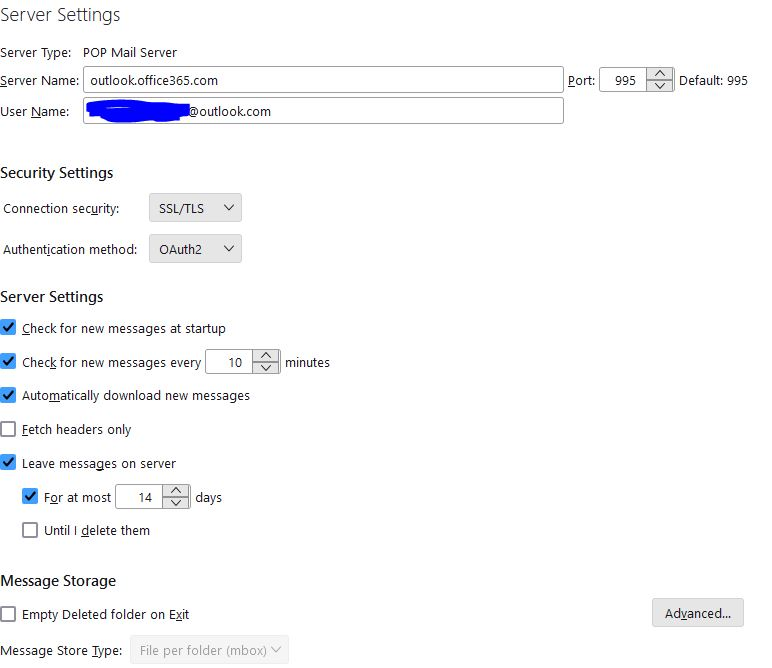
I have just set up an account with Outlook. I can send messages from it with no problem. Messages however sent to the account do not appear in the Inbox, but also are not bounced. The server settings are as follows: Server Type: POP Mail server Server Name: outlook.office365.com Port: 995 (also tried 993) Connection security: SSL/TLS Authentication method: OOAuth2
What other settings should I try?
Thanks
Vald lösning
That's it. Thank you. Wasn't aware of that setting, but there again I'm not normally an Outlook user. Brilliant.
Läs svaret i sitt sammanhang 👍 0Alla svar (7)
maybe if you post screenshot of the SMTP server settings pane and the complete error message, someone may have suggestions. What happens when you request new messages?
That is the complete set of server settings. I've added a screen shot but it shows exactly what I posed.
There are no error messages. Emails sent to this @outlook.com address just don't arrive.
Try logging on to the account online. If messages aren't there, then there may be an issue with the account on Microsoft.
Thanks David, but they are there when I log onto Outlook online. They just aren't picked up by Thunderbird.
Puzzling. It seems to be acting as though Thunderbird is offline, which can't be true since you're able to send. I will see if I can find someone who knows Outlook better.
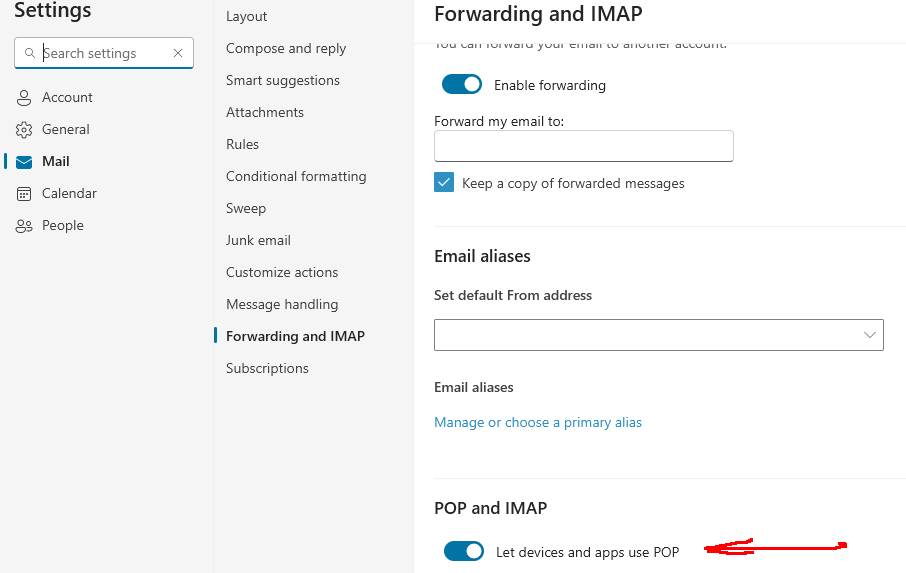
Have you enabled POP access in webmail Settings (see picture)?
Vald lösning
That's it. Thank you. Wasn't aware of that setting, but there again I'm not normally an Outlook user. Brilliant.