


I can't get out of a popup that blocks my view of downloaded docs

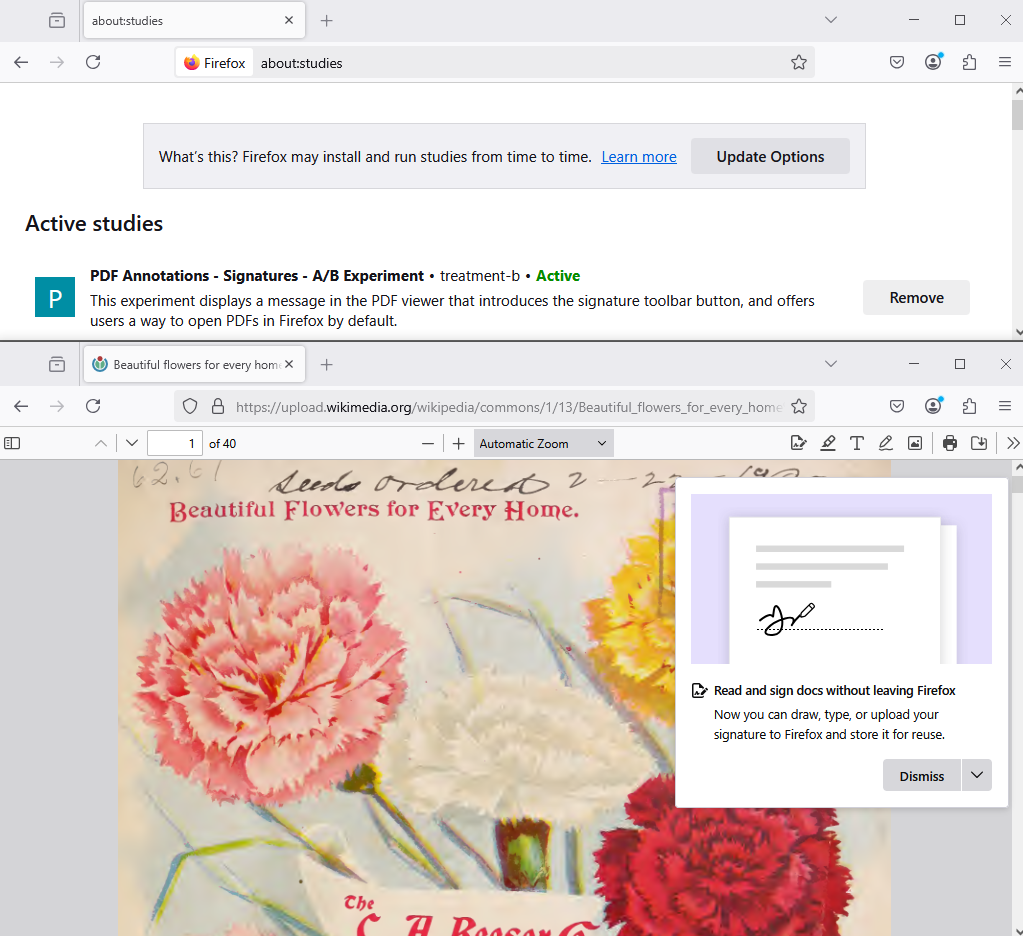
Suddenly every doc I download or preview is COVERED by something saying I "can now read and sign docs in Firefox" -- and I can't remove this popup -- or even relocate it so that I can SEE the doc I am trying to read.
Is this from my latest firefox upgrade? Can I undo it?
The whole popup thing is not even visible, so I can't find something to scroll down and say yes or no. Similarly I tried to play along with it and create a signature. I did that and clicked a "save signature" but again I cannot even see the whole thing so I cannot save it and get out of it. It won't let me take a screenshot so I can show you....
Alla svar (2)

Popups come from the site not from Firefox browser.
Hello
Is it this subject See your studies https://support.mozilla.org/en-US/kb/shield Type about:studies into your address bar to see a list of your studies. Click the Remove button next to the study you want to opt out of.
https://www.mozilla.org/en-US/firefox/137.0/releasenotes Now you can sign PDFs without leaving Firefox. Save your signatures to re-use later.
For information purposes 1 - Go to Configuration Editor for Firefox https://support.mozilla.org/en-US/kb/about-config-editor-firefox 2 - Enter a search term pdfjs.enableSignatureEditor
Ändrad av Agent virtuel