


about:newtab and about:home do not work in Firefox 33

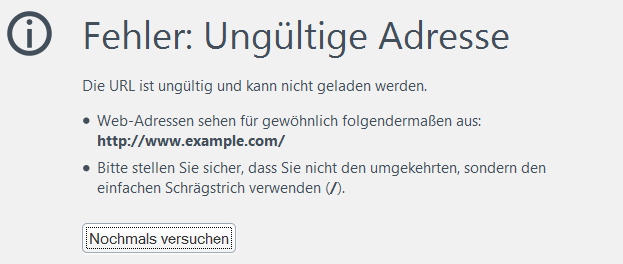
After upgrading from Firefox 32 to 33, the about:newtab and about:home pages show "Error: Unknown address". How do I get these pages to work?
Vald lösning
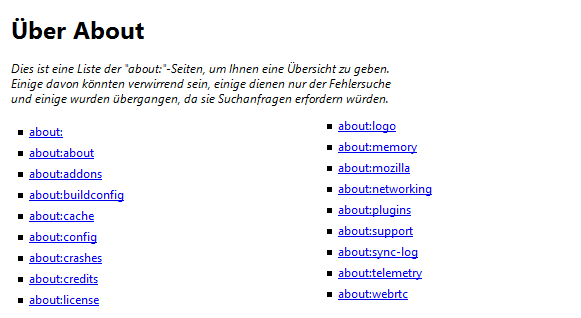
There are quite a few missing from your list compared with en-US:
about:accounts about:app-manager about:customizing about:downloads about:healthreport about:home about:newtab about:permissions about:preferences about:privatebrowsing about:rights about:robots about:sessionrestore about:sync-progress about:sync-tabs about:welcomeback
Did you try the "clean reinstall" to see whether that helps?
Läs svaret i sitt sammanhang 👍 0Alla svar (10)
That's strange! Do any other about: pages work? If you open about:about you can get links to a bunch of them.
In case one of your extensions is involved, could you test those pages in Firefox's Safe Mode? That's a standard diagnostic tool to deactivate extensions and some advanced features of Firefox. More info: Use Troubleshoot Mode in Firefox.
You can restart Firefox in Safe Mode using either:
- "3-bar" menu button > "?" button > Restart with Add-ons Disabled
- Help menu > Restart with Add-ons Disabled
Not all add-ons are disabled: Flash and other plugins still run
After Firefox shuts down, a small dialog should appear. Click "Start in Safe Mode" (not Reset).
Any difference?
All pages on the about:about page work. Starting Firefox in Safe Mode does not solve the problem.
Do you mean, all the pages other than about:home and about:newtab work, or those will also work when you click through from about:about?
I'm having trouble finding examples of this error. Just to clarify what you are seeing: instead of getting the usual page content, you get a white page with nothing but this text:
Error: Unknown address
Is that right?
Since these are built-in pages, you might want to try replacing your Firefox program files using a "Clean reinstall" procedure, which is as follows:
(1) Download a full installer for Firefox 33 from https://www.mozilla.org/firefox/all/ to a convenient location. (Scroll down to your preferred language.)
(2) Exit Firefox
(3) Rename the Mozilla Firefox program folder
64-bit Windows:
C:\Program Files (x86)\Mozilla Firefox
to
C:\Program Files (x86)\OldFirefox
32-bit Windows:
C:\Program Files\Mozilla Firefox
to
C:\Program Files\OldFirefox
(4) Run the installer you downloaded in #1. It should automatically connect to your existing settings.
Any improvement?
Note: Some plugins may exist only in that OldFirefox folder. If something essential is missing, look in these folders:
- OldFirefox\Plugins
- OldFirefox\browser\plugins
No problem. Try going through this link It will help you solve your problem. Cheers :) Startup, home page, tabs, and download settings
I do not have a problem with the settings. I enter about:newtab and I get the error.
On the about:about page, all links work. But about:newtab and about:home is not shown on the about:about page. I can only enter them directly which leads to the error. I attach a screenshot of the page, which is in German.
Both about:home and about:newtab are on the about:about page for English-US builds of Firefox. Could this be a build difference in the DE version? I'm baffled.
Maybe that is the explanation. See the attached screenshot for the about:about page of my Firefox. I guess I have to wait acouple of days for version 33.0.1 hoping that it will be fixed in that version. Thanks for the help anyway.
Vald lösning
There are quite a few missing from your list compared with en-US:
about:accounts about:app-manager about:customizing about:downloads about:healthreport about:home about:newtab about:permissions about:preferences about:privatebrowsing about:rights about:robots about:sessionrestore about:sync-progress about:sync-tabs about:welcomeback
Did you try the "clean reinstall" to see whether that helps?
I tried most and they did not work. Then I did the clean reinstall - and now it all works - like magic ;-) And with the original install I also had some other issue with priceline.com which is now fixed as well. So a double "Thank you!" to you.