Showing questions for topic:

Choppy, stuttering embedded video on Firefox browser for Windows 10

Here is a video which would demonstrate it best: https://youtu.be/MpHX4Ep-IMM These two comparison are made between Firefox 158.0 (64 bit) in Troubleshoot Mode and Brave … (lexoni më tepër)

Here is a video which would demonstrate it best: https://youtu.be/MpHX4Ep-IMM

These two comparison are made between Firefox 158.0 (64 bit) in Troubleshoot Mode and Brave 1.97.59 (64 bit), on Windows 10, version 22H2. I use the 30MB Big Buck Bunny version on test-videos.co.uk site, Firefox seems able to load the 1MB, or 2MB version pretty smoothly, but higher than that, it starts to stutter, for some reasons I cannot understand.

(Most results I can find online tell me to "disable hardware acceleration", but I have been turning that setting on and off multiple times without seeing any changes)

Ironically, videos on Youtube can load normally without issues. It just seems any embedded videos would behave oddly like this, which I encounter most often on Discord.

Please, I would appreciate any insights. I can provide additional information if needed. Thanks in advance.

Solved 1

When playing a video, the screen often fades to black while playing.

Okay posted this into iOS but never got any proper help, so I'm guessing that was the wrong place to put this. Whilst I'm watching a video, if said video is playing in fu… (lexoni më tepër)

Okay posted this into iOS but never got any proper help, so I'm guessing that was the wrong place to put this.

Whilst I'm watching a video, if said video is playing in fullscreen, it'll often fade to black during different parts, as whenever a flash happens or quick cuts (e.g. a film with lightning strikes, causes it to fade to black and it stays like that - then fades back in super slowly). It is SUPER annoying and it causes me to have to rewind if I miss something because of it (only for it to do it again and again)! I don't watch YouTube in fullscreen because of it, but it even does it in streaming services - but worse! I honestly have had enough of this, it is genuinely infuriating.

I'm on MAC air 2022 M2, macOs Tahoe 26.6.2 - and the most recent up-to-date Firefox update: Version 157.0 I usually put off updating Firefox because it signs me out of everything! Meaning I have to resign into all of my school things, streaming, YouTube, and even this page itself!

Now I've gone into a private window and tested it to see if it does the same thing - yes, yes it does do the same thing, I put on the same two YouTube videos and it did the exact same fading in the middle of it at the same exact timestamp!

Took this photo of the movie Cruella because I knew there was loads of flashing lights at one scene. You can see that the video is faded but the rest isn't. The second image is when I click multiple times to try and stop it! But it happens again directly after.

Please help me, this is really annoying and I've put up with it for too long :(

Solved 3

Can't play mp4 anymor after upgrade to 156.0.2

I just upgraded Firefox to version 156.0.2. It no longer plays mp4 content from a website. It says "No video with supported format and mime type found". This used to be … (lexoni më tepër)

I just upgraded Firefox to version 156.0.2.

It no longer plays mp4 content from a website. It says "No video with supported format and mime type found".

This used to be OK.

Solved 2 20

Firefox sturggles to establish firm connection with bluetooth earbuds

Hello, I am currently using windows 11 with firefox 149.0. Regardless of what website I use (youtube. steam etc), the browser struggles to establish consistent connection… (lexoni më tepër)

Hello, I am currently using windows 11 with firefox 149.0. Regardless of what website I use (youtube. steam etc), the browser struggles to establish consistent connection to my bluetooth earbuds. It connects for one moment, but then soon the volume goes out and eventually it disconnects. Though it would reconnect soon, the cycle just keeps ongoing. I have experimented with other apps and browsers, as well as multiple bluetooth earbuds of other brands to be sure that it is a firefox issue. I have checked the volume mixer menu to ensure that there is nothing wrong. I have also made sure that my drivers are all up to date with no issue. But the issue still persists.

Solved Arkivuar 5 60

постоянное отображение панели задач, при просмотре видео, в браузере, в формате "на весь экран" с версии 156.0

Постоянное отображение панели задач (до тех пор, пока не нажму на иконку браузера на панели дважды. Повторяется с каждым заходом в режим "на весь экран" ), при просмотре … (lexoni më tepër)

Постоянное отображение панели задач (до тех пор, пока не нажму на иконку браузера на панели дважды. Повторяется с каждым заходом в режим "на весь экран" ), при просмотре видео, в браузере, в формате "на весь экран" с версии 156.0. в других браузерах подобной проблемы нет, только в Firefox. Прикладываю скрин визуального отображения проблемы. С настройками самой панели задач проблем нет, перепроверял.

Solved 11 255

Los videos de YouTube no se reproducen correctamente en Firefox. Algunos videos no cargan o se quedan congelados y no puedo verlos normalmente. Ya intenté actualizar la página, pero el problema continúa. Quisiera saber cómo puedo solucionarlo.

Los videos de YouTube no se reproducen correctamente en Firefox. Algunos videos no cargan o se quedan congelados y no puedo verlos normalmente. Ya intenté actualizar la p… (lexoni më tepër)

Los videos de YouTube no se reproducen correctamente en Firefox. Algunos videos no cargan o se quedan congelados y no puedo verlos normalmente. Ya intenté actualizar la página, pero el problema continúa. Quisiera saber cómo puedo solucionarlo.

Locked 2

Los videos de YouTube no se reproducen correctamente en Firefox. Algunos videos no cargan o se quedan congelados y no puedo verlos normalmente. Ya intenté actualizar la página, pero el problema continúa. Quisiera saber cómo puedo solucionarlo.

Los videos de YouTube no se reproducen correctamente en Firefox. Algunos videos no cargan o se quedan congelados y no puedo verlos normalmente. Ya intenté actualizar la p… (lexoni më tepër)

Los videos de YouTube no se reproducen correctamente en Firefox. Algunos videos no cargan o se quedan congelados y no puedo verlos normalmente. Ya intenté actualizar la página, pero el problema continúa. Quisiera saber cómo puedo solucionarlo.

Locked 2

Los videos de YouTube no se reproducen correctamente en Firefox. Algunos videos no cargan o se quedan congelados y no puedo verlos normalmente. Ya intenté actualizar la página, pero el problema continúa. Quisiera saber cómo puedo solucionarlo.

Los videos de YouTube no se reproducen correctamente en Firefox. Algunos videos no cargan o se quedan congelados y no puedo verlos normalmente. Ya intenté actualizar la p… (lexoni më tepër)

Los videos de YouTube no se reproducen correctamente en Firefox. Algunos videos no cargan o se quedan congelados y no puedo verlos normalmente. Ya intenté actualizar la página, pero el problema continúa. Quisiera saber cómo puedo solucionarlo.

Locked 2

The taskbar does not disappear when switching the video player to full-screen mode.

Hello! My firefox get a problem: The taskbar does not disappear when switching the video player to full-screen mode (the attached screenshot shows what it looks like). Cl… (lexoni më tepër)

Hello! My firefox get a problem: The taskbar does not disappear when switching the video player to full-screen mode (the attached screenshot shows what it looks like). Clicking the browser icon on the taskbar a few times makes the taskbar disappear, but the problem recurs the next time full-screen mode is entered. This happens in all video players. Any solution to fix that?

Solved 3 72

Quality of audio output changes when starting a new window

Has anybody else experienced a similar problem? Or can you help me trouble shoot this issue please? I'm busy playing audio in a tab of the browser. The sound quality is g… (lexoni më tepër)

Has anybody else experienced a similar problem? Or can you help me trouble shoot this issue please?

I'm busy playing audio in a tab of the browser. The sound quality is good (rich, full, deep). Next, I open a new window by any means (Ctrl+N / Open link in new window / Menu > New window) As the new window appears, the current audio playback becomes tinny / lower quality. After a 3 seconds, the normal good sound quality starts again.

I'm currently using Bluetooth connected headphones and this happens on different headphones. I have to find some wired headphones first before I can try that. This happens with every new window that I open, regardless of the number of open tabs in current windows or how many previous open windows I already have. This happens regadless if audio enhancements of the output device are enabled or not. Spatial sound is set to off. Windows is set to 'do nothing' & will not adjust the volumes of different sounds when I'm using my PC to place or receive telephone calls.

OS: Windows 11 with latest patches Firefox: latest & older builds Hardware drivers: All manufacturer drivers applied

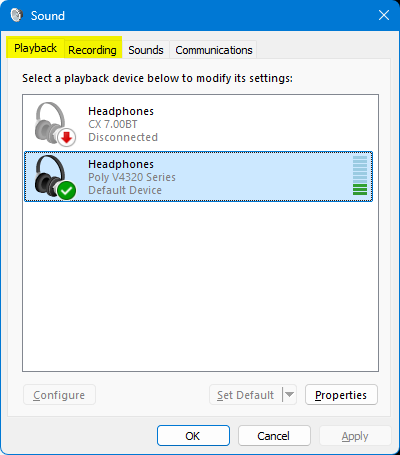
PS I can replicate this issue by changing between the 'Playback' & 'Recording' tab in the Sound Control Panel applet. That is to say, the same decrease in audio quality happens when I change from the Playback tab to the Recording tab. Audio quality improves again when I change from the Recording tab to the Playback tab https://assets-prod.sumo.prod.webservices.mozgcp.net/media/uploads/images/2026-09-12-15-38-23-1accad.png

PPS My new windows are set to open on 'about:support'

PPPS Can't reply to previously archived question : https://support.mozilla.org/en-US/questions/1525613

Solved 1 10

Firefox reports HEVC unsupported while Chrome can decode the same HEVC streams on the same system

(AI written summary of troubleshooting steps taken before making this support thread) Firefox version: - 152.0.1 Release - 153.0 Nightly OS: - Windows 11 build 26200 GPU:… (lexoni më tepër)

(AI written summary of troubleshooting steps taken before making this support thread)

Firefox version: - 152.0.1 Release - 153.0 Nightly

OS: - Windows 11 build 26200

GPU: - NVIDIA GeForce RTX 4070 SUPER

Codec package: - Microsoft HEVC Video Extensions installed from Microsoft Store

Problem

Firefox does not expose HEVC playback support, causing Twitch to disable 1440p streams encoded with HEVC.

The same machine can play the same HEVC Twitch streams in Chrome immediately after installing HEVC Video Extensions.

Expected result

Firefox should report HEVC playback support and allow playback of HEVC streams, as Chrome does on the same system.

Actual result

Firefox reports HEVC as unsupported.

about:support:

codecSupportInfo: H264 SWDEC HWDEC VP9 SWDEC HWDEC VP8 SWDEC HWDEC AV1 SWDEC HWDEC HEVC NONE

Troubleshooting already performed

- Installed Microsoft HEVC Video Extensions - Rebooted Windows - Updated NVIDIA drivers - Verified hardware acceleration is enabled - Tested with a brand new Firefox profile - Tested with Firefox Nightly - Confirmed Chrome can play the same HEVC streams

Additional observations

Chrome: - Twitch 1440p becomes available immediately after installing HEVC Video Extensions - Twitch Stats for Nerds reports:

 hev1.1.6.L150.90.0.0.0.0.0

Firefox: - Twitch reports that the browser does not support the required resolution - 1440p remains greyed out - about:support continues to report HEVC NONE

Reproducible tests

Firefox console:

MediaSource.isTypeSupported('video/mp4; codecs="hev1.1.6.L150.90"')

Result: false

MediaSource.isTypeSupported('video/mp4; codecs="hvc1.1.6.L150.90"')

Result: false

navigator.mediaCapabilities.decodingInfo({

 type: "media-source",
 video: {
   contentType: 'video/mp4; codecs="hev1.1.6.L150.90"',
   width: 2560,
   height: 1440,
   bitrate: 8000000,
   framerate: 60
 }

})

Result: {

 supported: false,
 smooth: false,
 powerEfficient: false

}

For comparison:

MediaSource.isTypeSupported('video/mp4; codecs="av01.0.08M.08"')

Result: true

navigator.mediaCapabilities.decodingInfo({

 type: "file",
 video: {
   contentType: 'video/mp4; codecs="av01.0.08M.08"',
   width: 2560,
   height: 1440,
   bitrate: 8000000,
   framerate: 60
 }

})

Result: {

 supported: true,
 smooth: true,
 powerEfficient: true

}

Additional note

Setting:

dom.media.webcodecs.h265.enabled = true

causes HTML5 codec test (https://html5test.co/) to report H.265 support, but does not change:

- about:support - MediaSource.isTypeSupported() - MediaCapabilities.decodingInfo() - Twitch HEVC playback availability

Question

Is this a known issue with HEVC Media Source Extensions support on Windows 11 build 26200, or is there another requirement for Firefox to expose HEVC playback capability through MediaSource and MediaCapabilities when the Windows HEVC codec is installed and functioning in Chromium-based browsers?


Solved 11 192

"Video can’t be played because the file is corrupt" but video can be played using Chromium, MPV, and VLC.

Media resource could not be decoded, error: Error Code: NS_ERROR_DOM_MEDIA_DECODE_ERR (0x806e0004) Details: virtual mozilla::MediaResult mozilla::FFmpegVideoDecoder<62… (lexoni më tepër)

Media resource could not be decoded, error: Error Code: NS_ERROR_DOM_MEDIA_DECODE_ERR (0x806e0004) Details: virtual mozilla::MediaResult mozilla::FFmpegVideoDecoder<62>::DoDecode(mozilla::MediaRawData*, uint8_t*, int, bool*, mozilla::MediaDataDecoder::DecodedData&): avcodec_send_packet error: Unknown error occurred

Solved 3 81