Choppy, stuttering embedded video on Firefox browser for Windows 10

Here is a video which would demonstrate it best: https://youtu.be/MpHX4Ep-IMM
These two comparison are made between Firefox 158.0 (64 bit) in Troubleshoot Mode and Brave 1.97.59 (64 bit), on Windows 10, version 22H2. I use the 30MB Big Buck Bunny version on test-videos.co.uk site, Firefox seems able to load the 1MB, or 2MB version pretty smoothly, but higher than that, it starts to stutter, for some reasons I cannot understand.
(Most results I can find online tell me to "disable hardware acceleration", but I have been turning that setting on and off multiple times without seeing any changes)
Ironically, videos on Youtube can load normally without issues. It just seems any embedded videos would behave oddly like this, which I encounter most often on Discord.
Please, I would appreciate any insights. I can provide additional information if needed. Thanks in advance.
Krejt Përgjigjet (1)
Zgjidhja e Zgjedhur
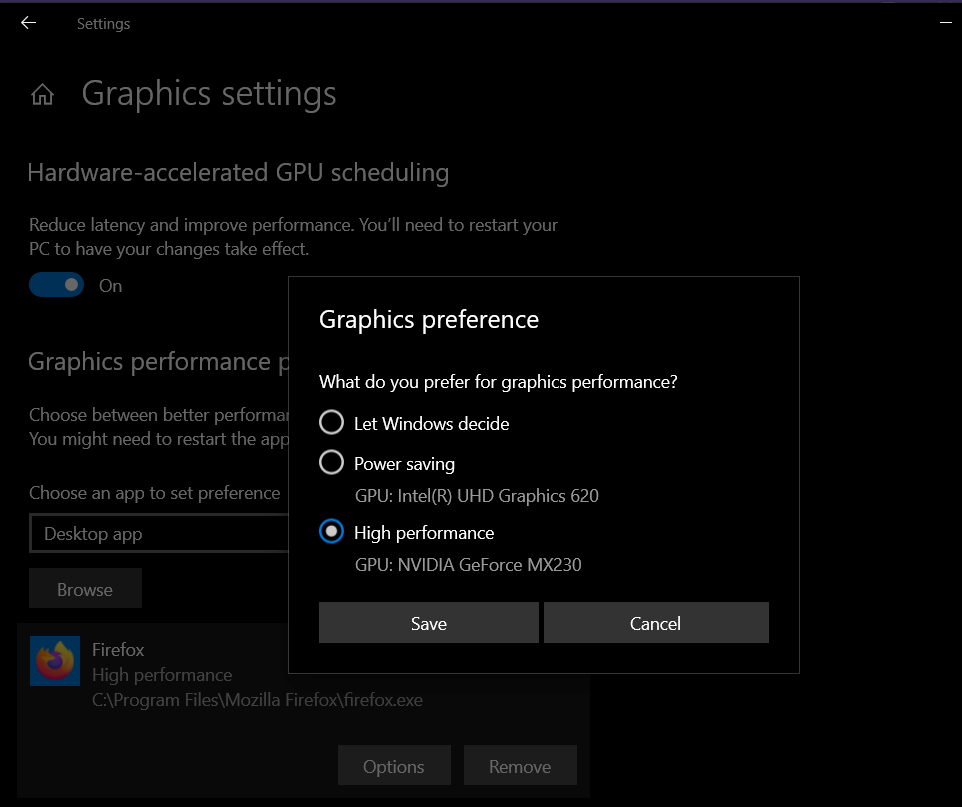
I managed to solve this problem. It turned out that I forced Firefox to use the dedicated graphic card on my laptop, through Settings on Windows 10.
So, Settings -> System -> Display -> Find "Graphics settings" -> Under "Graphics performance preference", remove Firefox if it is listed there (check the attached image).
Ironically, trying to replicate this on the Brave browser doesn't affect its ability to load the test videos at all. I guess this must be some odd interactions between Firefox and Windows Settings.
I hope this could help someone else, but chances that someone would make the same mistake as mine are quite low, I gotta say.