


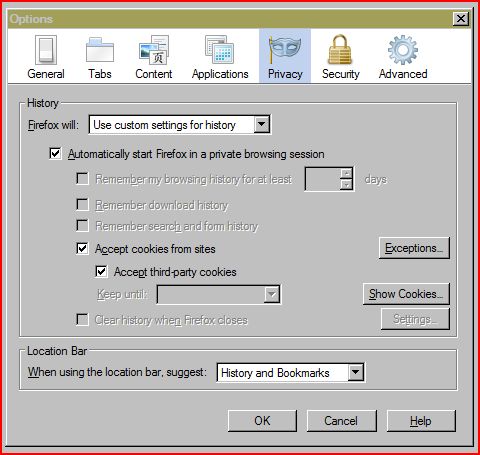
|Tools>Options>Privacy:"Keep until" option is blanked out, as are 3 "remember history" options, "Clear history when..." and "settings", how do I get them back?

The Use custom settings for history is chosen: "Accept cookies from sites" and "Accept third party cookies" are both ticked, but I want to be able to say yes or no to cookies!
Zgjidhja e Zgjedhur
Your image shows that you have checked "Automatically start Firefox in a private browsing session". This is causing your problem because cookies are not kept in private browsing.
Uncheck private browsing then go back to cor-el's advice.
Krejt Përgjigjet (5)
You can set that by choosing Keep until: Ask me every time
In that case Firefox will ask for every cookie, so you may get a lot of confirmation windows opening.
- Extended Cookie Manager: https://addons.mozilla.org/firefox/addon/extended-cookie-manager/
As I said - "Keep until" is blanked out. That is my problem.
Zgjidhja e Zgjedhur
Your image shows that you have checked "Automatically start Firefox in a private browsing session". This is causing your problem because cookies are not kept in private browsing.
Uncheck private browsing then go back to cor-el's advice.
Yes, that did it - thanks!
Happy to help.