


can't download firefox due to Windows xp security settings How fix

Windows xp security is set at 'high'. What must I allow to download your firefox browser?
Windows xp security is set at 'high'. What must I allow to download your firefox browser?
Krejt Përgjigjet (2)
There's a virus called "XP Security". I hope you don't have that installed. Removal instructions here if you have: http://www.bleepingcomputer.com/virus-removal/remove-win-7-antispyware-2011
Otherwise, do this:
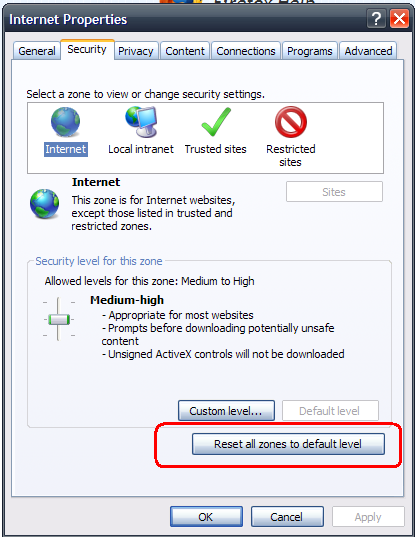
- Right click the Internet Explorer icon on your desktop, go to Properties and click the Security tab.
- Then click the button called Reset all zones to default levels. See screenshot
- Click Apply, then OK.
- Go to Download Firefox 4.0.1 and choose "Save" and save it to your desktop. Do not choose "Run".
- Finally, double click the file you downloaded to install Firefox.
See the section titled "Reset system Internet security settings - Windows" at http://kb.mozillazine.org/Unable_to_save_or_download_files#Enable_downloads_blocked_by_Security_Zone_Policy_-_Windows - I recommend using method 2, that will just adjust the Windows settings to allow the download.