


Weird Toolbar

I cannot attach a jpeg of my actual screen...
There's this weird binocular thing (the one you see when you get a missing flash message) that takes up one of the toolbar spaces entirely. I tried to disable the add-ons and also re-installed Firefox, but none of them got rid of the weird empty toolbar.
Does anyone know what's causing that? If you need to see a picture, please let me know and I'll try to send you the jpeg.
Thanks.
Krejt Përgjigjet (4)
ok i guess i can attach the image here. please see the attached image.
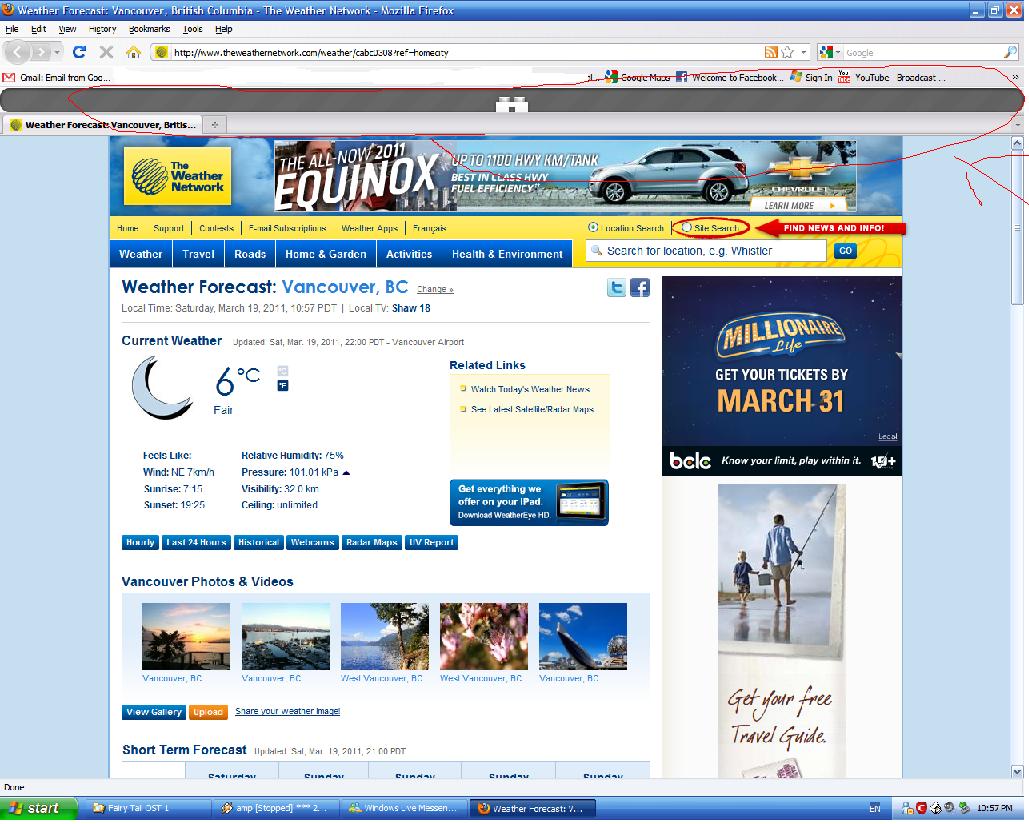
Issues with a black (empty) toolbar can be caused by a plugin or an extension that is not compatible with Firefox 3.6 and isn't working properly anymore.
A toolbar like the "ZoneAlarm Spy Blocker Plugin Stub for 32-bit Windows" and other toolbars like "Ask.com" or "My Web Search" can cause this issue.
You can see the toolbars in View > Toolbars.
See:
thanks so much cor-el!!! it was indeed the zonealarm spy blocker... i disabled it, removed it from the computer, and now i don't see it anymore!
really appreciate ur help!
You're welcome