Windows 10 reached EOS (end of support) on October 14, 2025. If you are on Windows 10, see this article.

Kërkoni te Asistenca

Shmangni karremëzime gjoja asistence. S’do t’ju kërkojmë kurrë të bëni një thirrje apo të dërgoni tekst te një numër telefoni, apo të na jepni të dhëna personale. Ju lutemi, raportoni veprimtari të dyshimtë duke përdorur mundësinë “Raportoni Abuzim”.

Mësoni Më Tepër
Arkivuar

How to turn OFF these Darn Security Warnings? ("Although this page is encrypted" etc)

alibiagent replied
YoMammaWearsArmyBoots

Hi. I don't know if it is a Firefox "Security Warning" or a Windows 7 security warning.

But, either way, I want to turn it off. I get them almost ANY time I enter FORM DATA on a website.

A pop-up appears saying this: "Security Warning - Although this page is encrypted, the information you have entered is to be sent over an unencrypted connection and could easily be ready by a third party. Are you sure you want to continue sending this information?"

I then always click "Continue" . . . and the log-in information continue without any problem.

But such as headache to be asked this EVERY time I log into to ANYTHING.

Anybody know how to turn this thing off?

Thanks.

- YoMamma

Hi. I don't know if it is a Firefox "Security Warning" or a Windows 7 security warning. But, either way, I want to turn it off. I get them almost ANY time I enter FORM DATA on a website. A pop-up appears saying this: "Security Warning - Although this page is encrypted, the information you have entered is to be sent over an unencrypted connection and could easily be ready by a third party. Are you sure you want to continue sending this information?" I then always click "Continue" . . . and the log-in information continue without any problem. But such as headache to be asked this EVERY time I log into to ANYTHING. Anybody know how to turn this thing off? Thanks. - YoMamma

Krejt Përgjigjet (1)

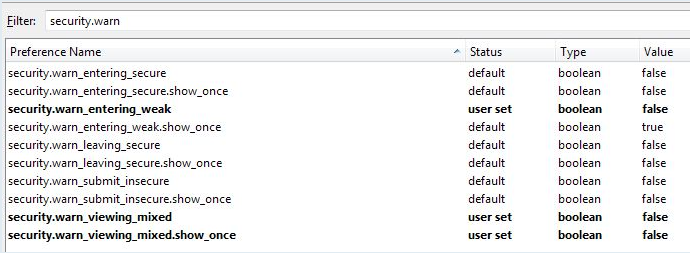
Here is the fix:

- goto about:config - filter for "security.warn" - disable (false) lines containing

     "security.warn_enter*, ....warn_viewing*, ....warn_leaving*, ....warn_submit*

(there are 10 lines with these headings - set all to 'false')