Windows 10 reached EOS (end of support) on October 14, 2025. If you are on Windows 10, see this article.

Kërkoni te Asistenca

Shmangni karremëzime gjoja asistence. S’do t’ju kërkojmë kurrë të bëni një thirrje apo të dërgoni tekst te një numër telefoni, apo të na jepni të dhëna personale. Ju lutemi, raportoni veprimtari të dyshimtë duke përdorur mundësinë “Raportoni Abuzim”.

Mësoni Më Tepër
Arkivuar

Fonts screwed up on certain websites

dfs_toronto

My Firefox installation at work used to display all websites fine. But starting a few months ago, the fonts displayed on certain websites (that always looked fine before) started looking of low quality. These websites look fine when I look at them at home or with IE.

I've tried working with Tools - Options - Content - Fonts and Colors - Advanced but haven't found anything to help yet. If I turn OFF "Allow pages to choose their own fonts" the problem fonts are fixed, but then all pages display the same font and I don't like that.

I've even tried removing and re-installing Firefox, but that doesn't help. In fact, my computer manages to remember all my old bookmarks without my having to re-import them, so there are some settings files that are not getting erased when I re-install.

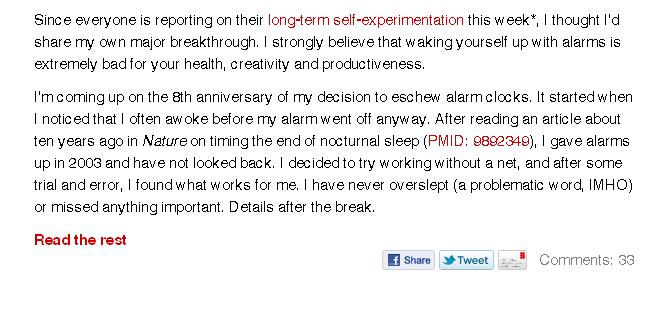
Below is a screen grab from BoingBoing.net so you can see what the fonts look like.

Does anyone know how to fix this, or how to re-set all the font settings on Firefox back to the defaults?

My Firefox installation at work used to display all websites fine. But starting a few months ago, the fonts displayed on certain websites (that always looked fine before) started looking of low quality. These websites look fine when I look at them at home or with IE. I've tried working with Tools - Options - Content - Fonts and Colors - Advanced but haven't found anything to help yet. If I turn OFF "Allow pages to choose their own fonts" the problem fonts are fixed, but then all pages display the same font and I don't like that. I've even tried removing and re-installing Firefox, but that doesn't help. In fact, my computer manages to remember all my old bookmarks without my having to re-import them, so there are some settings files that are not getting erased when I re-install. Below is a screen grab from BoingBoing.net so you can see what the fonts look like. Does anyone know how to fix this, or how to re-set all the font settings on Firefox back to the defaults?

Ndryshuar nga dfs_toronto

Krejt Përgjigjet (1)

Following up, attached is an image from BoingBoing.net showing what the displayed fonts look like.