Where can I download Firefox's: com.usps.cns.web.pdf.labelgenerationservlet ?

To get the mailing labels from my USPS account the US Post office says that for my Mac OSX's newly installed Firefox 3.6.12 I need to download a file called: "com.usps.cns.web.pdf.labelgeneration servlet". Once I do, USPS says - my computer will not recognize it. So , I'll need to rename it by deleting everything past ".pdf". This will turn it into a file Adobe will recognize and proceed opening the mailing labels. But, I cannot find where any such download can be gotten.
Krejt Përgjigjet (2)
Some web pages about this, found via a Google search:
http://hints.macworld.com/article.php?story=2005052713194641
http://discussions.apple.com/thread.jspa?threadID=1600856
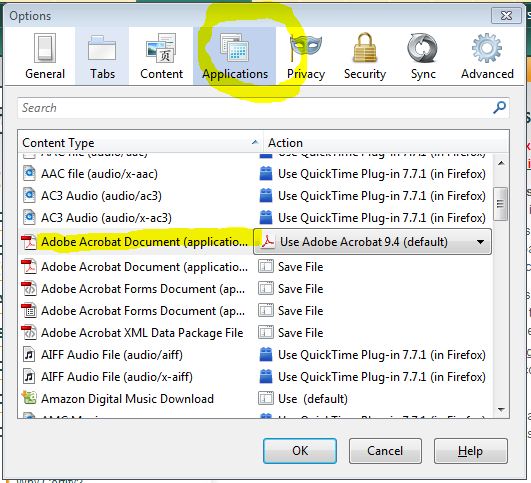
The problem lies with how Firefox handles PDF files. Go to your Options dialog, select "Applications" and make sure that the "Adobe Acrobat Document (application/pdf)" is set to a valid application. This will return to the annoying behavior of opening all PDF files inside a browser instead of saving, but you can switch it back when you're done. Hope this helps!!