


Desktop Version 159.0 (64bit) is not displaying email directories. Only Inbox visible but empty.

Since yesterday , Thursday 29th October. Thunderbird has only been displaying the "Inbox" for my account, no emails are visible in it and all of the directories including the deleted emails directory and spam directory are absent. I have Windows 11 installed. I am using the IMAP server for incoming email and have checked that all the settings are correct. My account displays no incoming emails but can send emails. The directories are still absent when running Trouble shooter and the inbox is still empty. In the Account Settings - Server Settings I tested connection to the server and it said secure connection made - this worked for both outgoing and incoming servers. I have tried uninstalling and reinstalling Thunderbird but the issue persists. Although I do not change any settings the full set of directories will occasionally appear along with some emails and then seconds later disappear again. My email account is working fine on my phone and tablet using gmail.
Ndryshuar nga rmulls
Krejt Përgjigjet (8)

It might be most expedient in this case to remove the account from Thunderbird and re-add it. (see <Account Settings | (account)> and click the big red "Delete" button.) Since this is an IMAP account, there's no risk of data loss.
Lin, Thank you for taking the time to reply. I have tried your suggestion, but unfortunately it did not work. R
I was a little hasty responding before - I should have asked more questions...
- This is a Gmail account, right?
- Are you saying this started out of the blue, that everything was working properly and it just seemed to start up on its own? Did it coincide with a Thunderbird or OS update?
- Check to make sure you are set to display All Folders. See the menu item <View | Folders | All Folders>. If the Menu Bar is hidden, press <Alt> or <F10> to reveal it.
- Right-click on the account name in the Folders Pane and choose "Subscribe". This should show a list of all available folders on the server, with a check box for each one. Are they all checked? Click the "Refresh" button and see if that helps. Try UNchecking them, then rechecking.
- When you successfully send an email, where does your local copy go? If you weren't properly connected to the servers, a copy might be saved to a Local Sent folder. Please check. Also, check webmail to see if a copy of it is in their Sent folder
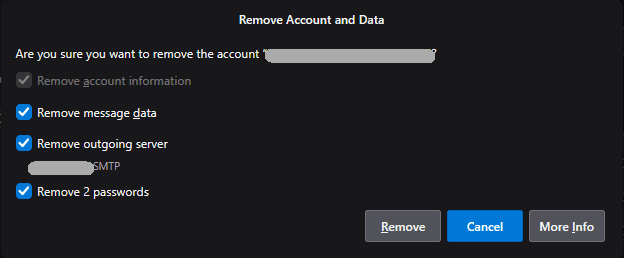
- When you removed the account, did you agree to all the "Remove Account and Data" prompts? If not, and the problem is a corrupt file or an incorrect setting, the problem can persist. In that case, please try again.
Hello Lin,
Thank you for the questions. My answers are below:
My ISP is a company called TalkTalk, so I use their email - this is the account I am having problems with. I do have a Google email account that I also use in Thunderbird and that is displaying directories correctly which does lead me to believe that the TalkTalk servers may be at fault. The problems coincided with a Thunderbird update to 159.0.
I have checked that I am displaying all folders.
I have used subscribe and unticked and reticked the boxes.
When I send an email from the problem account it does arrive in its destination, but there is NO copy in the sent folder in Thunderbird or in the webmail sent folder.
When I removed the account I made sure "Remove message data" was ticked but "Remove account information" was ghosted out (although it was ticked).
I will look into whether TalkTalk are having issues with their email.
Thank you again for your help.
Richard
I guess I misread you when you mentioned "Gmail".
Something doesn't sound right. In Thunderbird 159, when you remove account you should be asked to confirm THREE deletions. See the attached image. You didn't mention the Passwords option. Did you choose all options?
Please post a screen shot of your incoming server settings. See <Account Settings | (account) | Server Settings>.
How do your settings compare to what I found on TalkTalk's help page <https://help-centre.talktalk.co.uk/Email/Set_up_TalkTalk_email/Email_settings_to_access_TalkTalk_emails>?
IMAP (Incoming): Incoming Server Type: IMAP Mail Server Incoming Server Name: mail.talktalk.net Port: 993 User Name: <email address> Connection Security: SSL/TLS Authentication method: Normal Password
SMTP (Outgoing): SMTP Server Name: smtp.talktalk.net Port: 587 Connection Security: STARTTLS Authentication method: Normal Password User Name: <email address>
On the other hand, I find that Thunderbird thinks the IMAP server name should be <imap.talktalk.net>. I don't know which is correct. You may need to contact them to find out the correct settings.

Similar problem with TalkTalk: https://support.mozilla.org/en-US/questions/1615316
Another TalkTalk user with a similar problem suggested this workaround:
Right click on the account name in the folder pane on the left that has its folders missing. Subscribe. Click OK. The missing folders will reappear and TB will then re-sync. Re-syncing can take a while. This is not a solution but a workaround. The problem only occurs when starting TB, so you may want to keep it running minimized as long as possible.
Thanks Lin and christ1 for your replies, I'm going to contact my ISP and leave things for a few days to give the Mozilla guys a chance to look at the issue with Thunderbird- there are quite a few references to this problem on the forum now so hopefully it will be looked at. I can still receive emails through my phone and tablet, so will use those for now. Thanks again for your help.
Ndryshuar nga rmulls