


Windows 10 reached EOS (end of support) on October 14, 2025. If you are on Windows 10, see this article.

Kërkoni te Asistenca

Shmangni karremëzime gjoja asistence. S’do t’ju kërkojmë kurrë të bëni një thirrje apo të dërgoni tekst te një numër telefoni, apo të na jepni të dhëna personale. Ju lutemi, raportoni veprimtari të dyshimtë duke përdorur mundësinë “Raportoni Abuzim”.

Mësoni Më Tepër
Open

Thunderbird is slow, how do I make it fast without deleting my messages or filter rules ?

Salon

Hi, I've been back to Thunderbird since May, and while I'm happy to be moving away from gmail.com I find the experience with thunderbird a little disjointed and frustrating.

And it would be fine if it was not also sluggish.

I have approx 100'000 emails in All mail, 15'000 mail in inbox,203 mail folders and 160 email rules each with about 3 sub-rules each.

When I get a 2 Factor message sometimes it only take 10 seconds, sometimes it takes minutes, sometimes it never appears until I press the "check mail" button, it's never clear what "check mail" even is doing, if anything at all.

My computer is a 16 core Ryzen 5950x with 64gb ddr4 and it is otherwise very fast and I don't have any crapware installed like "mcaffee anti virus" or whatever.

I can't tell but it feels like it is applying every rule to every email in "All Mail" every single time and I'm pretty sure that is why it is so slow.

However the interface is very obtuse about what it is doing, so I have a hard time finding what the problem is.

Now, I am not going to delete my messages and I am not going to have fewer rules. but I think the rules should only be applies to newly received messages and that should only take milliseconds. Also, it should be easy to tell, what it is doing and how much time that takes ?

This indicator, is mostly meaningless

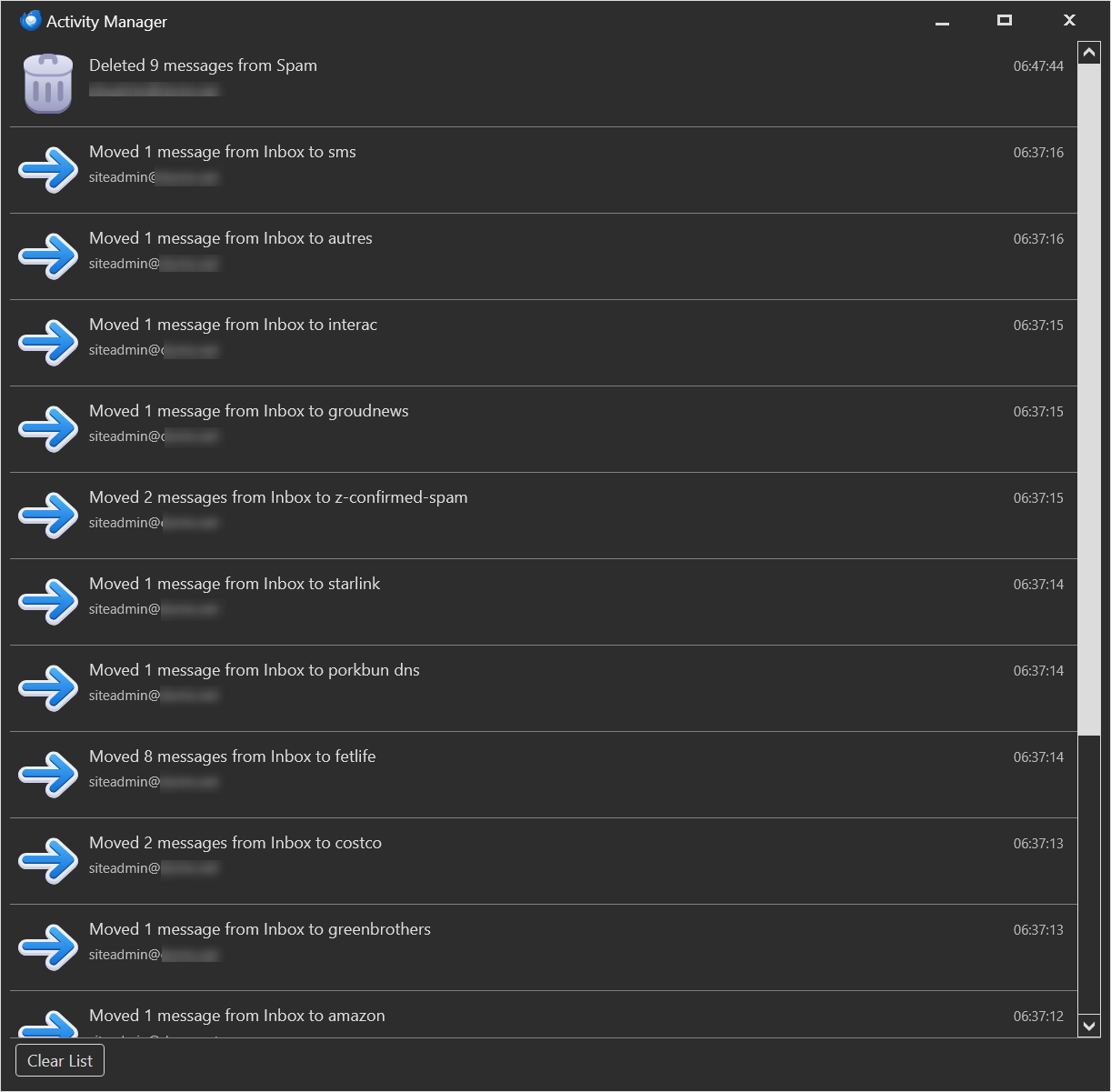
And this window, really doesn't say that much about what it is scanning

If it were saying how many email and which folders it applied rules to

It would feel a lot less sluggish if I was able to see what it is doing and be to tell if it is doing something or just hanging, it is very frustrating to wait and not even be sure if anything is happening at all !

And I greatly suspect that my problem is that it is applying All rules to All mail, not just the new mail, and if that was fixed and the activity manager made more descriptive and responsive, it would not feel so slow and frustrating and I would know what to change to make it faster !

But right now, if I didn't have such distaste for google, I would just go back to gmail which never made me wait more than 2 seconds for anything.

Hi, I've been back to Thunderbird since May, and while I'm happy to be moving away from gmail.com I find the experience with thunderbird a little disjointed and frustrating. And it would be fine if it was not also sluggish. I have approx 100'000 emails in All mail, 15'000 mail in inbox,203 mail folders and 160 email rules each with about 3 sub-rules each. When I get a 2 Factor message sometimes it only take 10 seconds, sometimes it takes minutes, sometimes it never appears until I press the "check mail" button, it's never clear what "check mail" even is doing, if anything at all. My computer is a 16 core Ryzen 5950x with 64gb ddr4 and it is otherwise very fast and I don't have any crapware installed like "mcaffee anti virus" or whatever. I can't tell but it feels like it is applying every rule to every email in "All Mail" every single time and I'm pretty sure that is why it is so slow. However the interface is very obtuse about what it is doing, so I have a hard time finding what the problem is. Now, I am not going to delete my messages and I am not going to have fewer rules. but I think the rules should only be applies to newly received messages and that should only take milliseconds. Also, it should be easy to tell, what it is doing and how much time that takes ? This indicator, is mostly meaningless And this window, really doesn't say that much about what it is scanning If it were saying how many email and which folders it applied rules to It would feel a lot less sluggish if I was able to see what it is doing and be to tell if it is doing something or just hanging, it is very frustrating to wait and not even be sure if anything is happening at all ! And I greatly suspect that my problem is that it is applying All rules to All mail, not just the new mail, and if that was fixed and the activity manager made more descriptive and responsive, it would not feel so slow and frustrating and I would know what to change to make it faster ! But right now, if I didn't have such distaste for google, I would just go back to gmail which never made me wait more than 2 seconds for anything.
Foto të bashkëngjitura ekrani

Krejt Përgjigjet (1)

You should read this article that describes Gmail's peculiarities and Thunderbird can best work with them:

https://support.mozilla.org/en-US/kb/thunderbird-and-gmail

One of the best tweaks you can make is to unsubscribe from the "All Mail" folder. In the context of Thunderbird and other standard IMAP clients, that folder is redundant, and to have Thunderbird maintain a local copy is an unnecessary performance and storage liability.

Bëni një pyetje

Duhet të bëni hyrjen te llogaria juaj që t’i përgjigjeni postimeve. Ju lutemi, filloni me një pyetje të re, nëse s’keni ende një llogari.