


Cannot submit forms on a particular website
Good Day.
I have encountered a problem recently with on particular forum site.
When I attempt to login I receive an error after pressing the submit button.
The form displays this error "The submitted form was invalid. Try submitting again."
I have been using the site regulary for several years and have never had this problem
The following is what I am using:
    Firefox ver 153.0.1 64 bit
    Windows 10 and/or Windows 10 (yes this is happening on all 3 of my PCs)
The forum site is using phpBB Forum Software. I do not know the version. As stated above they have been using this software for several years.
In trouble shooting this issue I have discovered that if I do the following in the specified order I can login and create and respond to posts and Private Messages. But as soon as I log out I receive the invalid form message until I do the following steps again.
            1) Clear all cookies, temporary cache, site settings, browsing and download history, site settings
               and saved form info.
            2) Shutdown Firefox
            3) Navigate to my profile with Windows Explorer
            4) Delete the file cookies.sqlite
I must do this each and every time I access the site.
I am at a loss as to what to do about this. Does Firefox have any error logs or console logs? If so how can I enable them to see if I can get a better idea of what is happening?
Thanks in advance for any help with this.
Zgjidhja e Zgjedhur
Hi jbr,
Just a note to inform all that this problem was NOT due to Firefox but to the configuration settings on the forum software. Apparently phpBB Forums changed the way the software handles session cookies in such a manner that unless the board administrator modified their installation configuration it could appear to the servers that a form posting could be originating from a different server. The update documentation did not correctly document this and it took some time for the issue to register on the phpBB tracking system.
Once phpBB put out the new directions, the issue was resolved.
I apologize for the wild goose chase. Thank your for your help on this because I did learn a few tricks to help diagnose problems should the need arise in the future.
Krejt Përgjigjet (11)
You'd see the cookie/session communication in Network pane of console (F12) — however if a legacy site is running into e.g. a partitioning issue you'd also need to have some context around SameSite defaults etc. to infer anything useful from the headers sent & received (cookies get mostly set on "document" type objects).
If you only use the site using a new Private Window, does the same issue happen the next time as well?
Hi Jbr,
Yes it runs just the same. Unless I clear the history cache completey and delete the cookies.sqlite file I get the invalid form error when ever I try to post something to the forum site.
Also something strange happened this afternoon when I was working on the issue and flipping between Firefox normal windows and the Private windows the site began to respond normally. After logging off the forum I could log back on without any problems. I could shut down Firefox and start a new session and login to the site without clearing the cache or manually deleting the cookies file. This went on for several hours until I put the laptop to sleep to eat dinner. When I got back to the laptop, I found that I once again had to clear the cache and delete the cookies file before I could login.
I have contacted the site admin and he says I'm the only one who has reported anything like this. He is really a forums admin and can only works the account side of the system, not the technical communications or server side of things so I have no hope of any help from them.
Oh and one thing I did notice in the F12 window specifically the inspector window was an error about
webkit-text-size-adjust. See the attached image.
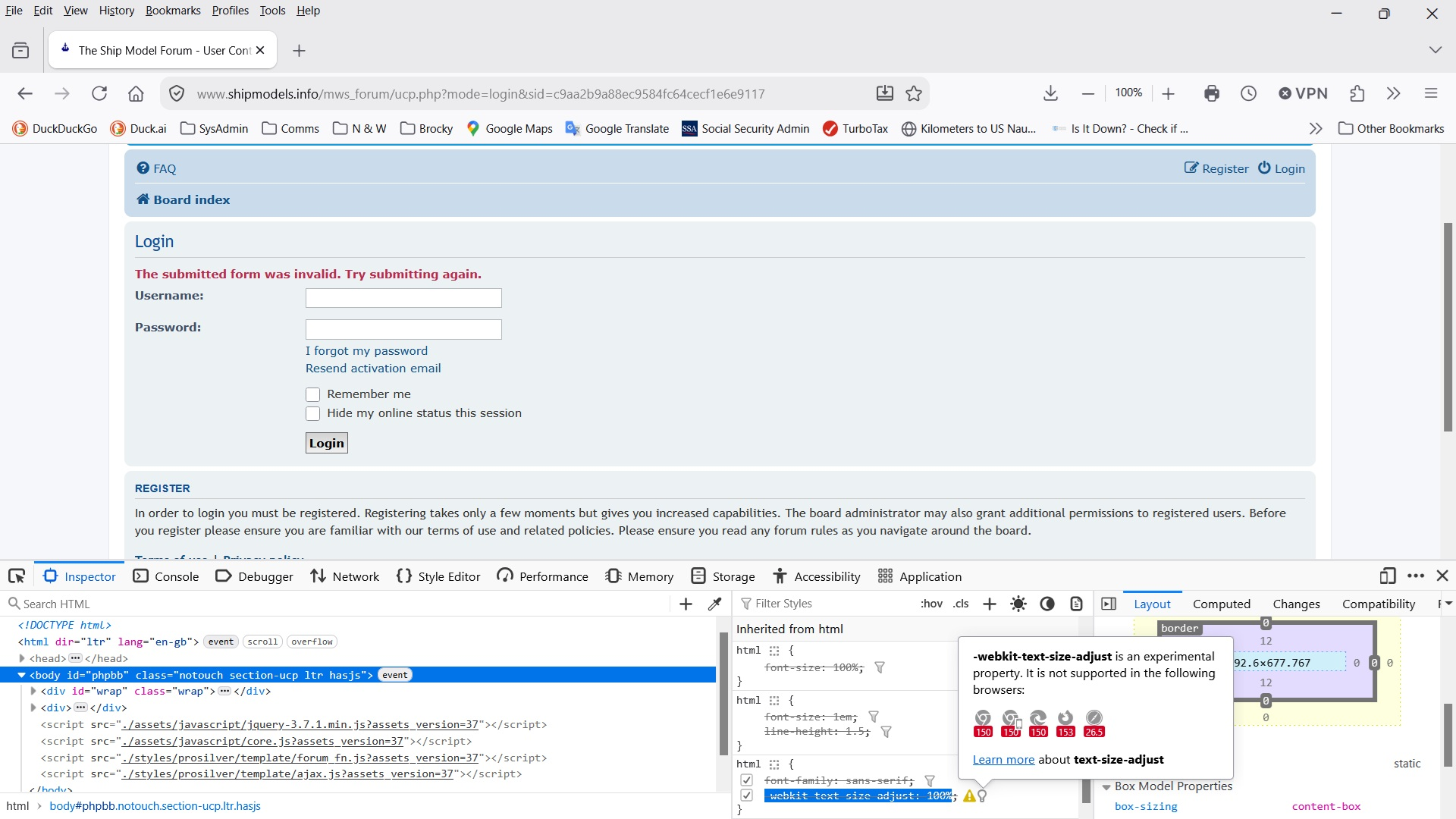
I see the form has extra protections that need to be passed correctly — make sure you're not using any addons that tamper with sites you visit — e.g. by restarting into Troubleshoot Mode (from Help menu) and trying to use the site from there.
Well I don't know why I didn't suspect the Norton 360 extensions right away. I was able to login when I ran the form in trouble shooting mode. Then I thought if I disable the Norton Safe Web and Norton Safe Search extensions the site should work, but alas no joy. Even though I disabled the extensions I was back to deleting the cache and the cookies.sqlite file.
So no I am wondering what does the trouble shooting mode disable besides any installed extensions? I mean if it is the Norton extensions wouldn't disabling them make the site work properly?
Can't it be any other extension? The steps are basically these: Troubleshoot extensions, themes and hardware acceleration issues to solve common Firefox problems
Well there are no other extensions. You're talking to T-Rex when it comes to computers. When I got started in computers the only PCs were the Radio Shack TRS 80 or the Commodore 64. The only networks consisted of dumb terminals hardwired to a mainframe via modems and twisted pair copper cables. So I have never really gotten around to jazzing up the browser.
On a more related note, I have been playing around with this issue on my Windows 10 Desktop. The Firefox browser on it does not have any extensions installed and still has the same issue. I have to clear the cache and then go to the profile root and delete the cookies.sqlite file. So I'm thinking it may not be the Norton extensions on the laptop...
This is very strange.
Basically what Troubleshoot Mode does is just what's in the article linked — disabling extensions, disabling themes, disabling various rendering optimizations, disabling HW acceleration … none of which ought to affect your session history. Whereas in Private Browsing none of your session data gets written down, so it's basically made for this task. I don't understand why one alleviates the issue and the other doesn't work for you.
Equally there's no reason to be removing any storage files from under the profile — if data for a site is cleared, there's nothing else it can access. No matter the amount of the backing database removal.
You can try stripping the site of any cookie permissions to see what happens. It's either in page info (site permissions), or in privacy settings around sites' exceptions for storing data where you can deny any session stored for a site. That should write no change anywhere so you should always have a fresh start with the site. (It may break its singin, though.)
Hey JBR Good Day.
I have made some progress thanks to you suggestion of working with the Browsing Data settings under the Privacy and Security section in Firefox's settings.
I have always had Firefox set to clear everything but Browsing & download history.
I added the website to the Manage Exceptions option in the Browsing Data section. I set it to Allow for Session.
Now I can login in after starting the browser without deleting the cookies.sqlite file or the history cache first. The only caveat is that I have just one shot at logging in. If I log out of the session, or I bugger up entering the user id or password I have to shut down and restart the browser.
All in all I am satisfied with this because I don't lose any of my browsing history and can use the History cache to restart other sites I have been to during the day and I don't have to delete the cookie file any more.
I'm not deleting my desktop shout cut to the Profile sub directory just yet in case this problem presents itself again.
Thanks for the help and have a great day.
Ndryshuar nga BrockyTaz
Zgjidhja e Zgjedhur
Hi jbr,
Just a note to inform all that this problem was NOT due to Firefox but to the configuration settings on the forum software. Apparently phpBB Forums changed the way the software handles session cookies in such a manner that unless the board administrator modified their installation configuration it could appear to the servers that a form posting could be originating from a different server. The update documentation did not correctly document this and it took some time for the issue to register on the phpBB tracking system.
Once phpBB put out the new directions, the issue was resolved.
I apologize for the wild goose chase. Thank your for your help on this because I did learn a few tricks to help diagnose problems should the need arise in the future.
No worries. This is definitely not how interoperable web was supposed to work, so diagnosing that is relevant to make sure it's not a client–side issue. Unfortunately server–side flaws are too opaque in many cases — glad you're unblocked now! 🚀