


TB address book has duplicate entries or other entries that will not delete or edit?

TB address book has duplicate entries or other entries that will not delete or edit? Tried to even change the name. Close reopen and it reverts back to original. ??? Thanks for the help.
Krejt Përgjigjet (22)

Is this a local address book, not a network address book such as Google or Yahoo? If so, try exporting the address book, then importing it back to a new address book. I recommend you use vCard format. If that looks good, delete the original.
Can't delete the original or Collected. I even went in to the vCard file and deleted the offending addresses.
lin need a better explanation. Where is the address book you are indicating?
Please elaborate. Are you saying even after creating a new address book, exporting the flakey one and importing it into the new one, there are still duplicate contacts and those contacts are not deleteable?
Yes.>>>>>>>>>>>>>>
I tried 20 different way. Even. Edit vCard. Edit using DB browser. Something is lost in the translation. Maybe. I just need to junk it all..... Go to google or outlook........ I forget why I use TB. Maybe , It just looks nice.....
I can't say it's not happening to you, but it seems like it would be impossible. Yes, it's true that you cannot delete "All Address Books" (because it is not a real address book) and for some obscure technical reason you can't delete "Personal Address Book" or "Collected Addresses" either. But any other local address book can be deleted, and any CardDav address book, such as one linked to Google, can be Removed (unsubscribed). HOWEVER, you cannot delete contacts from a CardDav address book IF it's marked as "Read Only". You can enable and disable that option by right-clicking on the Address Book name and examining "Properties".
You never gave me an answer to me earlier question about whether it's an on-line address book. Now I'm thinking that's what it is. Please check.
Ndryshuar nga Lin
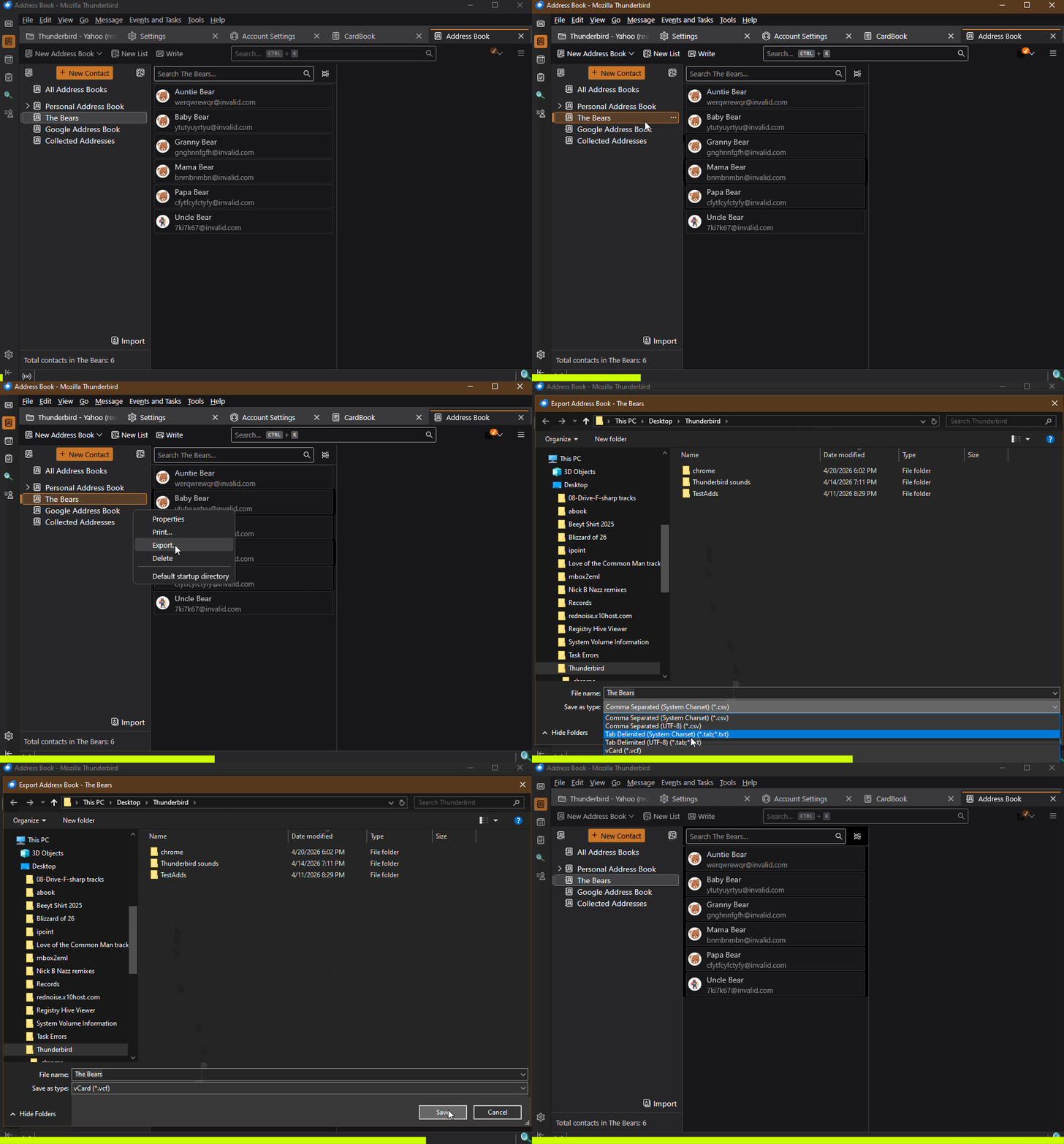
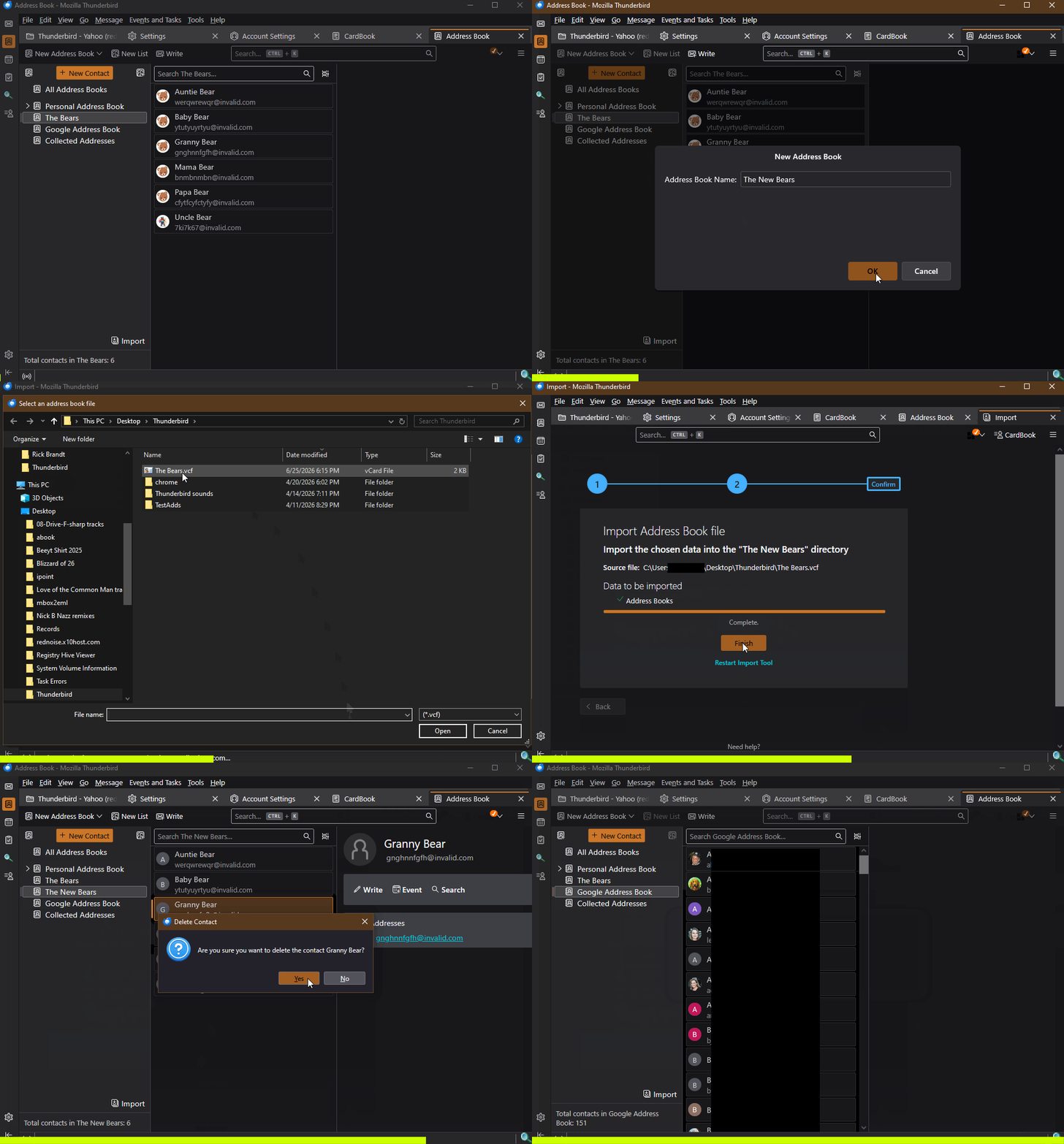
Just to make sure you're using the same export/import method I am, see the attached animations...
accidental duplicate reply. please ignore
Ndryshuar nga Lin
It's not online. Just my computer. Rclick, properties gives the name only.
It's not online. Just my computer. Rclick, properties gives the name only. What are you trying to show me at the end, of 2nd animation? First animation same same.
After export. I edited in notepad. Deleted some. Import the New Personal book. Some changes made it. Some I was able to delete them. Not sure, what you were doing clicking between the Old and the New book????
The first one shows exporting an address book to a VCF file. The second one shows creating a new address book, importing the VCF file into it, then deleting a contact.
If I understand you correctly, you manually deleted some contacts from a VCF file by editing it with Notepad, but those deleted contacts still show in a freshly created, empty address book after importing that edited VCF into it? I'm sorry, that is impossible. There has to be something else going on here.
PM sent.
Yep. And the abook vCard. I tried editing the abook.SQlite with DB Browser. It made a couple blank entries. But, those deleted.
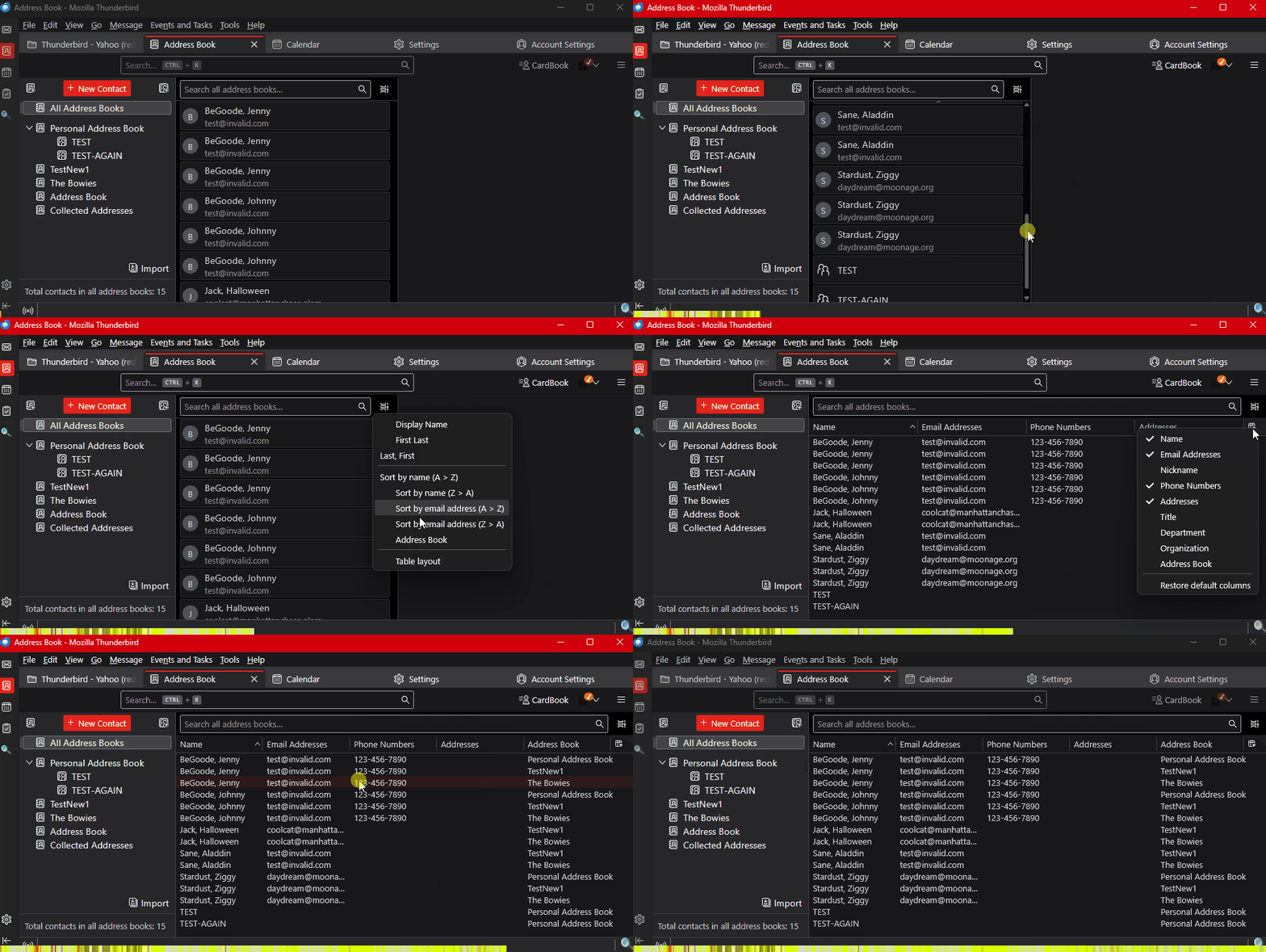
I wonder if you're getting tripped up by the "All Address Books" pseudo-"address book". This is not an address book at all, though it looks like one, but is an aggregate of all the entries in all other address books. That means that if you have the same contact in multiple address books, it will appear multiple times in All Address Books". It's more obvious when you view it in List View rather than the default Table View. When in List View you can reveal extra information columns, including "Address Book", which tells you what address book that entry comes from. See the attached animation.
I have "All Address Books". Then "Personal Address Book". "NEW Personal Address Book". And "Collected Addresses" . "All Address Books" contains 294. Personal 149, NEW 143. Collected has 2 that will not delete.
Opps. I stand corrected. the 2 stray ones just deleted.
So that works out, right? If the two stray contacts in Collected are now gone, everything is accounted for.
Something thing to keep in mind is that the total Contacts include Mailing Lists as contacts
Another part of the equation could be the address book's auxiliary files, for example "abook.sqlite-shm" and abook.sqlite-wal. These are part of sqlite's self-journaling feature that help insure database integrity. I haven't personally experienced it, but I suppose they could be corrupt and perhaps interfering with deleting an entry. And it I don't know what would happen if you've been poking at the sqlite file itself with an external tool. But normally, those files do their work within seconds and then wait until needed again. If you delete them (or to be safer, move them to another location in case you later want to put them back) while Thunderbird is shut down, they will be regenerated next time Thunderbird is run. So, if you still have a misbehaving address book, that would be something to try.
It's funny the 4 contacts I am trying to delete. They are gone....