


Changing Calendar default organizer account

I have 4 gmail accounts in Thunderbird. The calendar shows items from all 4 accounts. My issue comes when setting up an invitation. Pretend my accounts are:
personal1@gmail.com personal2@gmail.com personal3@gmail.com business1@gmail.com
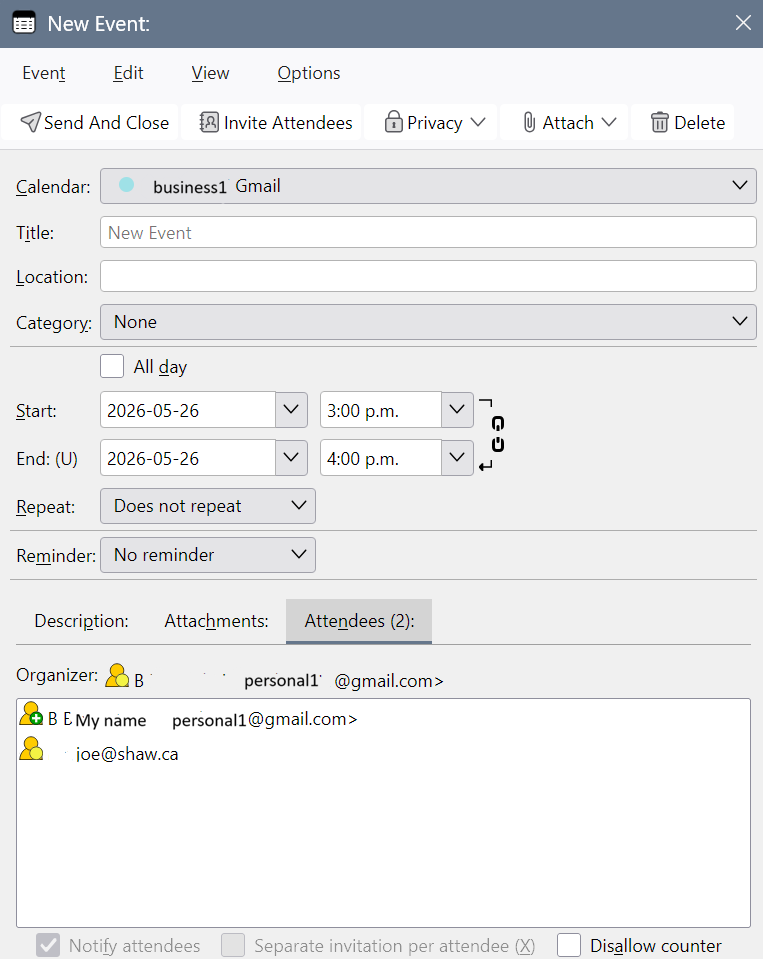
If I want to set up a meeting with invitations from business1@gmail.com, I select the account from the left side of the calendar list, then I create a new event on the day I want. The dialogue box correctly shows "business1@gmail.com in the Calendar drop down box at the top. I can then fill in title, location, category, time etc. But when I click on Invite Attendees, thunderbird has already added "personal1@gmail.com" as the first attendee and is waiting for me to enter the contact of the second attendee. If I add people and send it out, it goes from my "personal1" account and not my "business1" account and any replies come into "persoanl1". Same thing happens if I start by selecting the "personal2" or "personal3" accounts first in Calendar view. It always sets "personal1" as the organizer.
I can not figure out why Thunderbird is automatically using "personal1" as a default and sending from there. I am adding a screen shot to show what it looks like after adding an invitee.
Krejt Përgjigjet (2)

Zgjidhja e Zgjedhur
The dialogue box correctly shows "business1@gmail.com in the Calendar drop down box at the top.
It actually shows the name of the Calendar, which is 'business1 Gmail' as per your screenshot. It does not show an email address though. Details matter.
But when I click on Invite Attendees, thunderbird has already added "personal1@gmail.com" as the first attendee and is waiting for me to enter the contact of the second attendee.
My best guess is you did assign the email address "personal1@gmail.com" to the 'business1 Gmail' calendar. To check this: In a Calendar tab, right-click the 'business1 Gmail' calendar in the left pane - Properties. Select the correct email account from the 'Email' drop-down menu.
Thanks - that was the problem. In fact, all calendars were associated with one of the other email addresses. On my other computer, with 6 accounts, each of those had the wrong email associated with them. I wonder why that happens when adding the calendar - whether it chooses the email account currently selected on the email tab? Thanks for your help.