


Windows 10 reached EOS (end of support) on October 14, 2025. If you are on Windows 10, see this article.

Kërkoni te Asistenca

Shmangni karremëzime gjoja asistence. S’do t’ju kërkojmë kurrë të bëni një thirrje apo të dërgoni tekst te një numër telefoni, apo të na jepni të dhëna personale. Ju lutemi, raportoni veprimtari të dyshimtë duke përdorur mundësinë “Raportoni Abuzim”.

Mësoni Më Tepër

How to show a list of only the Inboxes as in Favoutites in Outlook MS standalone app

  • 2 përgjigje
  • 0 e kanë hasur këtë problem
  • 110 parje
  • Përgjigjja më e re nga Dr.Watson

How can I duplicate below in TB / BetterBird ?

We all know and see from left side of TB / BettreBird open app screen is the list of email accounts one has. In Outlook 2016 and onwards one can add just the Inbox of each mail account I have to a list called 'Favourites' and this resides above all the mail accounts and displays as a list of all the 'Inboxes' only. This means I just have to click on each respective inbox an it displays just that....all the mails in the Inbox. Currently I just have the list of account names where, when a mail is received and the corresponding circled number of mails shown I have to open the account to see the drop down then select the Inbox to get to the list of emails.

I am sure I am missing the solution.

Thanks for assistance.
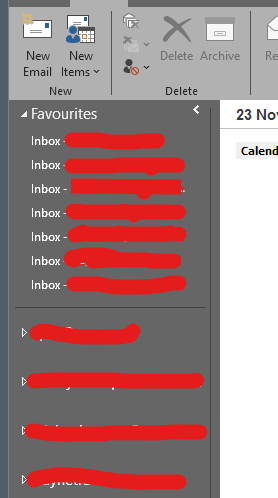
How can I duplicate below in TB / BetterBird ? We all know and see from left side of TB / BettreBird open app screen is the list of email accounts one has. In Outlook 2016 and onwards one can add just the Inbox of each mail account I have to a list called 'Favourites' and this resides above all the mail accounts and displays as a list of all the 'Inboxes' only. This means I just have to click on each respective inbox an it displays just that....all the mails in the Inbox. Currently I just have the list of account names where, when a mail is received and the corresponding circled number of mails shown I have to open the account to see the drop down then select the Inbox to get to the list of emails. I am sure I am missing the solution. Thanks for assistance.
Foto të bashkëngjitura ekrani

Zgjidhje e zgjedhur

Thanks , will give it a go.

Lexojeni këtë përgjigje brenda kontekstit 👍 0

Krejt Përgjigjet (2)

The following methods might be helpful:

Method A: Using Favorite Folders:

Step 1: Right-click a folder on the Folder Pane. > Tick "Favorite Folder".

Step 2: (In menu bar) "View" > "Folders" > Tick "Favorite Folders".

---

Method B: Using Unified Folders:

(In menu bar) "View" > "Folders" > Tick "Unified Folders".

Zgjidhja e Zgjedhur

Thanks , will give it a go.

Bëni një pyetje

Duhet të bëni hyrjen te llogaria juaj që t’i përgjigjeni postimeve. Ju lutemi, filloni me një pyetje të re, nëse s’keni ende një llogari.