


Windows 10 reached EOS (end of support) on October 14, 2025. If you are on Windows 10, see this article.

Kërkoni te Asistenca

Shmangni karremëzime gjoja asistence. S’do t’ju kërkojmë kurrë të bëni një thirrje apo të dërgoni tekst te një numër telefoni, apo të na jepni të dhëna personale. Ju lutemi, raportoni veprimtari të dyshimtë duke përdorur mundësinë “Raportoni Abuzim”.

Mësoni Më Tepër
Arkivuar

Wrong favicon on Bookmark (Toolbar)

medsum

I visited the following site: Broker I can see their favicon in the tab. I bookmarked it to the Bookmark Toolbar, but the favicon is not the same (See image).

I did some search on this in google but nothing helped (refresh it, delete the favicon sql file, devtools chrome enabled, etc). I thought that firefox will honor the absolute path in the website. The following code is from the web site (I used the developer tools to inspect it).

<link id="dynamic-favicon" rel="shortcut icon" href="https://content.client.bnc.ca/content/dam/orion/favicon.ico">

If I edit that line to remove everything before the favicon.ico word, I get the incorrect icon.

This is not an issue in other browsers, but I only use Firefox at home.

How can I solve this? Hopefully without using an extension. Thanks
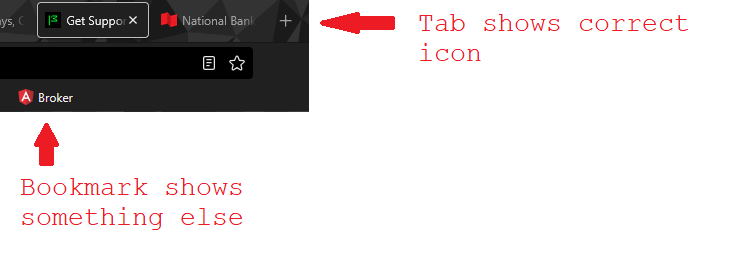
I visited the following site: [https://client.bnc.ca/nbdb/login Broker] I can see their favicon in the tab. I bookmarked it to the Bookmark Toolbar, but the favicon is not the same (See image). I did some search on this in google but nothing helped (refresh it, delete the favicon sql file, devtools chrome enabled, etc). I thought that firefox will honor the absolute path in the website. The following code is from the web site (I used the developer tools to inspect it). <link id="dynamic-favicon" rel="shortcut icon" href="https://content.client.bnc.ca/content/dam/orion/favicon.ico"> If I edit that line to remove everything before the favicon.ico word, I get the incorrect icon. This is not an issue in other browsers, but I only use Firefox at home. How can I solve this? Hopefully without using an extension. Thanks
Foto të bashkëngjitura ekrani

Krejt Përgjigjet (1)

Is there a way to bump this to firefox people? A few views but no solution yet.