


Windows 10 will reach EOS (end of support) on October 14, 2025. For more information, see this article.

Kërkoni te Asistenca

Shmangni karremëzime gjoja asistence. S’do t’ju kërkojmë kurrë të bëni një thirrje apo të dërgoni tekst te një numër telefoni, apo të na jepni të dhëna personale. Ju lutemi, raportoni veprimtari të dyshimtë duke përdorur mundësinë “Raportoni Abuzim”.

Mësoni Më Tepër

Local Folders seem to be invisible

  • 3 përgjigje
  • 2 e kanë hasur këtë problem
  • 35 parje
  • Përgjigjja më e re nga david

more options

Hi there. I used the export/import functions to export my Thunderbird profile to a new computer.

It was largely successful. Many of my layout and general appearance settings were not imported to the new computer, but I just re-set those manually.

My last remaining problem is that it appeared that none of my local folders and messages were exported.

However, when I use file explorer to go to drive C on my new computer,

\Users\myname\AppData\Roaming\Thunderbird\Profiles\xxxxxxxxx.default-esr\Mail\Local Folders\Storage.sbd All of the folders, subfolders and messages are right there.

They're just not showing up in the directory tree pane or account pane (sorry, not sure what you really call it) in my main Thunderbird interface. All I see are "Trash" and "Outbox."

Anyone have any ideas as to how I make my local folders and messages re-appear?

Thanks,

Dave
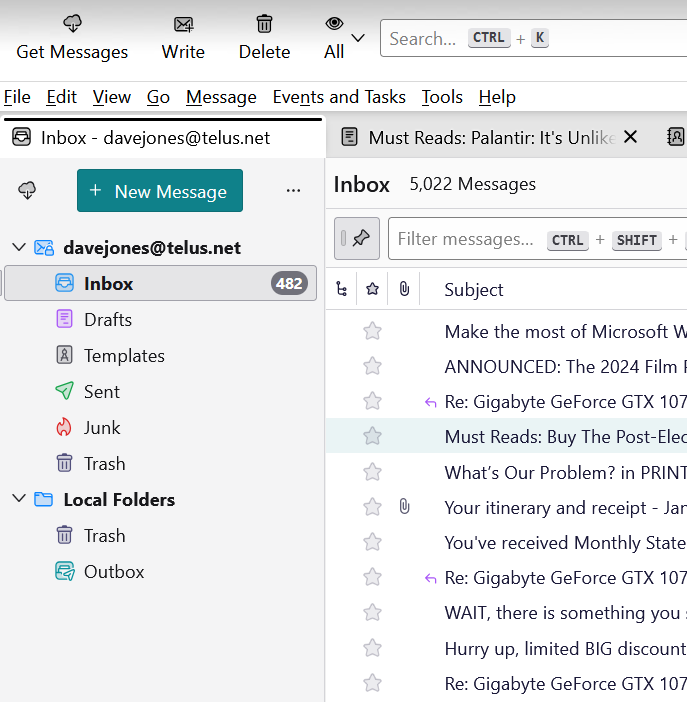
Hi there. I used the export/import functions to export my Thunderbird profile to a new computer. It was largely successful. Many of my layout and general appearance settings were not imported to the new computer, but I just re-set those manually. My last remaining problem is that it appeared that none of my local folders and messages were exported. However, when I use file explorer to go to drive C on my new computer, ''\Users\myname\AppData\Roaming\Thunderbird\Profiles\xxxxxxxxx.default-esr\Mail\Local Folders\Storage.sbd '' All of the folders, subfolders and messages are right there. They're just not showing up in the directory tree pane or account pane (sorry, not sure what you really call it) in my main Thunderbird interface. All I see are "Trash" and "Outbox." Anyone have any ideas as to how I make my local folders and messages re-appear? Thanks, Dave
Foto të bashkëngjitura ekrani

Zgjidhje e zgjedhur

Have you tried moving the entries from Storage.sbd to Local Folders and restarting Thunderbird?

Lexojeni këtë përgjigje brenda kontekstit 👍 1

Krejt Përgjigjet (3)

more options

Zgjidhja e Zgjedhur

Have you tried moving the entries from Storage.sbd to Local Folders and restarting Thunderbird?

more options

That did it! Thank you so much. Strange that in exporting my old profile, that Thunderbird moved the files to this odd and ineffective place.

more options

You are very welcome. :)