


date order

I want to Change date order (ascending/descending) of messages when there are no headings for mail including the date column. How do I do this? I recently installed latest version of Thunderbird.
Zgjidhje e zgjedhur
CAn't find quick filter button. Should it be in the list beginning with unread and ending with attachment?
Lexojeni këtë përgjigje brenda kontekstit 👍 0Krejt Përgjigjet (4)
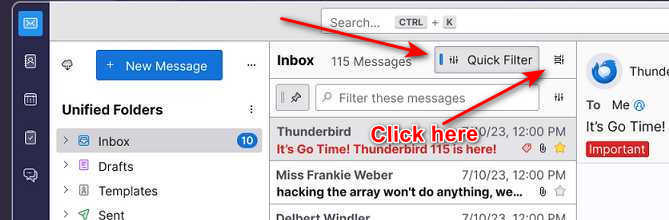
Look for 'quick filter' button just above the message list pane. To the right is a small icon, Click that and select 'table view' - this changes display to show subject, from, date and you can then click 'date' to change sort order.
Zgjidhja e Zgjedhur
CAn't find quick filter button. Should it be in the list beginning with unread and ending with attachment?
See attached screenshot
Thanks. I did not have this button but but it appeared on going to View/layout/...... Problem solved.