


There seems to be no View>sort by>unthreaded in 115.7 How do I get rid of threading?

I have read the solutions for threading and well they either don't work or are not options. There is no View>sortby. I have a view> toolbars view>layout and view>folders none of which even have a sortby under them. I can not deal with this threading. I hate to give up Thunderbird but I cant work like this. HELP
I have read the solutions for threading and well they either don't work or are not options. There is no View>sortby. I have a view> toolbars view>layout and view>folders none of which even have a sortby under them. I can not deal with this threading. I hate to give up Thunderbird but I cant work like this. HELP
Krejt Përgjigjet (2)
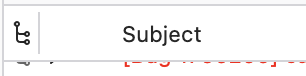
The quickest way to unthread is click the "Toggle message threads" icon, top left of the message list.
Alternatively ...
You are apparently using the hamburger menu which in version 115 no longer has some of the message list and other context items.
View in the menu toolbar has View > Sort by. Access the toolbar on Windows with the alt key.