


Firefox crashes after trying multiple solutions

After v. 89 was released firefox started having this issue, basically when i start firefox it crashes. I have tried several different solutions like fresh installs and refreshes. The one that has worked best so far is deleting the profile file and restarting my computer. It will usually let me use it until i close out of it entirely. My computer is currently running windows 7 if rhat is important.
Krejt Përgjigjet (1)
We're sorry to hear that Firefox is crashing. In order to assist you better, please follow the steps below to provide us crash IDs to help us learn more about your crash.
The crash report is several pages of data. We need the report numbers to see the whole report.
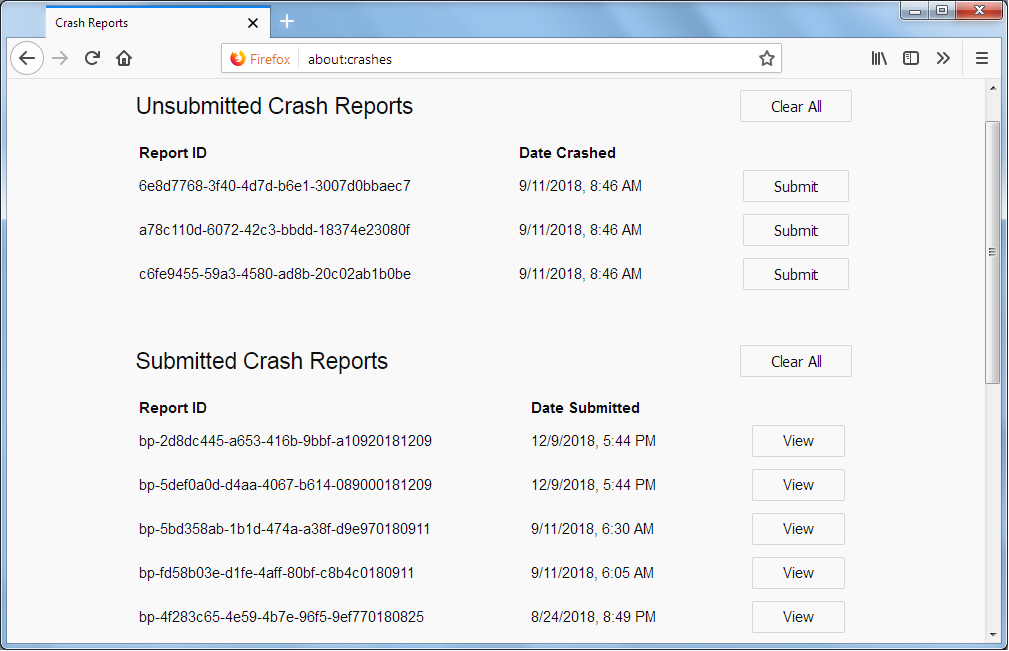
- Enter about:crashes in the Firefox address bar and press Enter. A list of Submitted/Unsubmitted Crash Reports will appear, similar to the one shown below.
- Copy the 5 most recent Submitted Report IDs that start with bp- and then go back to your forum question and paste those IDs into the "Post a Reply" box.
Note: If a recent Report ID does not start with bp- click on it to submit the report.
(Please don't take a screenshot of your crashes, just copy and paste the IDs. The below image is just an example of what your Firefox screen should look like.)
Thank you for your help!
More information and further troubleshooting steps can be found in the Troubleshoot Firefox crashes (closing or quitting unexpectedly) article.