


View new address book.

I have managed to create a new address book and added 30 emails, but I do not know how to view the contents of that address book. When I click tools - address book on the Menu bar or Address book on the Mail toolbar, I only get "All address books". How do I access individual address books? Thanks
I have managed to create a new address book and added 30 emails, but I do not know how to view the contents of that address book. When I click tools - address book on the Menu bar or Address book on the Mail toolbar, I only get "All address books".
How do I access individual address books?
Thanks
Zgjidhje e zgjedhur
Click the > next to All Addresses (see picture), or select it and press Enter.
Lexojeni këtë përgjigje brenda kontekstit 👍 0Krejt Përgjigjet (2)
Zgjidhja e Zgjedhur
Click the > next to All Addresses (see picture), or select it and press Enter.
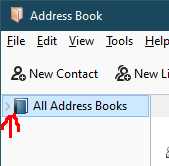
Thanks a lot; it's easy when you know how. I would never have spotted that arrow without help. It is not exactly massive!