


dual boot Win 7 Linux Thunderbird on both linked to common profile, downloading all messages on both systems, How do I stop this?

I use a dual-boot Win 7/Linux system, with Thunderbird on both, linked to a common profile. I am getting all E-mail messages on each system, whereas I only want them to be downloaded the once, rather than duplicated. I used to be able to select "Delete messages from server once downloaded", but this option does not seem to be available any more. Anyone know how I can do as I wish with the latest Thunderbird (60.5.1)??
Krejt Përgjigjet (2)
Zgjidhja e Zgjedhur
re :I used to be able to select "Delete messages from server once downloaded", but this option does not seem to be available any more.
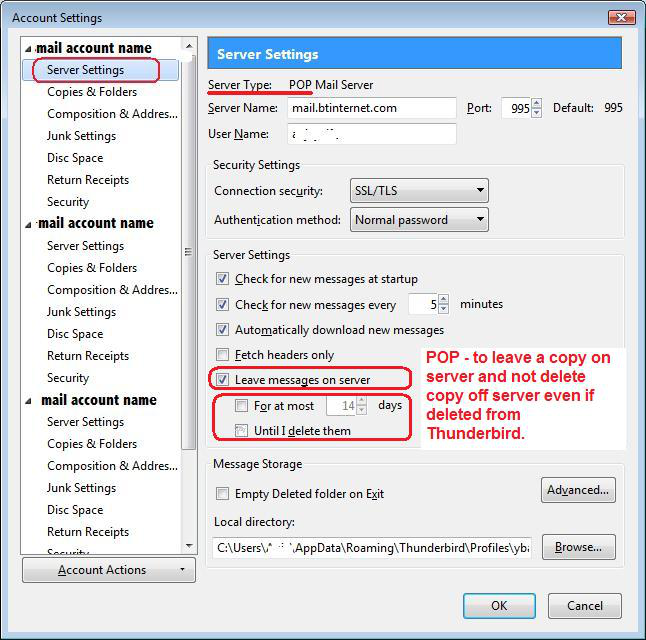
POP mail accounts have the option to leave message on server. This is in the Account Settings window.
- Right click on mail account name in Folder Pane and select 'Settings'
- select 'Server Settings'
- Uncheck 'Leave message on server'
- click on OK
see image as guide
Restart Thunderbird.
Ndryshuar nga Toad-Hall
Thank you - for some silly reason I had done this in Windows, but not in Linux, so now I understand why I was getting duplicates which weren't apparently from a consistent cause - it depended on whether I opened Thunderbird in Windows or Linux!